Page 31 of 60
Chapter 3: Colposcope Adjustments
NOTE: Unless specifically noted for one or the other, the following information is true for
both the LT-300 SD and the LT-300 HD digital video colposcopes.
3.1 Camera Angle Adjustment
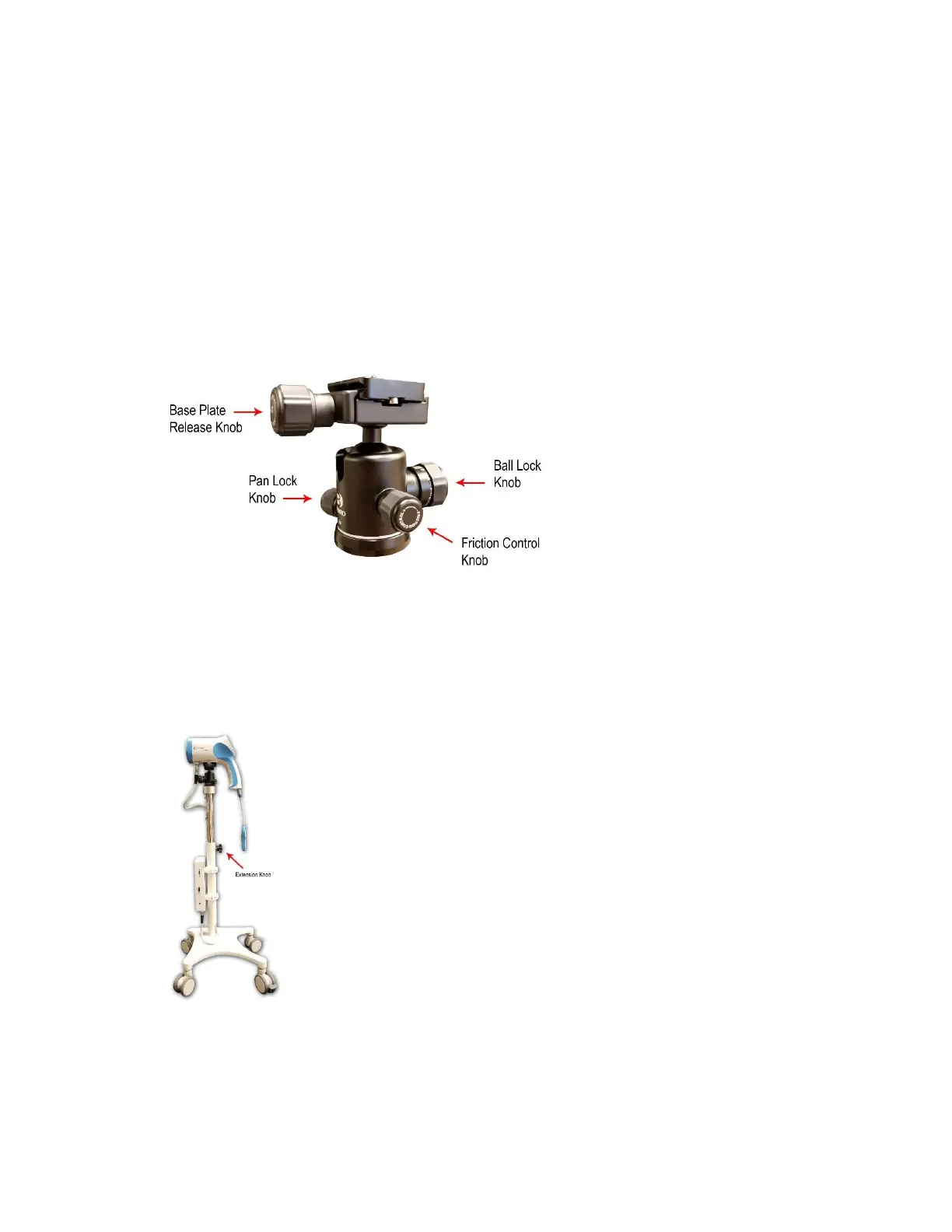
The colposcope camera sits on the camera mount, which allows it to rotate 360° horizontally and
approximately 70° vertically, depending on the allowances of the wire and handles. By adjusting the ball
lock knob, the user can customize the tightness of the ball socket. When the tension is right, the head of the
colposcope can be moved freely and will stay in position after the movement is complete and the user has
let go of the camera without having to tighten any knobs.
Diagram 3.1-1
3.2 Vertical Stand Adjustment
Turn the vertical tube extension knob counterclockwise to loosen the internal extension tube. Slide the
internal extension up or down to the desired height. Turn the extension knob clockwise to tighten the grip
and hold the internal extension tube in place.
Diagram 3.2-1
NOTE: If the main cable has not been connected to the colposcope camera head yet, make sure to hold
onto it during height adjustment of the internal extension tube so that it doesn’t fall backwards into the tube.



 To Next Page