Display Icons
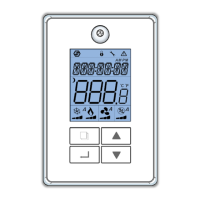
Local LCD
The signal icon indicates network connection status
Visible and fixed static = Online to both the BACnet MSTP network and the Strato Automation server
Blinking = Online to the BACnet MSTP network only
The lock icon indicates that setpoints have been locked from the network and cannot be modified by the thermostat keys
The wrench icon indicates that the device is in configuration mode
The warning icon indicates that there may be MSTP communication errors / problem (invalid frames)
Check wiring and use an MSTP sniffer tool if necessary
Displays whether the time is AM or PM
This line displays the room temperature or room setpoint
Use up and down arrows to temporarily modify the display setpoint
Displays the time (hh:mm) on the first line and the day of the week.
Icon to display night mode / unoccupied.
The water droplet icon indicates whether the dehumidification or humidification process is on and working
The segmented bar indicates whether the humidifier is at 33, 66 or 100% output capacity
The A indicates that the humidity function is in Automatic mode
The fan icon indicates that fan is on and working
The segmented bars indicates whether the fan in 1st, 2nd or 3rd speed
The A indicates that the Fan mode is in Automatic mode
The snowflake indicates that cooling process is on and working
The segmented bar indicates whether the cooling is at 33, 66 or 100% output capacity
The A indicates that the cooling function is in Automatic mode
The flame indicates that heating process is on and working
The segmented bar indicates whether the heating is at 33, 66 or 100% output capacity
The A indicates that the heating function is in Automatic mode
www.lynxspring.com


 To Next Page
 Loading...