OPERATOR’S STATION
Form # 169304 40 Model Year - 2009
DETAILED PROGRAMMING INSTRUCTIONS
(Key On / Engine Running or Not / Header Disengaged).
(Press PROGRAM and SELECT on CDM to enter programming mode).
NOTE: ENGINE MUST BE RUNNING TO CALIBRATE SENSORS.
(continued next page)
L1 C x x x
||
T R A C T O R S E T U P ?
L2 M x x x
||
N O / Y E S C A B D I S P L A Y S E T U P ?
L1 C x x x
||
S E L E C T H E A D E R T Y P E ?
L1 C x x x
||
S E L E C T H E A D E R T Y P E ?
L2 M x x x
||
A 3 0 A U G E R
L1 C x x x
||
S E L E C T H E A D E R T Y P E ?
L2 M x x x
||
A 4 0 A U G E R
L1 C x x x
||
T I L T C Y L I N S T A L L E D ?
L1 C x x x
||
R E E L F O R E / A F T ?
L1 C x x x
||
K N I F E O V E R L O A D S P D ?
L2 M x x x
||
1 0 0 0 S P M
L1 C x x x
||
H E A D E R I N D E X M O D E ?
L2 M x x x
||
R E E L & C O N V E Y O R
L2 M x x x
||
R E E L O N L Y
L1 C x x x
||
R E T U R N T O C U T M O D E ?
L2 M x x x
||
H E I G H T & T I L T
L2 M x x x
||
H E I G H T O N L Y
L1 C x x x
||
H E A D E R C U T
L2 M x x x
||
2 0 . 5 F E E T
L1 C x x x
||
H A Y C O N D I T I O N E R ?
L1 C x x x
||
A U G E R H D R R E E L S P D
L2 M x x x
||
R P M / M P H
L2 M x x x
||
R P M / K P H
L1 C x x x
||
S E T T I R E S I Z E ?
L2 M x x x
||
1 8 . 4 X 2 6 T U R F
L2 M x x x
||
1 8 . 4 X 2 6 B A R
L2 M x x x
||
2 3 . 1 X 2 6 T U R F
L2 M x x x
||
6 0 0 - 6 5 R 2 8
L1 C x x x
||
S E T E N G I N E I S C R P M ?
L2 M x x x
||
O F F / O N S E T C O N T R O L L O C K S ?
L1 C x x x
||
S E T C O N T R O L L O C K S ?
L2 M x x x
||
N O / Y E S V I E
C O N T R O L L O C K S ?
L1 C x x x
||
D R A P E R S P E E D
L2 M x x x
||
E N A B L E D / L O C K E D
L1 C x x x
||
A U G E R S P E E D
L2 M x x x
||
E N A B L E D / L O C K E D
L1 C x x x
||
R E E L S P E E D
L2 M x x x
||
E N A B L E D / L O C K E D
L1 C x x x
||
R E E L F O R E / A F T
L2 M x x x
||
E N A B L E D / L O C K E D
L1 C x x x
||
H E A D E R T I L T
L2 M x x x
||
E N A B L E D / L O C K E D
L1 C x x x
||
E X I T C O N T R O L L O C K S ?
L2 M x x x
||
N O / Y E S D R A P E R S P E E D
E N A B L E D / L O C K E D
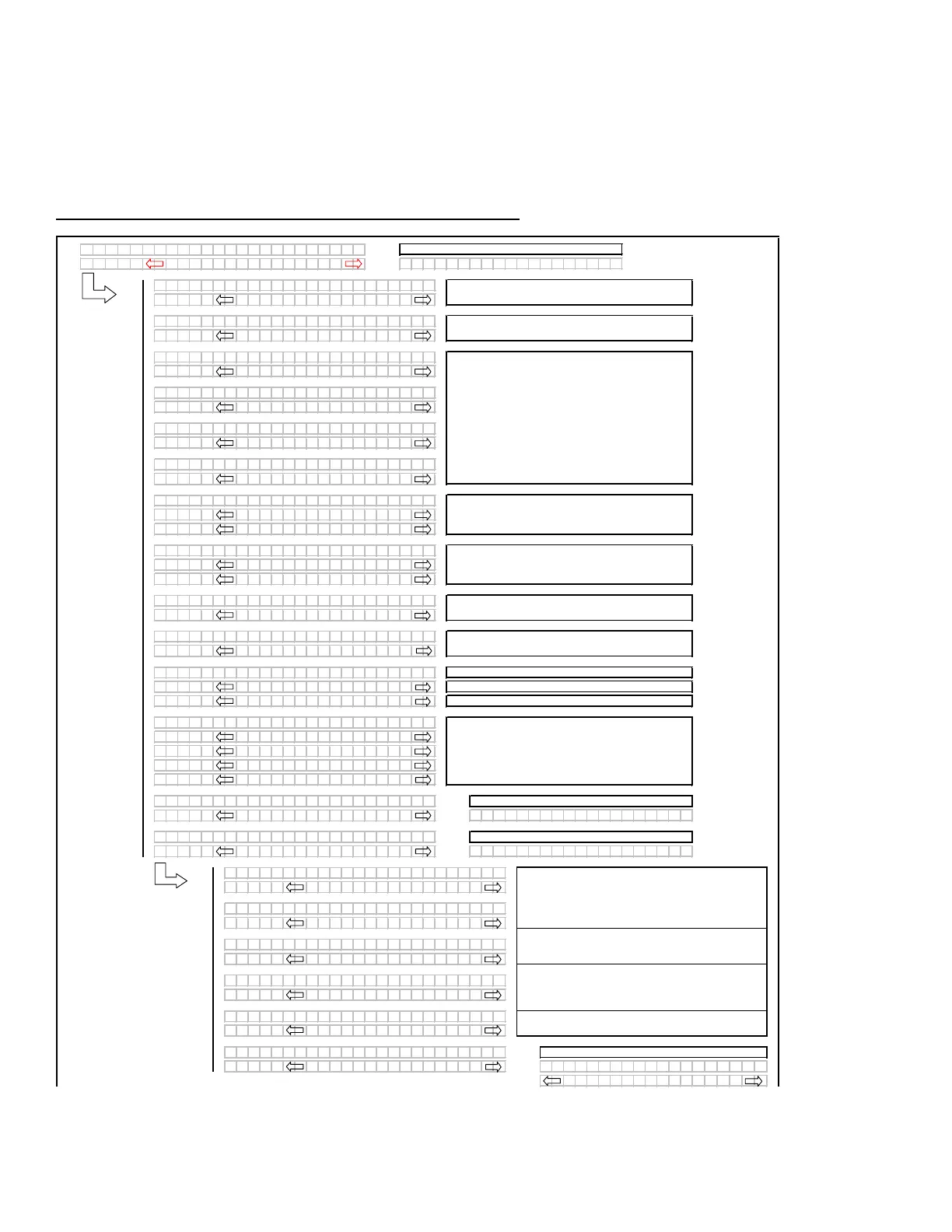
Programming Menu Flow Chart
Use the "arrow" keys to set the header cut width.
If the REEL SPEED sensor is not "installed" (A30
Auger Header selected) in the TRACTOR SETUP
m
enu, the INDEX mode should be suppressed.
If the HEADER TILT sensor is not "installed" (no
expansion module installed), then the RTC mode
s
hould default to HEIGHT only.
Selects the header type, the selected header will be
flashing. The "factory" default to be DRAPER.
If the A30 is selected them the reel speed should be
suppressed as there is no reel speed sensor.
If a DRAPER or A40 is selected the reel speed
should be enabled (with expansion module installed).
Knife Overload Speed should be suppressed unless
the expansion module is installed.
The TILT selection meeds to be available even if the
expansion module is not installed.
DRAPER HEADER ONLY. Default will be flashing.
Use "arrow" keys to select.
Pressing "SELECT" will jump to:
This menu allows the operator to selectably "lock out"
the control functions for the various header functions.
T
he default or selected "status" for each item will
flash.
If the expansion module is not installed the
corresponding menu items should be suppressed.
The "arrow" keys are used to ENABLE or LOCK OUT
each function. Pressing "SELECT" will go to the next
L1 m
enu item.
Tilt to be suppressed if not "installed" in the tractor
setup menu.
Pressing "SELECT" will go to the next line 1 (L1)
menu selection. The turn signal "arrow" keys are
us
ed to change the values.



 To Next Page