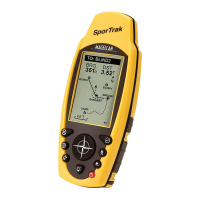
12 Magellan SporTrak GPS Receiver
A waypoint is a point on a map that you can name and save in the SporTrak.
They are primarily used for creating routes. Whether the route is a simple
GOTO or a more complex multileg route, it needs stored waypoints to use
as its starting and destination point.
Saving a Waypoint with a Receiver-Generated Name
From any screen, press [MENU]. Use the arrows to highlight
“Mark” and press [ENTER].
The “Save” button is highlighted and you can
press [ENTER] to save the waypoint using
the default name and icon.
You can later go back and edit any of the
waypoint information through the Database
Menu or you can change the information now
following the guidelines below. (See Waypoints in
the Reference chapter of the User Manual.)
Saving a Waypoint with a User-Input Icon and Name
From any screen, press [MENU]. Use the arrows to highlight
“Mark” and press [ENTER].. Use the UP/DOWN arrows and
notice that the highlight moves from field to
field and then back to “Save.”
Highlight the Icon field using the UP/DOWN
arrows. Press [ENTER].
The Icon Select window is displayed. Use the
arrow keypad to move from one icon to another
with the name of the icon displayed at the top.









 To Next Page