55Magellan SporTrak GPS Receiver
Reference
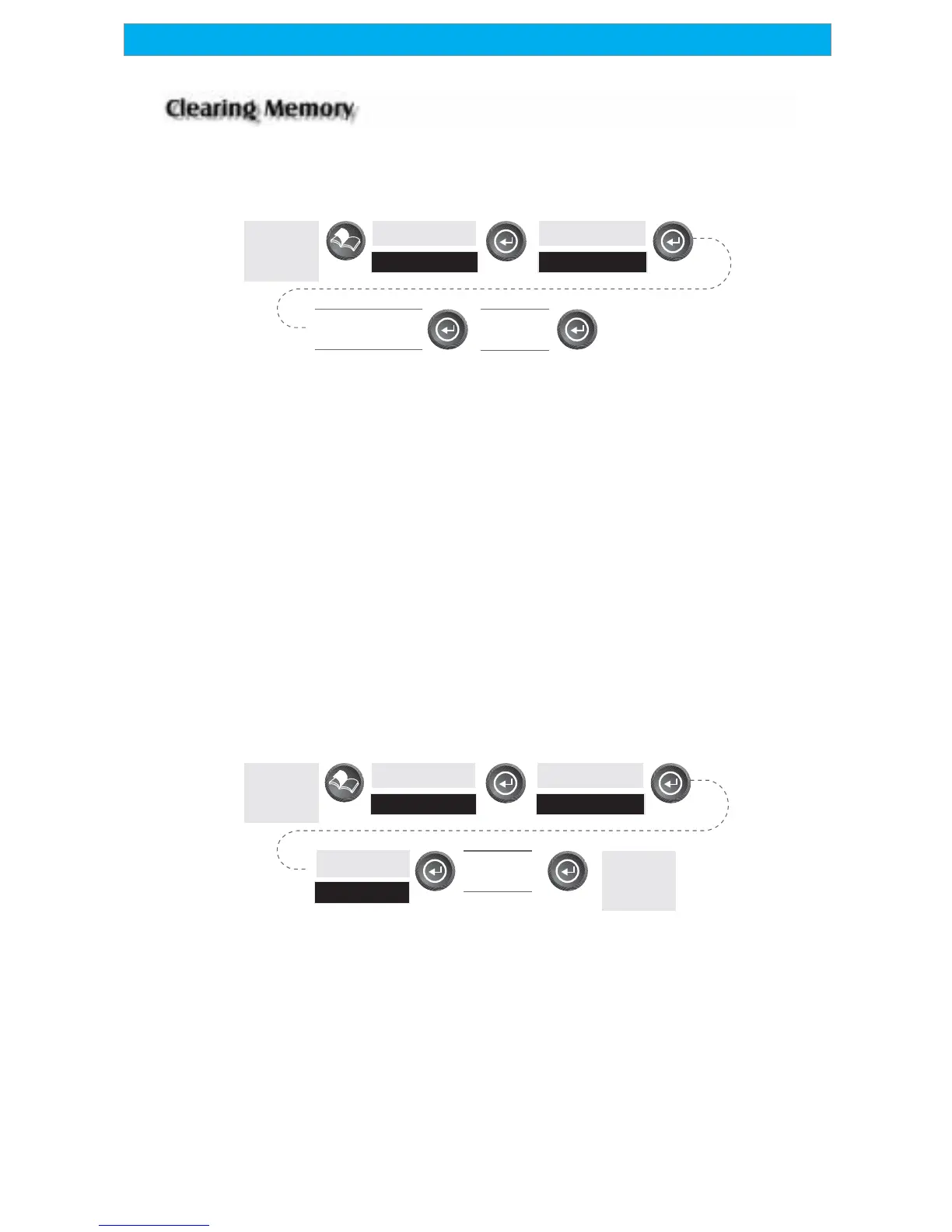
All of the Clear functions operate in the same way. The instructions shown
apply to all of the Clear options except Clearing All.
From
Any
Screen
Highlight
Setup
Highlight
Clear Memory
Confirm?
Yes/No
Highlight
Menu Choice
Clearing Track History — This will clear the track history that is displayed
on the Map screen from memory.
Clearing Wpts/Routes — This will clear all waypoints and routes from the
SporTrak’s memory.
Clearing all Routes — This clears all routes from the SporTrak’s memory.
Resetting SporTrak to Factory Defaults — Allows you to reset all of the
Setup choices to the factory defaults.
Clearing All Memory in the SporTrak — This clears all memory from the
SporTrak. After completing these instructions, the SporTrak will shut
off. The next time it is turned on, it will prompt you that it needs to be
initialized.
From
Any
Screen
Highlight
Setup
Highlight
Clear Memory
Confirm?
Yes/No
Highlight
All
SporTrak
will shut
off









 To Next Page