40 Magellan SporTrak GPS Receiver
Reference
(Note: To modify the icon, name or message use the Up/Down arrows
to highlight the field you wish to change and press ENTER. You are
then placed into the Edit Mode.)
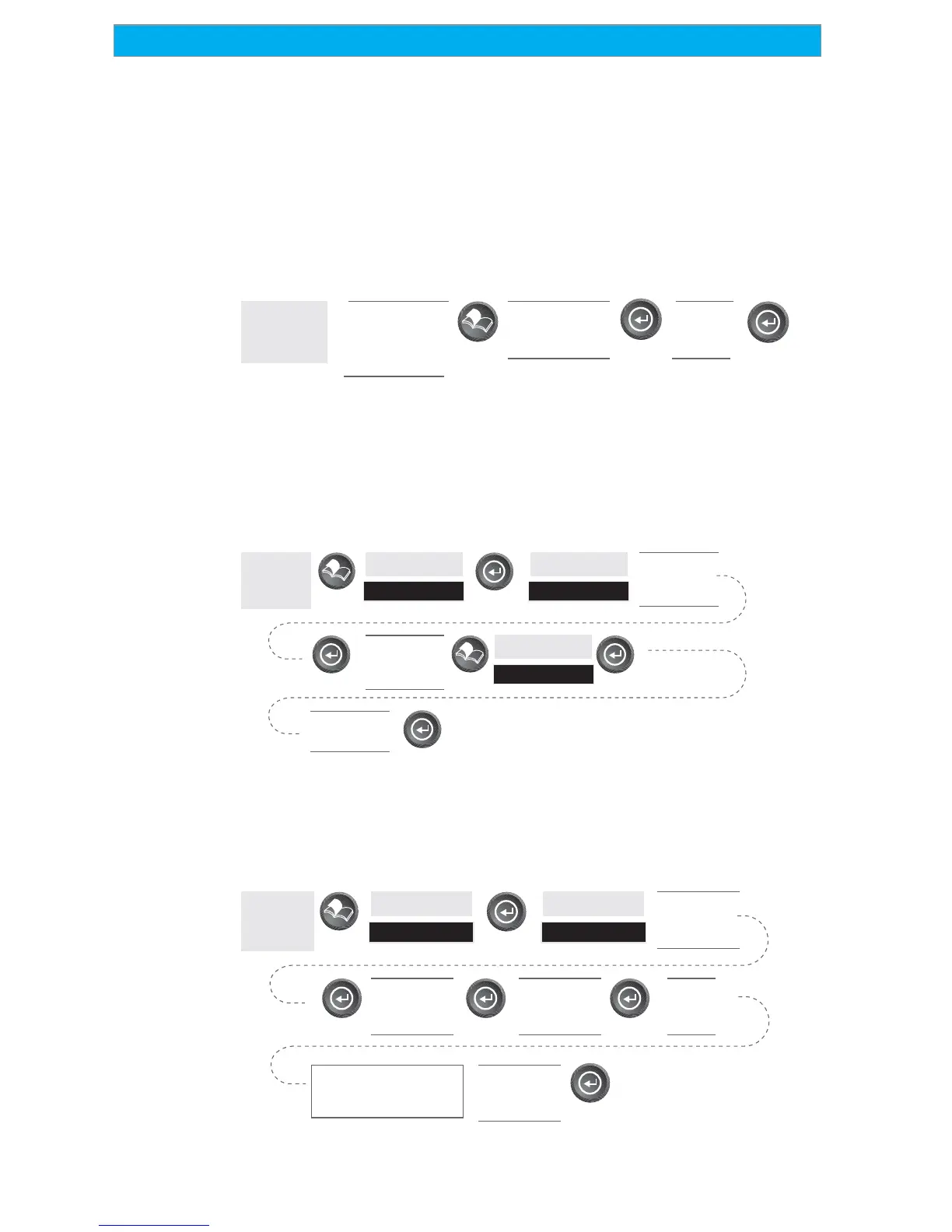
Creating New Waypoint with Map Cursor — Provides a method of
creating a new waypoint with coordinates other than your present
position. The new coordinates are computed automatically based on the
location of the map cursor.
From
Map
Screen
Use arrow
keys to move
cursor to
desired
Use up/down
arrows to
highlight Mark
Modify
(see
Note)
(Note: To modify the icon, name or message use the Up/Down arrows
to highlight the field you wish to change and press ENTER. You are
then placed into the Edit Mode.)
Deleting a User Waypoint — Deletes a waypoint that you have created.
From
Any
Screen
Highlight
Database
left/right
arrows select
“Find By”
Highlight
User
Select
Waypoint to
be Deleted
Highlight
Delete
Confirm?
Yes or No
Editing a User Waypoint — Allows you to edit a waypoint that you have
already stored in the SporTrak’s memory.
From
Any
Screen
Highlight
Database
left/right
arrows select
“Find By”
Highlight
User
Select
Waypoint to
be Edited
Select Field
to be
Edited
Edit
the
Field
Repeat selecting and
editing fields until all
changes are complete
Highlight
“Save”
button









 To Next Page