57Magellan SporTrak GPS Receiver
Reference
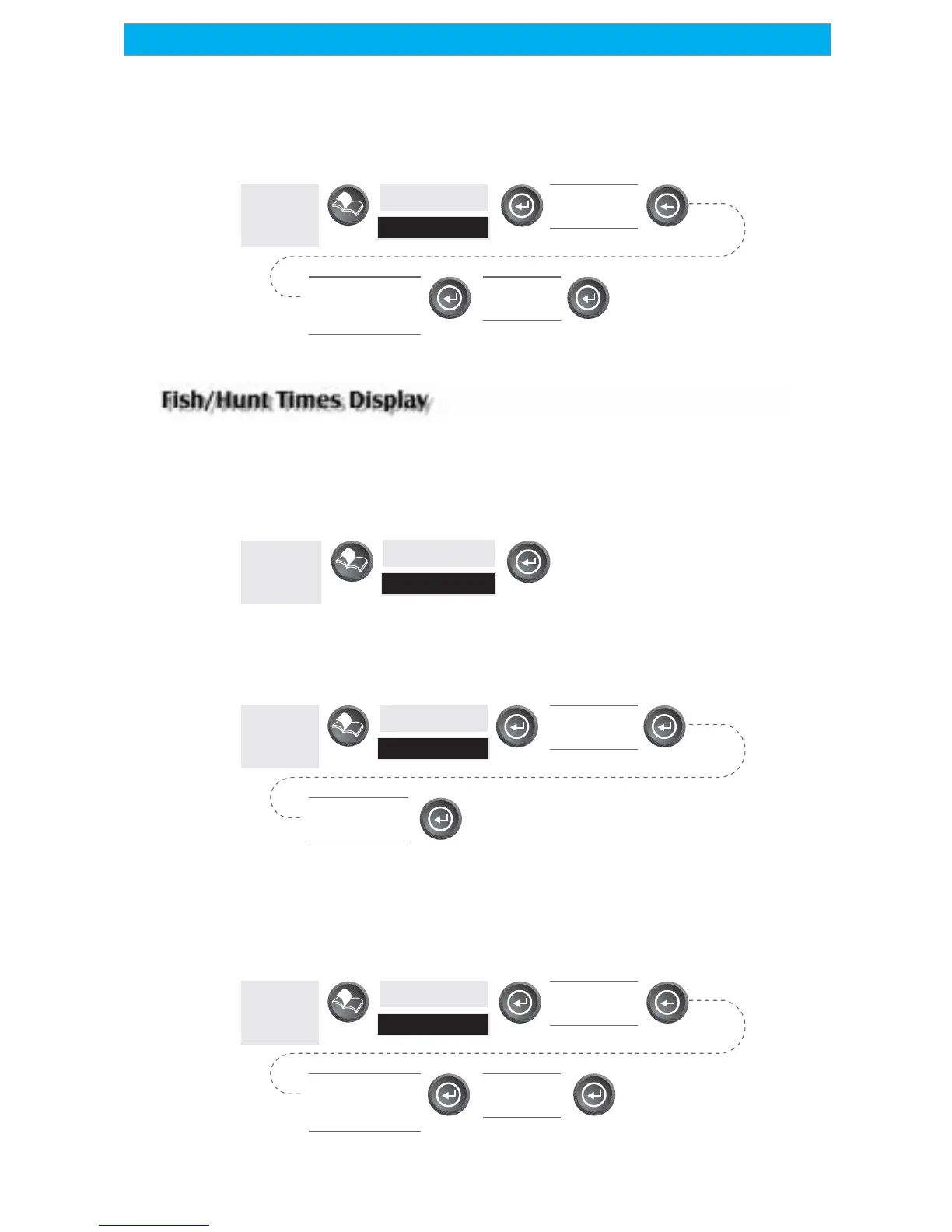
Changing the Sun/Moon Position — Allows you to change the position
that you want to view the sun/moon information for. The default is
“Position” which is your present position.
From
Any
Screen
Highlight
Sun/Moon
Highlight
At Field
Use left/right
arrows to select
“Find By”
Highlight
Waypoint
Accessing the Fish/Hunt Screen — The Fish/Hunt screen displays the best
times for fishing or hunting for the position you choose from your User
waypoints.
From
Any
Screen
Highlight
Fish/Hunt
Changing the Fish/Hunt Date — Allows you to change the date for the
fishing/hunting information for the position selected.
From
Any
Screen
Highlight
Fish/Hunt
Highlight
Date Field
Use arrows to
change date
Changing the Fish/Hunt Position — Allows you to change the position
that you want to view the fishing/hunting times for. The default is
“Position” which is your present position.
From
Any
Screen
Highlight
Fish/Hunt
Highlight
At Field
Use left/right
arrows to select
“Find By”
Highlight
Waypoint









 To Next Page