Flex 8EX / 12EX EU System Instruction Manual
March 2018
Page 44 of 66
4.2.2.10 Pitch & Catch Function
This function allows two operators to control one crane from opposite ends of a
cross or long travel (see Section 4.2.4 on page 45 on how to set to this function).
When set to “Pitch & Catch” make sure the 2nd transmitter is set to the next-highest
channel (channel X*+1). For example, if the system is preset at Ch. 01 then the
channel of the 2nd transmitter should be set to Ch. 02. Furthermore, dipswitch
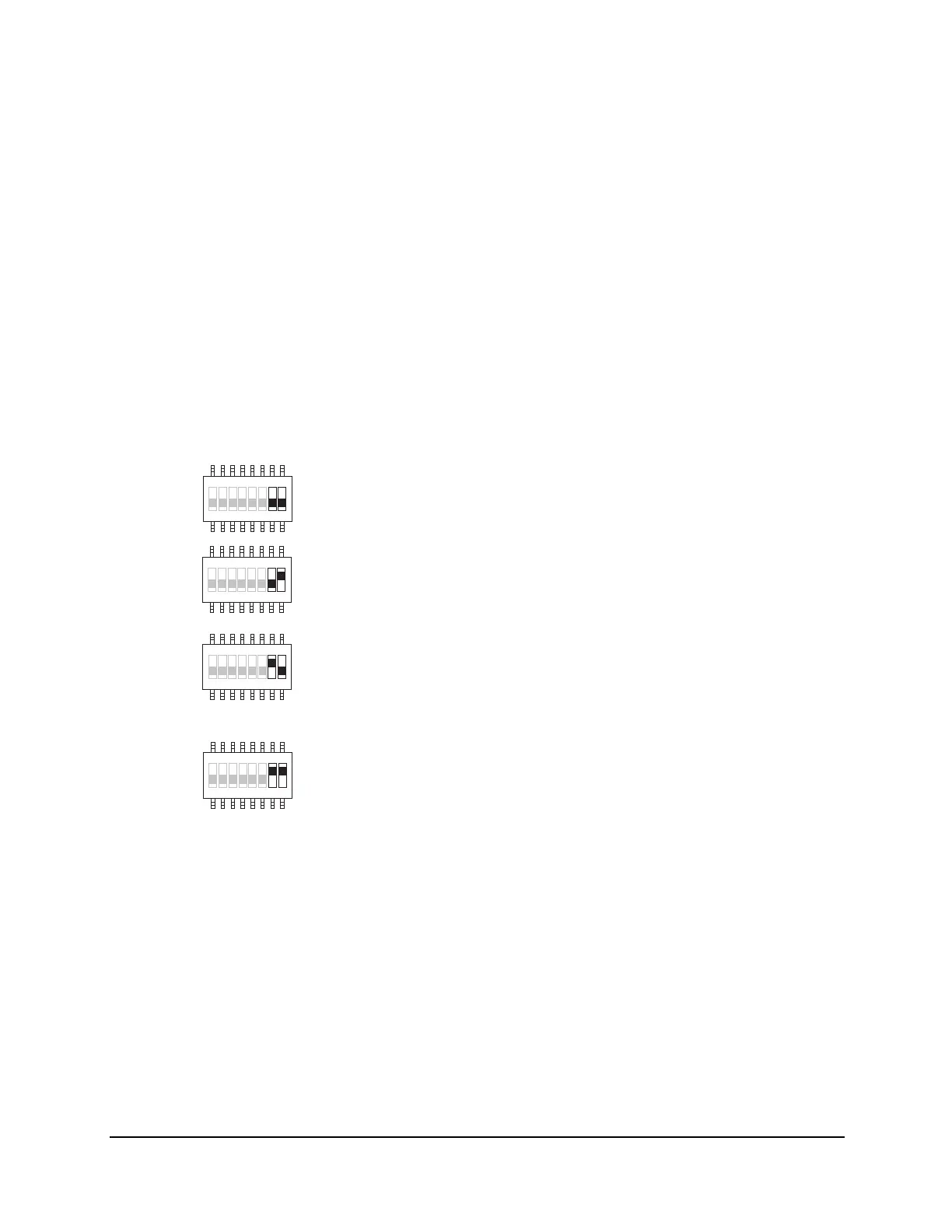
positions #7 and #8 on the receiving module should be set to “10”. This will allow the
receiver to scan only Ch. 01 and Ch. 02. On the other hand, since there are only 62
available channels on the Flex system, the system preset at channel 62 is ineffective
because the 2nd transmitter cannot be set to Ch. 63. If your system is preset at Ch.
62, be sure to change it to another channel.
4.2.3 Receiver Auto-Scanning Settings
Receiver Channel Dipswitch
Example: If the first 6 dipswitch positions on the receiving module are set to Ch. 01
(“000000” or “000001”), when set to 2-channel scanning (type 3 above), then the
receiver will only scan Ch. 01 and Ch. 02.
41 32 65 87
4132 65 87
4231 7856
41 2 3 65 78
↓
(1) → Scans all 62 channels (manufacture preset)
For standard operation
(2) → Single fixed channel
Auto-scanning function disabled
(3) → Scanning 2 channels only (channel X*, channel X*+1)
For Pitch & Catch and Random Access operation
with 2 receivers
(4) → Scanning 3 channels only (channel X*, channel X*+1,
channel X*+2)
For Random Access operation with 3 receivers
* Channel X → Channel set on the receiving module



 To Next Page