IMPULSE
®
•Link 5 Instruction Manual
April 2020
Page 32 of 47
4.7. Help Tab
The Help tab contains information about IMPULSE•Link 5 Viewer and Professional, as well as resources for the
user.
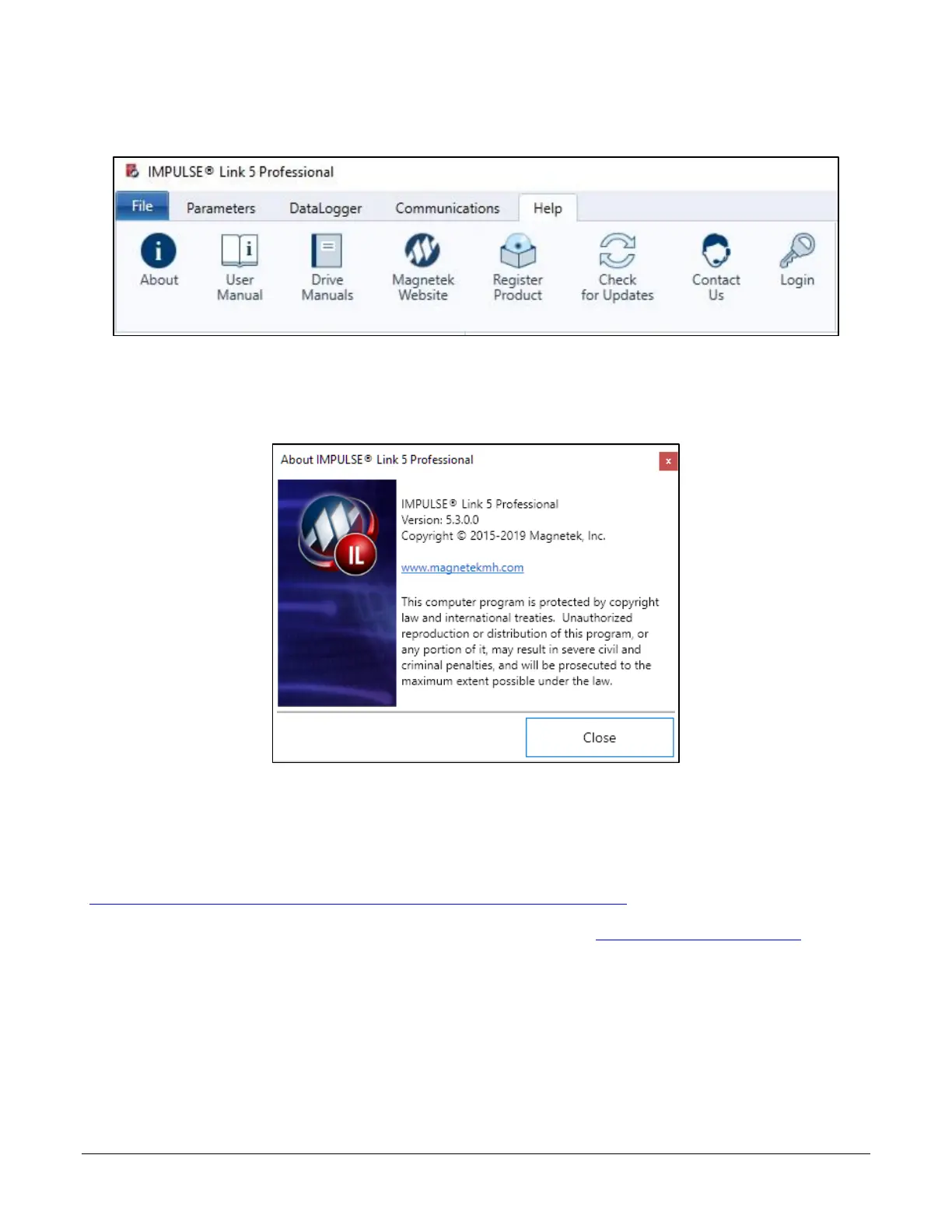
Figure 32: The Help Tab
About - Launches the "About IMPULSE•Link 5" screen, which includes information regarding the version, the
build, and the copyright date.
Figure 33: About IMPULSE•Link 5
User Manual – Downloads the IMPULSE•Link 5 User Manual from the internet, provided the PC is connected.
Drive Manuals – Opens Magnetek Material Handling's "Product Manuals" webpage:
(http://www.magnetekmh.com/Material%20Handling/Product%20Manuals.aspx).
Magnetek Website – Opens Magnetek Material Handling's main website (http://www.magnetekmh.com/).
Register Product – Opens a dialog to obtain an IMPULSE•Link 5 Professional software license.
Contact Us – Opens a dialog containing the Technical Support number and a link to the Field Service email.


 To Next Page