IMPULSE
®
•Link 5 Instruction Manual
April 2020
Page 37 of 47
6. DataLogger Maintenance
6.1. Updating DataLogger Series 4 Firmware
IMPULSE•Link 5 can update the firmware in the DataLogger Series 4 (DLS4) to incorporate any new features and
enhancements to the DLS4. If the PC has internet, the newest version of firmware for the DLS4 will be automatically
installed on the PC using the Check for Updates button.
The newest version of the firmware may be manually downloaded from the Magnetek Material Handling website
at: http://www.magnetek.com/en/Material%20Handling/Downloads.aspx
Once the firmware is saved to the PC, do the following:
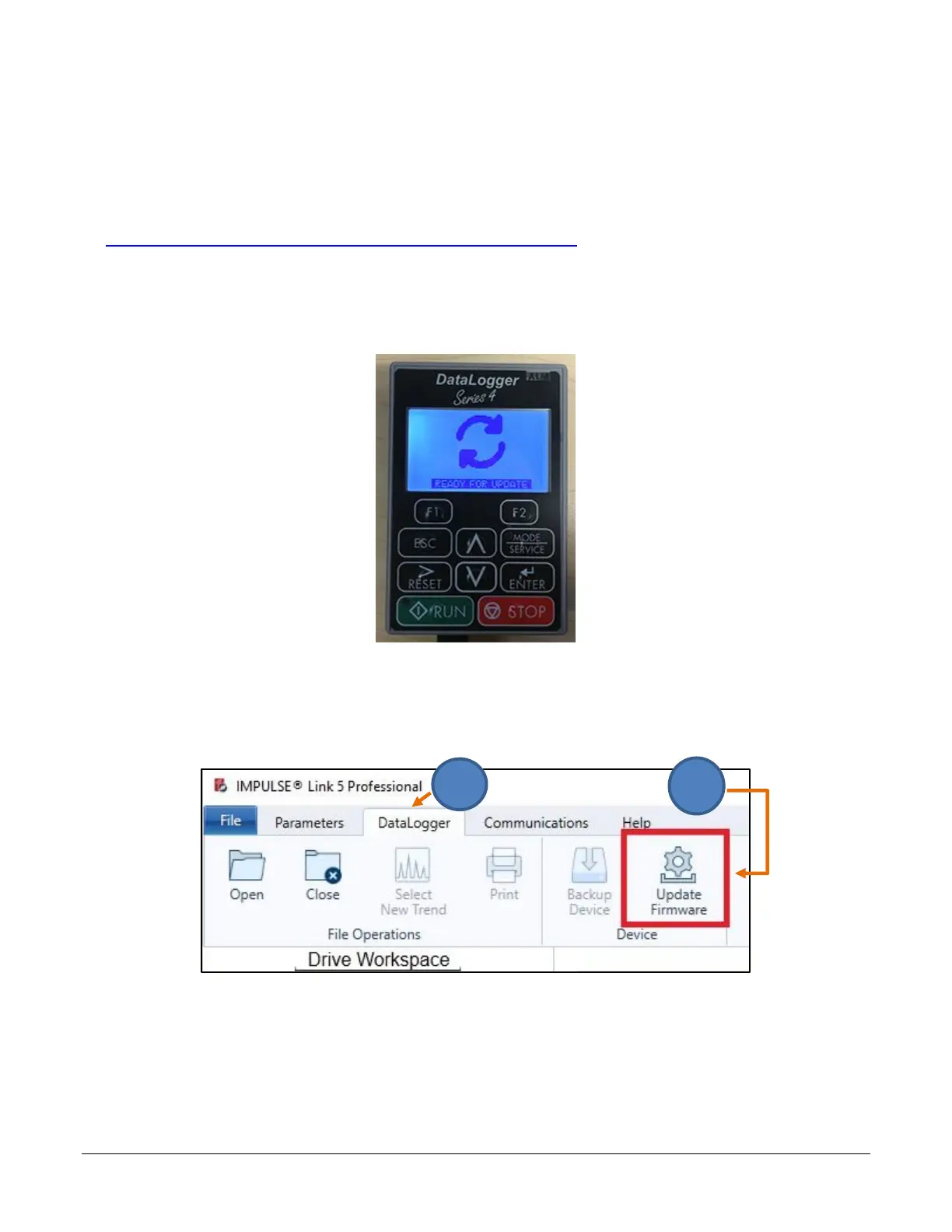
1. Connect the DataLogger Series 4 to the PC using a USB cable. Press the DLS4 keypad’s F1 and F2 keys
simultaneously until the “READY FOR UPDATE” message appears.
Figure 38: DataLogger Series 4 Screen – Ready for Update
2. Go to the DataLogger tab.
3. Click on the “Update Firmware” icon in IMPULSE•Link 5.
Figure 39: The Update Firmware Icon


 To Next Page