IMPULSE
®
•Link 5 Instruction Manual
April 2020
Page 36 of 47
The monitor screen displays real-time values for whichever drive is highlighted under Drive Workspace.
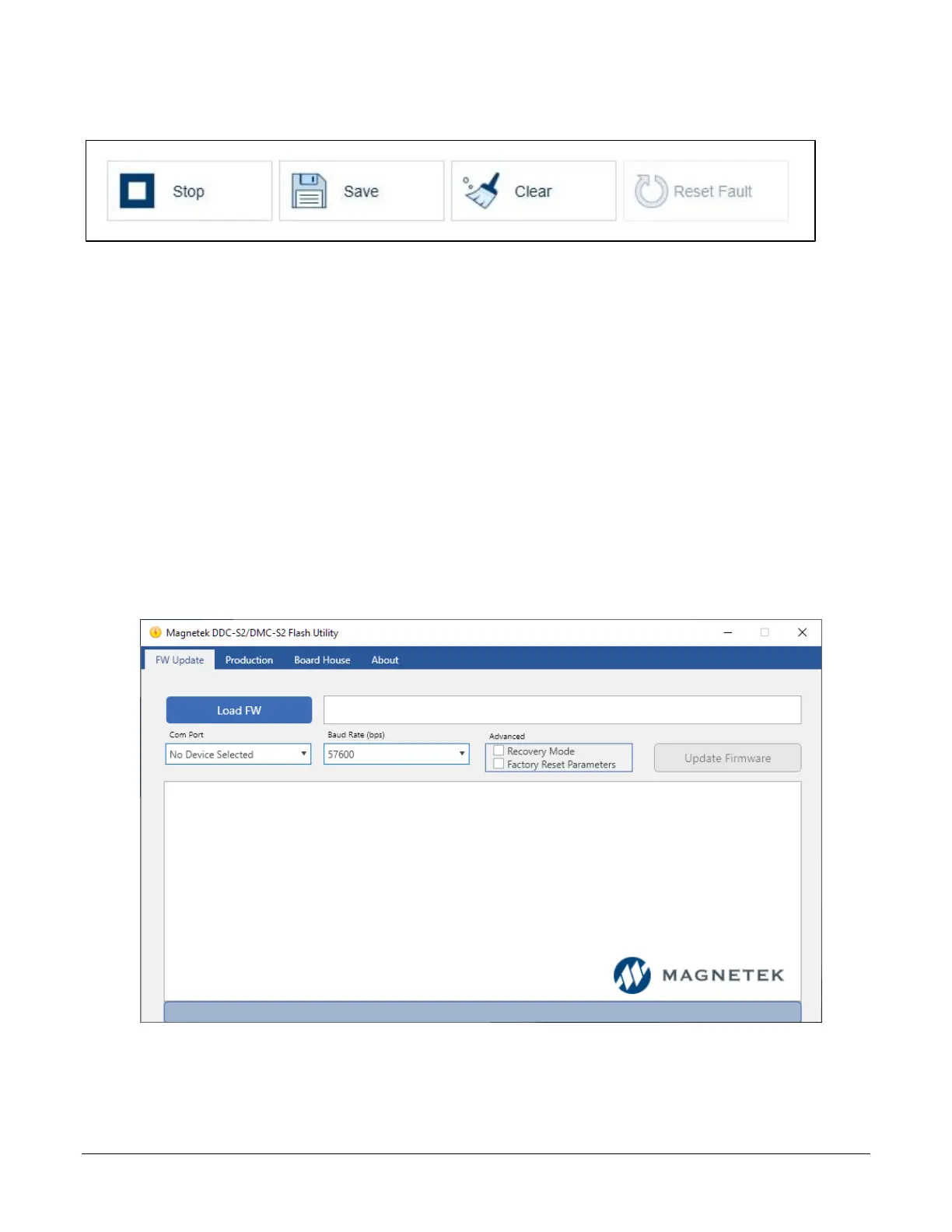
Click the Stop button to end the Drive Monitor on the highlighted drive. The drive will be removed from the Drive
Workspace as it is stopped.
5. Click the Save button to save a data log to your host PC.
6. Click the Clear button to remove all Runs, Alarms, and Faults for this monitor.
5.2.3. OmniPulse DDC Series 2 & MagnePulse DMC Series 2 Flash Utility
The OmniPulse DDC Series 2 (DDC-S2) and MagnePulse DMC Series 2 (DMC-S2) Flash Utility allows a
user to update DDC-S2 or DMC-S2 Control Board firmware using the provided cables (P/N: CABLE-
RJ45-DB9F and ADAPTER-DB9M-USBA).
To update the firmware, do the following:
1. Click “Load FW” button
2. Select firmware file
3. Click “Open” button
4. Select Com port
5. Click “Update Firmware” button
Figure 37: OmniPulse DDC-S2 & MagnePulse DMC-S2 Flash Utility


 To Next Page