IMPULSE
®
•Link 5 Instruction Manual
April 2020
Page 18 of 47
4.4.4. Runs
When the DLS4 detects a run, it increments the run counter and begins to take average and peak values of the
Monitors being logged. It also logs how long the run remains active. When the run has ended, this information
is written to the internal memory. If the run ended due to a fault, the reference to that fault gets linked with the
run. A reference to the last alarm (if any) that occurred during the run is also stored. The DLS4 records
numerous pieces of data at the end of the run event. Each of these can be turned ON or OFF for viewing
purposes. For example, when “Model” is deselected, it will not be displayed in the Events window.
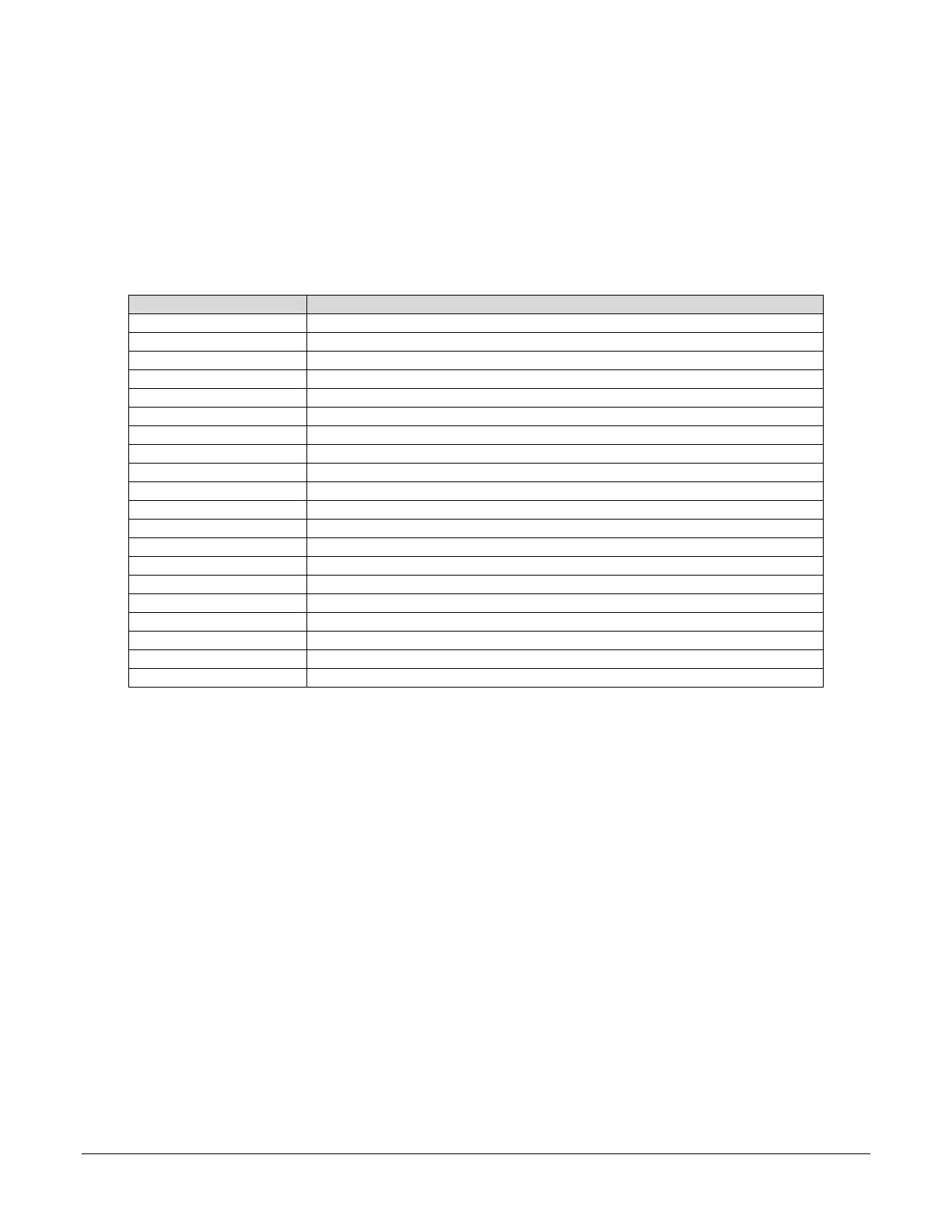
Table 2 shows the various data that is collected.
Number of Runs recorded by the DLS4.
Date the Run event ended [Day/Month/Year].
Time the Run event ended [Hour:Minute:Second].
Amount of time the Run command was active.
Average DC Bus Voltage during the Run.
Peak DC Bus Voltage during the run.
Average output current to the motor.
Peak output current to the motor.
Average output frequency of the drive.
Peak output frequency of the drive.
Average speed of the motor.
Average torque applied to the motor during the Run.
Peak torque in the motor.
Heatsink temperature when the Run event ended.
Control method of the drive.
1
Only valid when the control method is Open Loop Vector or Flux Vector.
Table 2: Run Data – AC Drive


 To Next Page