IMPULSE
®
•Link 5 Instruction Manual
April 2020
Page 46 of 47
Appendix C: Drive to PC Serial Wiring
Series 4 / Series 3 / G+ Mini Serial Connection
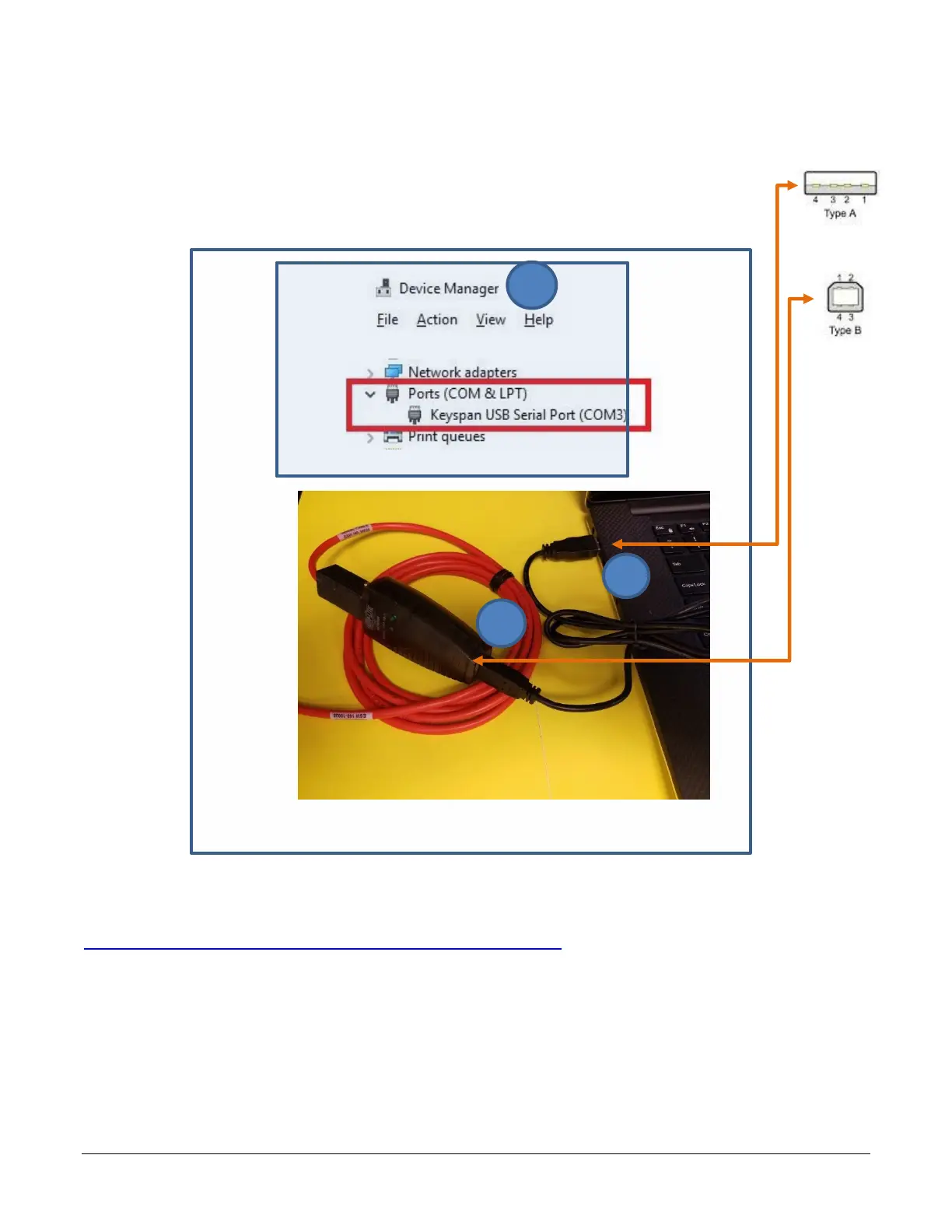
1. Connect USB-A male to available USB port on a PC.
2. Attach USB-B male to USB female plug of Keyspan ADAPTER-DB9M-USBA.
3. Open Device Manager and verify a Keyspan USB Serial Port appears after Step 2.
NOTE: If a Keyspan COM Port does not appear under Device Manager Ports, try downloading the Keyspan
USA-19HS Driver for Windows 7, 8, and 10 from the Magnetek Downloads page under Drivers.
http://www.magnetekmh.com/Material%20Handling/Downloads
4. Connect DB-9 female of CABLE-RJ45-DB9F to Keyspan ADAPTER-DB9M-USBA.
5. Connect RJ45 connector to drive.
6. Use IMPULSE•Link 5 to interact with your drive. See QUICK START.


 To Next Page