Using the Functions activated by F1 button
Turn the rotary switch to the RCD position
Initial screen is setup to the AUTO
Using the F2 and F3 button, select the rating and
the type of the RCD
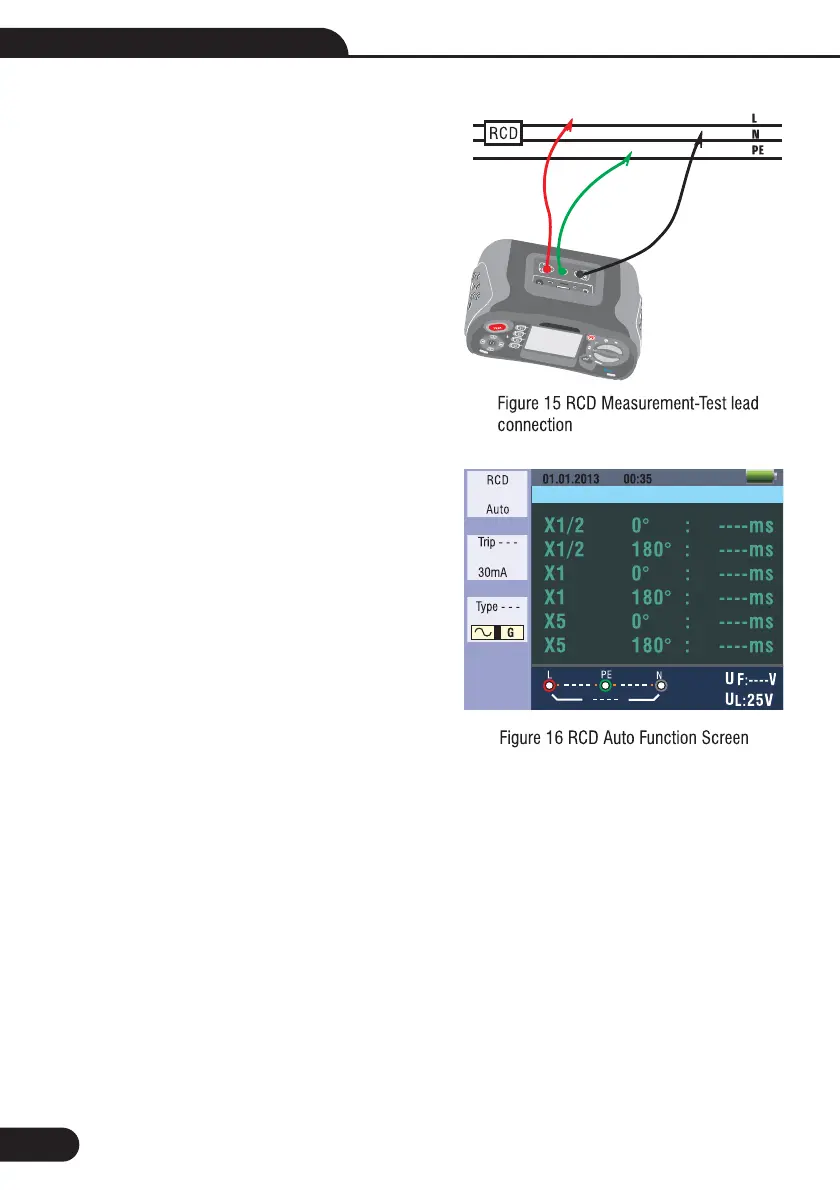
Connect test leads as shown in the
If --- from the lower right corner disappears and
voltage of the L- PE on the lower left appears, the
unit is ready to TEST (If N and PE test leads are
reversed, the instrument will still carry out the test)
Press the TEST button when ready
Test will proceed it should not trip from x ½ mode
but will trip from thex10°mode, and indicate
the trip time
Reset RCD the unit will measure the Trip Time
from the x 1 180° mode
Repeat for bothx50°andx5180° resetting
RCD after each test
Tests now complete - see display for results
Using the AUTO Mode
1-
2-
3-
4- Figure 15
5-
6-
7-
8-
9-
10-
1
1
1
1
1
1
1
1
-
-
-
-
-
-
-
-
22
Multifunction Tester User Manual



 To Next Page