3-General Specification
4-Instrument Overview
Power Source
Battery Life
CAT Rating
Protection Classification
Protection Rating
LCD Screen Type
Pixels
Operating Temp
Relative Humidity
Storing Temp
Operating Altitude
Protective device
Dimensions
Weight
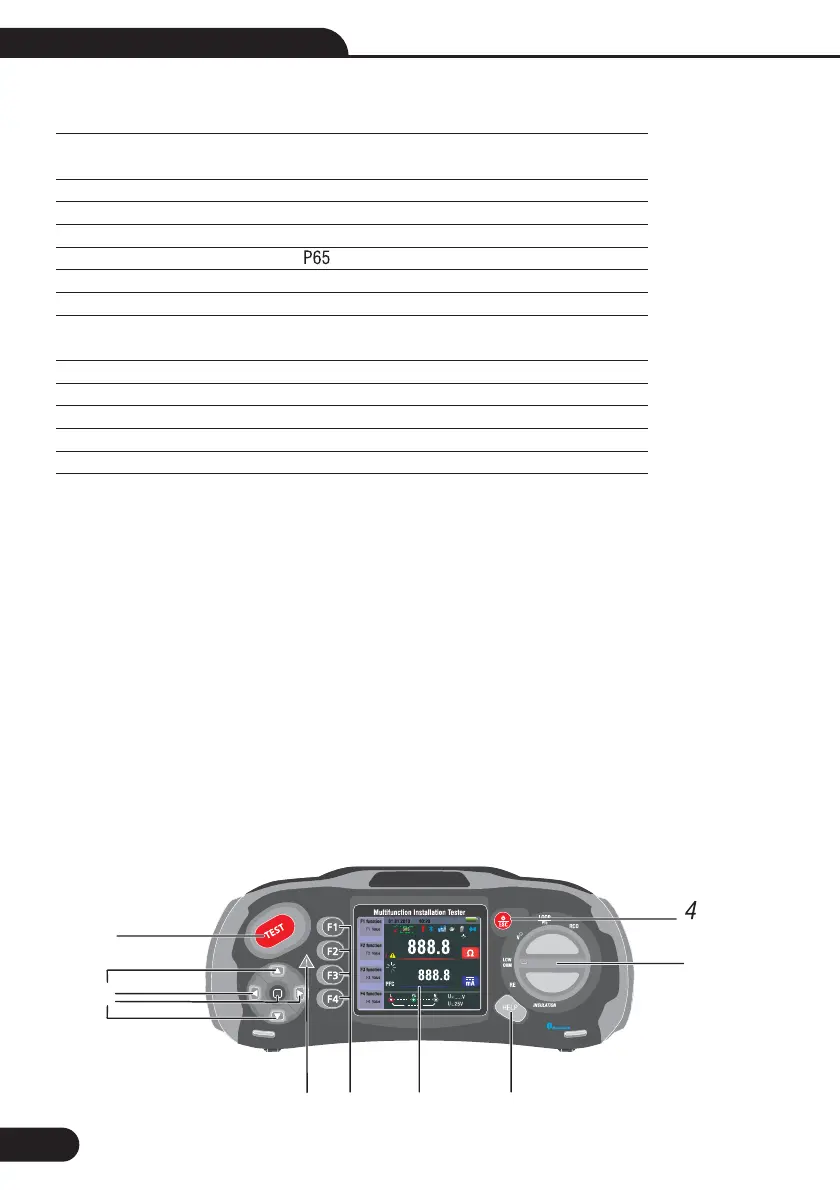
4.1-Front View
-Starts the selected test. The T key is surrounded by a “touch pad”. The touch pad measures the potential
between the operator and the tester’s PE terminal. If you exceed a 100 V threshold, the D symbol above
the touch pad is illuminated.
-Warning lamp
-320X(RGB)X240 color active matrix
-Press and hold Turns the tester on and off. Short Press return the latest status.
-Function selector switch.
-Navigation keys:
Enter, Up, Down, Left/Save, Right
-Selects the sub-menus from the Test Mode selected by the rotary switch:
F1, F2, F3, F4
-Accesses help menus and delete files .
1
2
3
4
5
6
7
8
1-
1-
6-
7-
8
8 x 1.5V AA Size Alkaline batteries
or 8 x 1.2V AA Size rechargeable Ni-MH batteries
Average of 15hours
IV 400V
Double Insulation
I
3.5”TFT
320x240
0°C~ 45°C
95% 10°C~ 30°C: Non-condensing
75% 30°C~ 40°C
10°C~ 60°C
2000m
500mA Fast response BS 88 Fuse
220mm x 94.6mm x 60.5cm
631g
-
5
1
2
6
3
8
7
Multifunction Tester User Manual



 To Next Page