4-2
NOTE: The sample aperture is oriented by manually rotating the ST holster aperture rotation knob or
the ST probe aperture rotation thumbwheel to the desired position around the sample
aperture.
• VACUUM (VAC) button. Activates vacuum aspiration and probe clearing.
o Press and hold to activate vacuum aspiration for the duration of press. The cutter retracts, and
vacuum is applied for up to 15 seconds.
o Press and immediately release to activate a short vacuum and saline pulse. If a specimen is not
transported into its chamber, use this approach to bring the clogged tissue or fluid into that chamber,
rather than indexing to the next sequential chamber.
• ARM button. Retracts the trocar shaft (needle).
o Press and hold ARM until the blue LEDs flash (about 1 second) to automatically retract the trocar
shaft to the pre-fire position.
• SAFETY UNLOCK and FIRE buttons. Fire the trocar shaft (needle).
o Press and hold the mechanical safety unlock button while simultaneously pressing the FIRE button to
fire the trocar shaft.
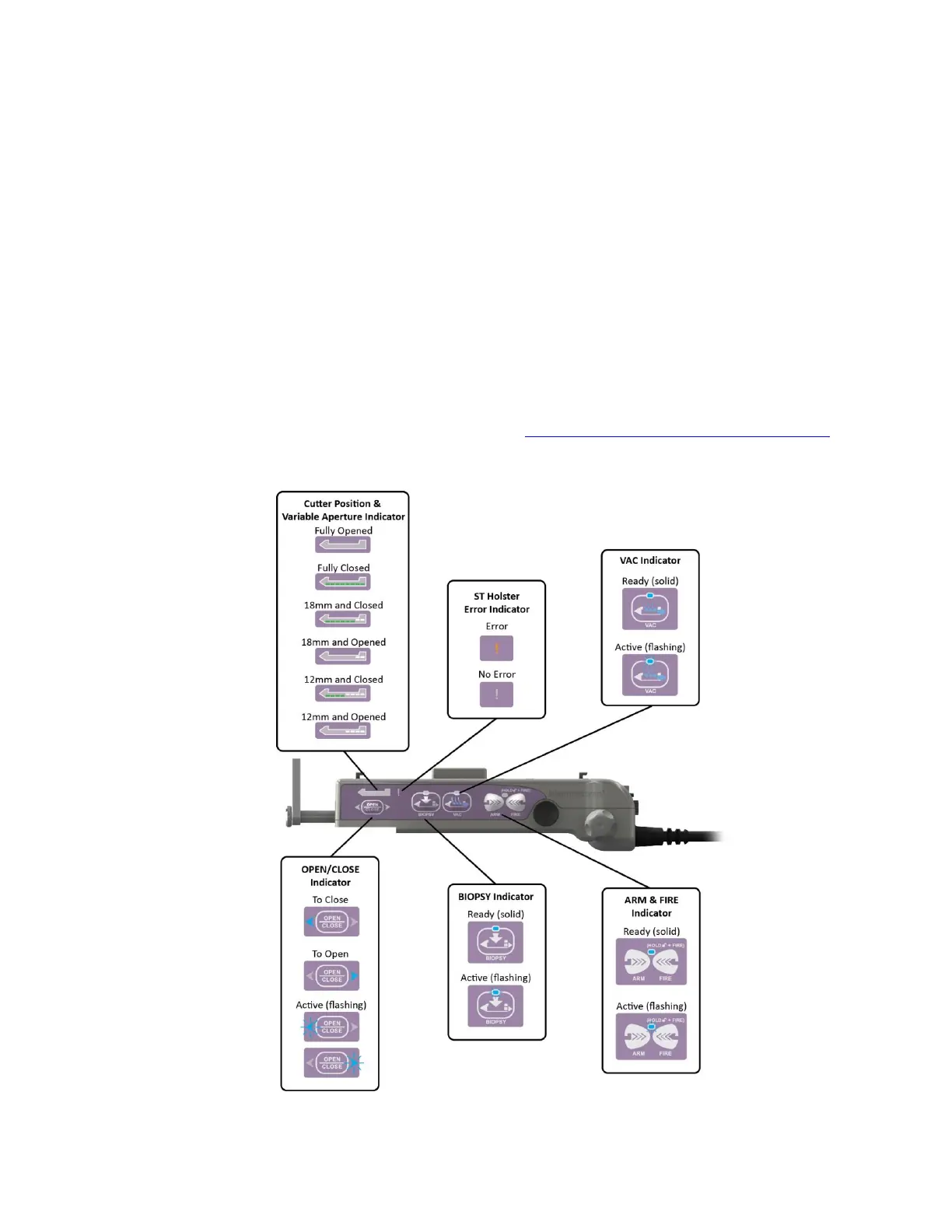
NOTE: ST LED Holster states are described in Chapter 12: Stereotactic (ST) Holster States.
Figure 20. ST Holster LED Functions
NOTE: Buttons on the opposite side of the holster are reversed.



 To Next Page