5-2
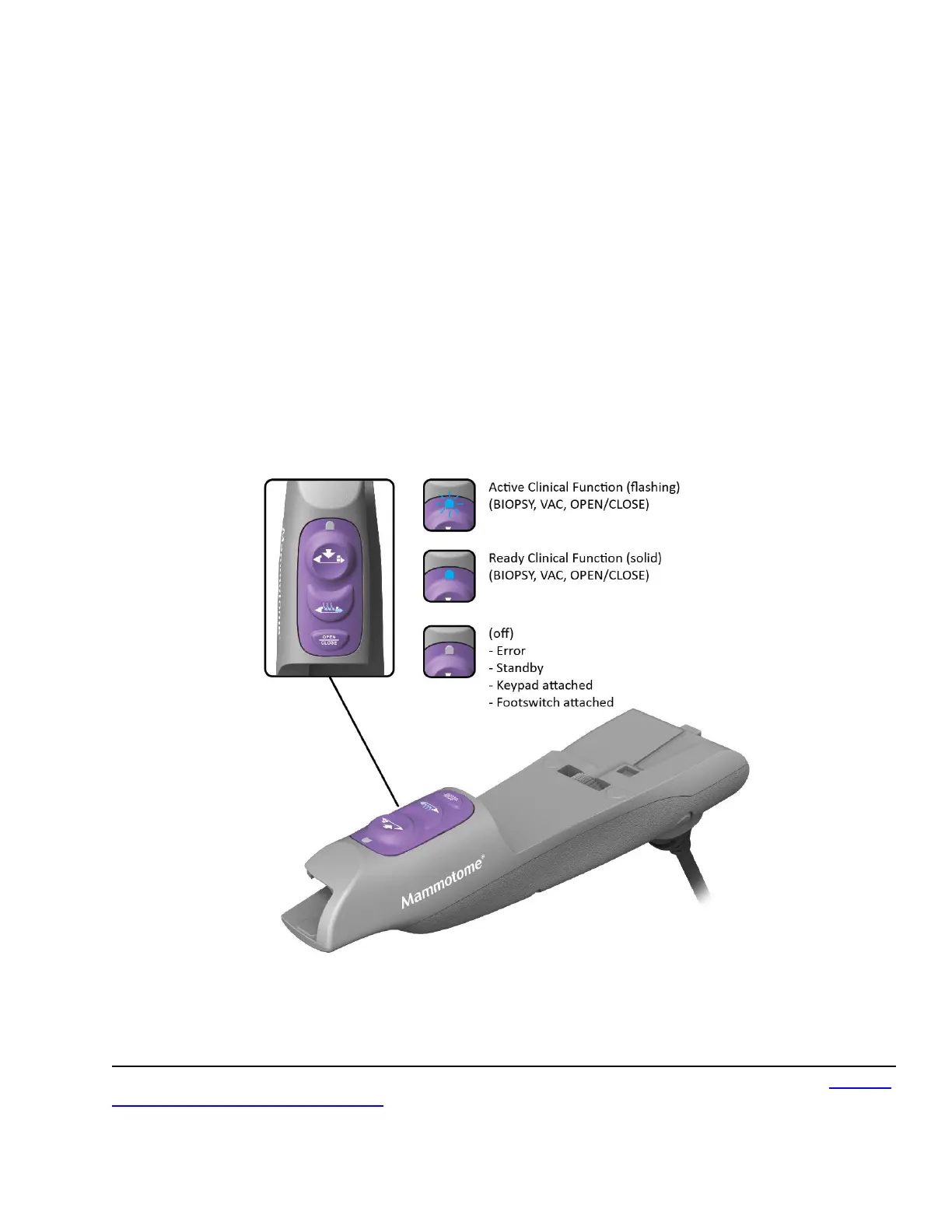
• OPEN/CLOSE button. Opens and closes the cutter location in the aperture.
• VACUUM (VAC) button. Activates vacuum aspiration and probe clearing.
o Press and hold to activate vacuum aspiration for the duration of the press. The cutter retracts, and
vacuum is applied for up to 15 seconds.
o Press and immediately release to activate a short vacuum and saline pulse. If a specimen is not
transported into its chamber, use this function to bring the clogged tissue or fluid into that chamber,
rather than indexing to the next sequential chamber.
• BIOPSY button. Activates the cutter for tissue sampling.
o Press and release for single specimen acquisition.
o Press and hold for continuous sampling.
NOTE: When the BIOPSY button is depressed, the specimen management system first automatically
indexes to the next available chamber to receive the attempted specimen.
NOTE: The sample aperture can be manually rotated by using the wrist to rotate the probe/holster
assembly to the desired orientation.
Figure 22. U/S HOLSTER LED Functions
NOTE: If a remote input device is attached (e.g. remote footswitch, remote keypad), the blue LED on the U/S
holster illuminates in the Active (flashing) state only.
Preparation for Use
To prepare the Mammotome revolve Dual Vacuum-Assisted Biopsy System for tissue sampling, refer to Chapter
3: Initial Installation and Getting Started.



 To Next Page