8-9
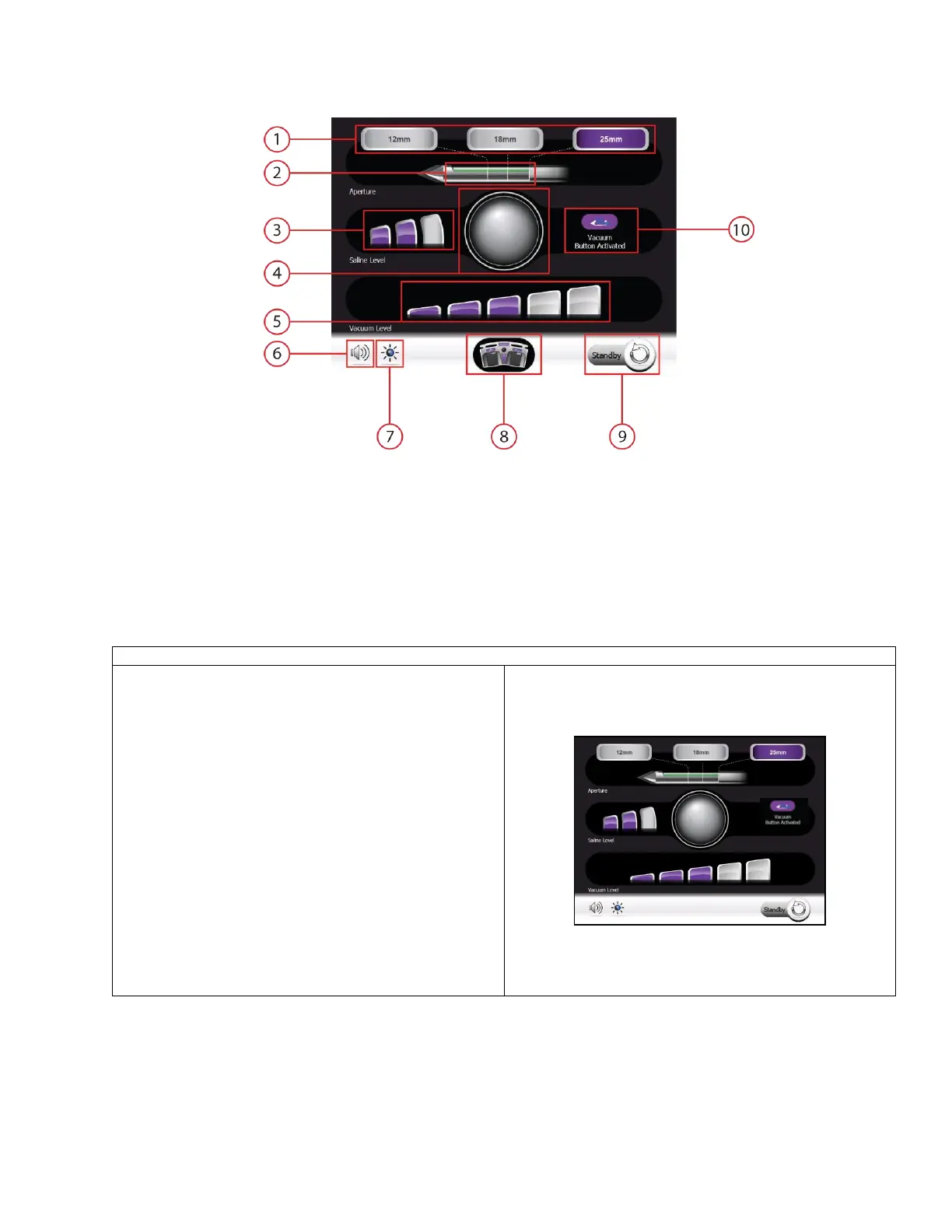
EX Procedure Screens
1. Set Aperture Buttons and Status
2. Aperture and Cutter Position Indicator
3. Saline Level Buttons and Status
4. Biopsy Count Location and Count Reset Button
5. Vacuum Level Buttons and Status
6. Volume Level Button
7. Brightness Level Button
8. Keypad/Footswitch Indicator
9. Standby Button
10. Button Activation Indicator
• This screen is displayed once the system is fully
initialized and ready to perform clinical functions.
• In this screen, the user can adjust the following
procedure settings:
o Set Aperture
o Adjust Saline Level
o Adjust Vacuum Level
o Volume
o Screen Brightness
• During tissue sampling or other clinical functions,
the graphics on the screen reflect the function
being performed by the system. The touch buttons
are lit when the setting they control are available
to be adjusted. When the function is not available
(i.e. during tissue sampling) the corresponding
button is dim.



 To Next Page