ADD-ONUNITS
Removingthealternator
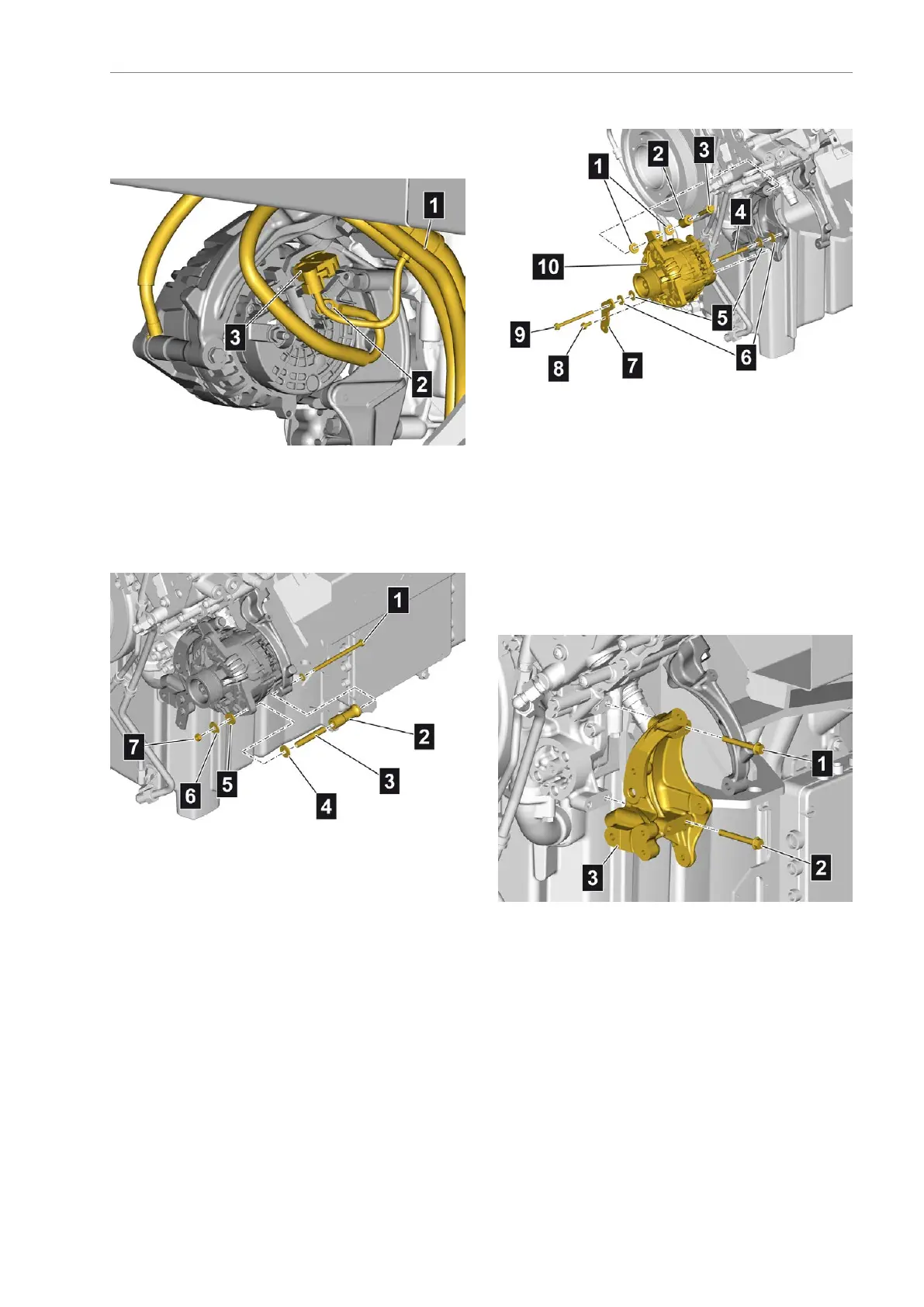
Disconnectingthealternatorelectrical
connection
•Unlockthecompactplug(3)
•UnscrewthemountingnutforterminalB+(2)
•Separatethecabletie
•Removethewiringharness(1)fromthealternator
Detachingthealternatormounting
•Unscrewthemountingnut(7)
•Removethewasher(5)andinsulatingwasher(6)
•Pulloutthemountingbolt(1)withwasher
•Removethebush(2),insulatingsleeve(3)and
insulatingwasher(4)
Detachingthealternator
•Marktheinstallationpositionofthemounting
bolts(8)and(9)
•Unscrewthemountingbolts(8)
•Unscrewthemountingbolt(9)
•Removetheholder(7),insulatingwashers(6),
washers(5)andinsulatingsleeve(4)
•Unscrewthemountingbolt(3)andremove
togetherwiththebush(2)andinsulatingwashers
(1)
•Removethealternator(10)
Detachingtheholder
•Marktheinstallationpositionofthemountingbolts
(1)and(2)
•Unscrewthemountingbolts(1)and(2)
•Removetheholder(3)
AE63stedition101


 To Next Page
 Loading...