11
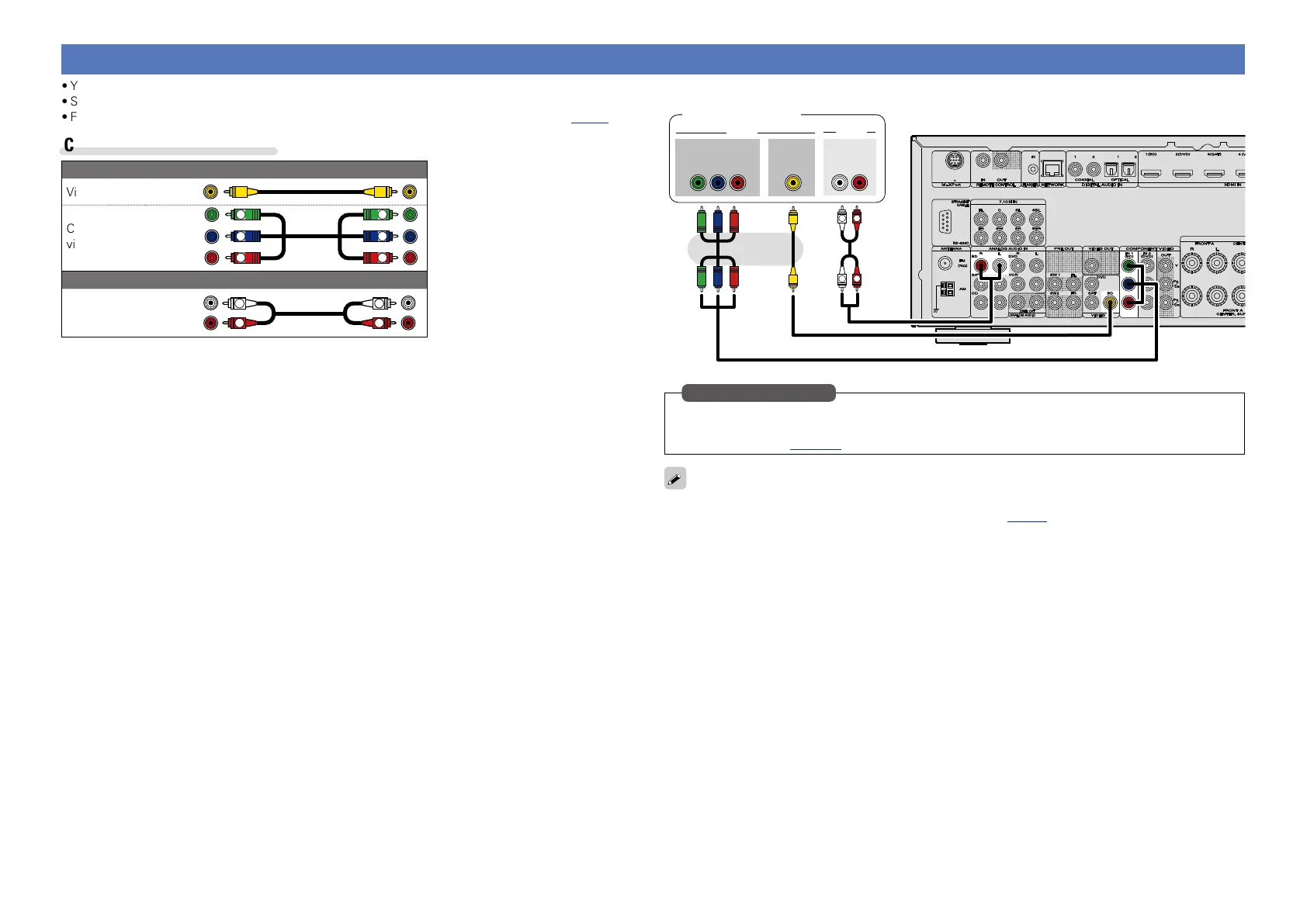
Connecting a Blu-ray Disc player
•You can enjoy video and audio from a Blu-ray Disc.
•Select the connector to use and connect the device.
•For instructions on HDMI connections, see “Connecting an HDMI-compatible device” (vpage7).
Cables used for connections
Video cable (sold separately)
Video cable
Component
video cable
Y
PB
PR
Y
PB
PR
Audio cable (sold separately)
Audio cable
R
L
R
L
VIDEO
COMPONENT VIDEO
Y P
B PR
OUT
L
L
R
R
AUDIO
OUT
VIDEO
AUDIO
RL
OUT
Blu-ray Disc player
Set this to change the digital input connector or component video input connector to which the input
source is assigned.
“Input Assign” (vpage107)
in Set as Necessary
When you want to play back HD Audio (Dolby TrueHD, DTS-HD, Dolby Digital Plus, DTS Express) and Multi-
channel PCM with this unit, use an HDMI connection (vpage 7 “Connecting an HDMI-compatible
device”).



 To Next Page