79
Playback
1
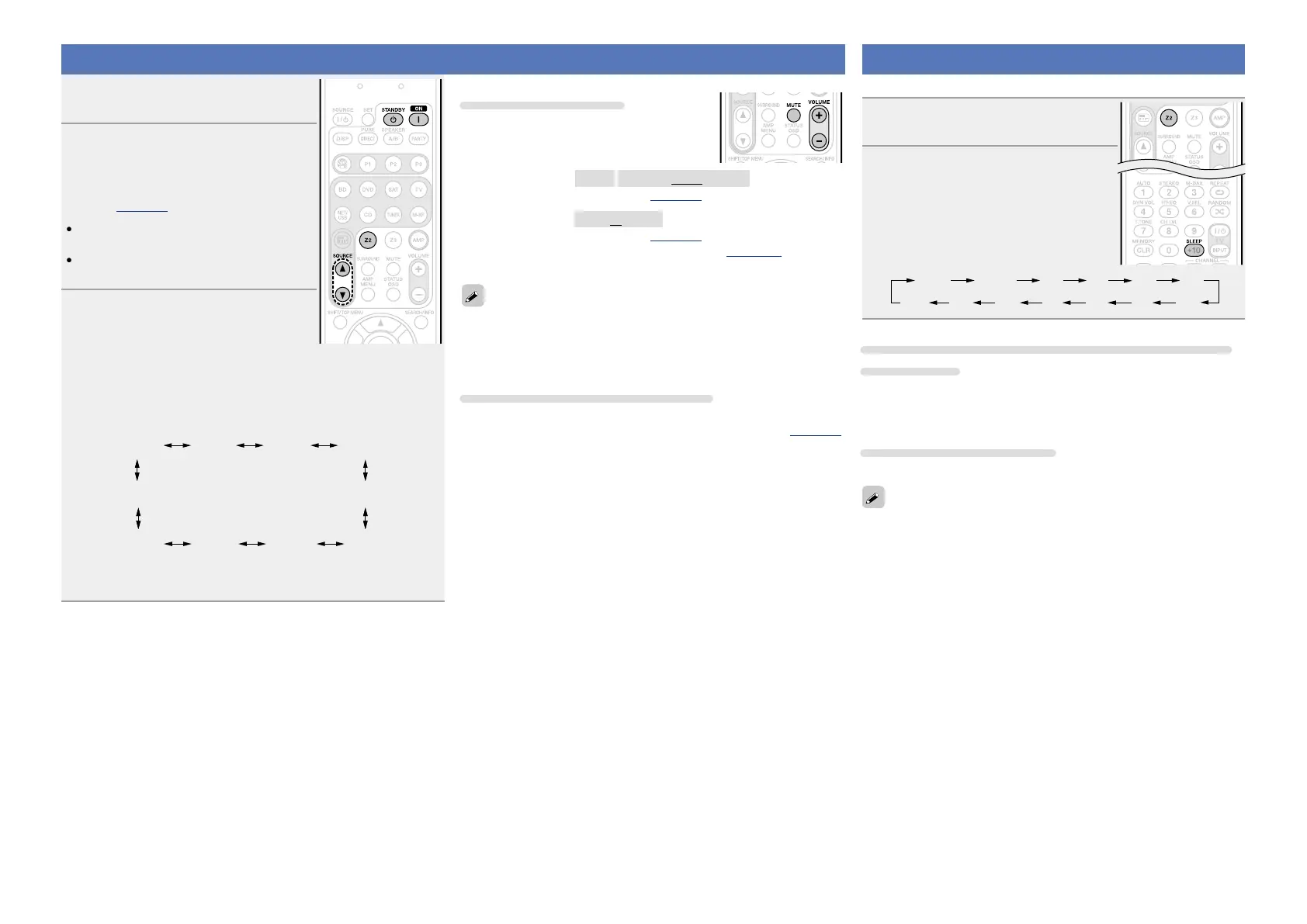
Press Z2 to set the remote control
unit to ZONE2-operation mode.
2
Press ON Z to turn on the ZONE2
power.
“ZONE2 ON” appears on the display.
The indicator on the display lights
(vpage121).
•When
STANDBY X is pressed, ZONE2
turns off.
•Power in ZONE2 can be turned on or off by
pressing ZONE2 ON/OFF on the main unit.
3
Press SOURCE d or SOURCE f.
The audio signal of the selected source
is output to ZONE2.
•Every time you press
SOURCE d or SOURCE f, the input source
switches in the following order.
•Turn INPUT SELECTOR after pressing ZONE SELECT on the main
unit to select an input source.
ZONE2
Source
ZONE2
BD
ZONE2
DVD
ZONE2
VCR
ZONE2
SAT
ZONE2
AUX
ZONE2
ZONE2
M-XPort
ZONE2
Source
ZONE2
TUNER
ZONE2
CD
ZONE2
NET/USB
z
z When “ZONE2 Source” is selected, the input source for MAIN
ZONE will be assigned to ZONE2.
Adjusting the volume
Use VOLUME +, – to adjust the volume.
GAdjustable rangeH
– – –
–80dB – –40dB – 18dB
(When the “Volume Display” (vpage101) setting is “Relative”)
GAdjustable rangeH
0 – 41 – 99
(When the “Volume Display” (vpage101) setting is “Absolute”)
•At time of purchase, “Volume Limit” (vpage 101) is set to
“–10dB (71)”.
•Turn VOLUME after pressing ZONE SELECT on the main unit to
adjust the sound volume.
•For “w ZONE2 playback by audio output”, adjust the volume on the
connected amplifier.
Turning off the sound temporarily
Press MUTE.
The sound is reduced to the level set at “Mute Level” (vpage101)
in the menu.
•To cancel, either adjust the volume or press MUTE again.
•The setting is canceled when the zone’s power is turned off.
Sleep timer function
This is useful when you want to sleep while listening in ZONE2.
1
Press Z2 to set the remote control
unit to ZONE2-operation mode.
2
Press SLEEP and display the time
you want to set.
•The time switches as shown below each
time SLEEP is pressed.
6080 7090100
110
120
To confirm the countdown time before putting the
unit to sleep
Press SLEEP.
“Z2 Sleep zmin” appears on the display.
z Countdown time
To cancel the sleep timer
Press SLEEP to set “OFF”.
The sleep timer is also canceled when the ZONE2 power is turned off.



 To Next Page