2. Swage Setup– Station 3
The APEX 10™ is shipped with the swage rod fully backed off in the down position. We recommend
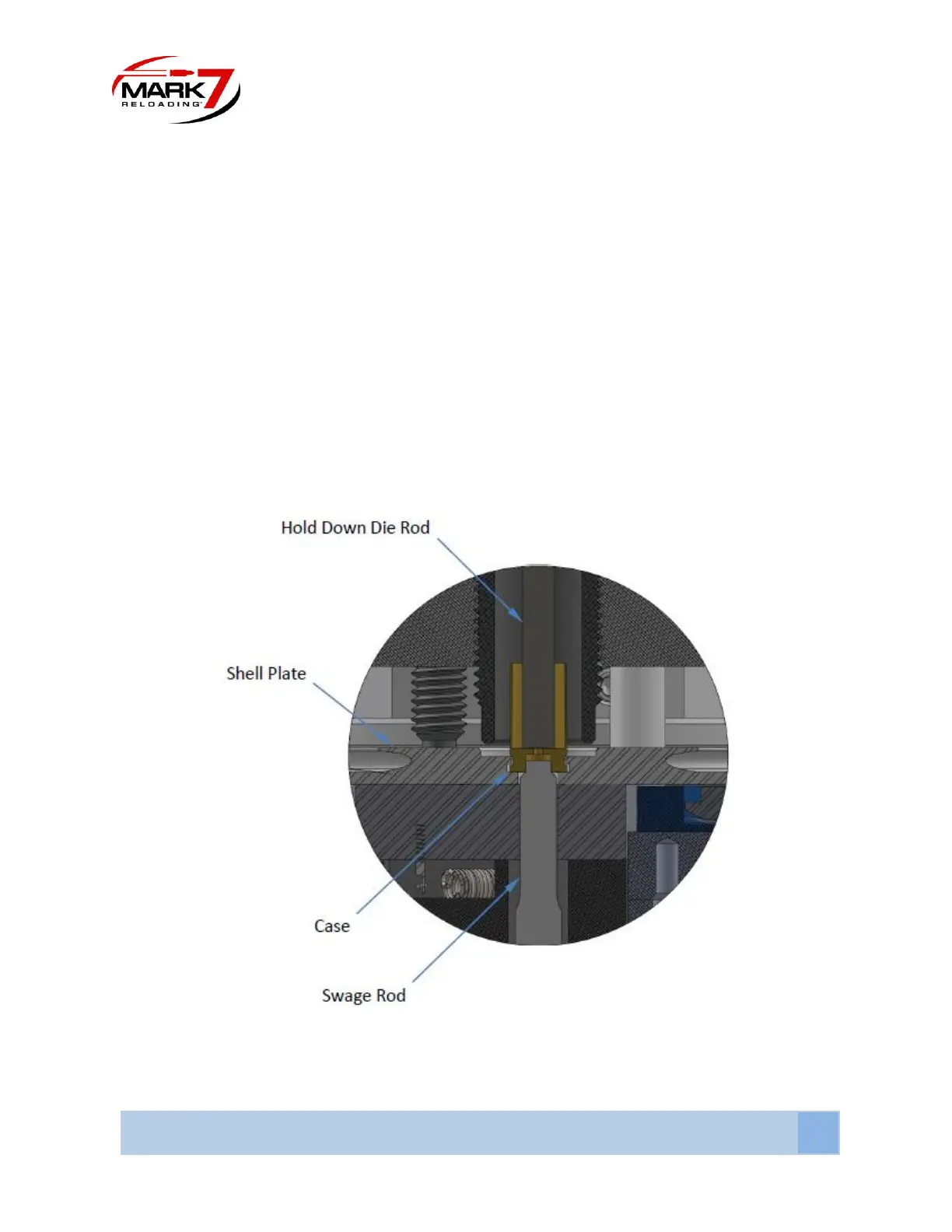
cutting an empty case in half (cross-section) and insert it into the shell plate in station 3.
• Move the Tool head to the bottom.
• Lower a swage back up die until the center contacts the bottom of the case. Lower a ¼ turn and
lock down.
• Raise the swage rod until the swage rod enters the primer pocket and the shoulder contacts the
bottom of the case. Turn ¼ more and lock in place.
• Remove the case used to adjust the rods and install a case that has been previously decapped.
• Perform a cycle with the case in station 3 -then remove and inspect the primer pocket to
confirm that the pocket is swaged properly. Adjust as needed.
• We recommend using a primer pocket gauge especially if using crimped/military brass.
Figure 16: Cross-section of properly adjusted Swage Rod


 To Next Page