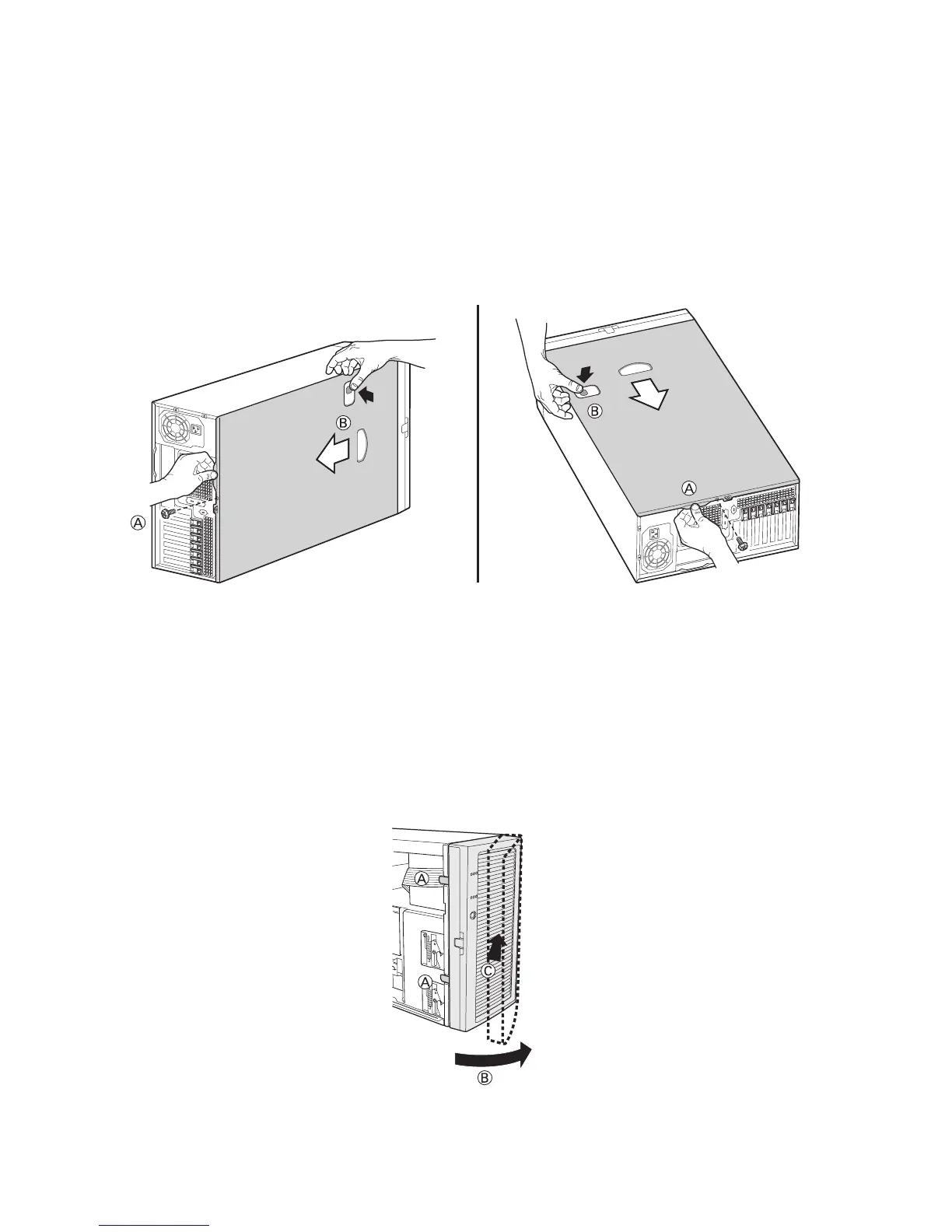
Remove Primary Access Cover
When facing the front of the chassis, the Primary Access cover is on the left-hand side for pedestal-
mounted servers, and on top for rack-mounted servers.
1. Observe the safety and ESD precautions at the beginning of this chapter.
2. Power off the system and disconnect the power cable.
3. If the shipping screw is installed, remove it (letter “A”).
4. Press the latch (letter “B”) and slide the Primary Access Cover toward the rear of the chassis.
5. Lift the Primary Access Cover outward to remove it.
Figure 6. Removing the Access Cover
Remove Bezel Assembly
1. Release the two plastic tabs (letter “A”) on the left side of the Bezel Assembly to disengage
the tabs.
2. Rotate the Bezel Assembly (letter “B”) no more than 40 degrees outward.
3. At a 40-degree angle, push the Bezel Assembly away from the chassis (letter “C”). If Bezel
Assembly does not immediately disconnect from the chassis, then tap the left-hand side of the
Bezel Assembly to disengage the bezel hooks on the right-hand side of the chassis.
Figure 7. Removing Bezel Assembly



 To Next Page