Installing or Replacing the Processor
CAUTIONS
Processor must be appropriate: You may damage the server board if you install a processor that
is inappropriate for your server.
ESD and handling processors: Reduce the risk of electrostatic discharge (ESD) damage to the
processor by doing the following: (1) Touch the metal chassis before touching the processor or server
board. Keep part of your body in contact with the metal chassis to dissipate the static charge while
handling the processor. (2) Avoid moving around unnecessarily.
Installing the Processor
To install a processor, follow these instructions:
1. Observe the safety and ESD precautions at the beginning of this book.
2. Turn off all peripheral devices connected to the server. Turn off the server.
3. Disconnect the AC power cord(s) from the server.
4. Remove the chassis cover.
5. Remove the memory and processor air duct.
6. Locate the processor sockets (see Figure 20 on page 24).
7. Disconnect and remove any components necessary to access the processor sockets.
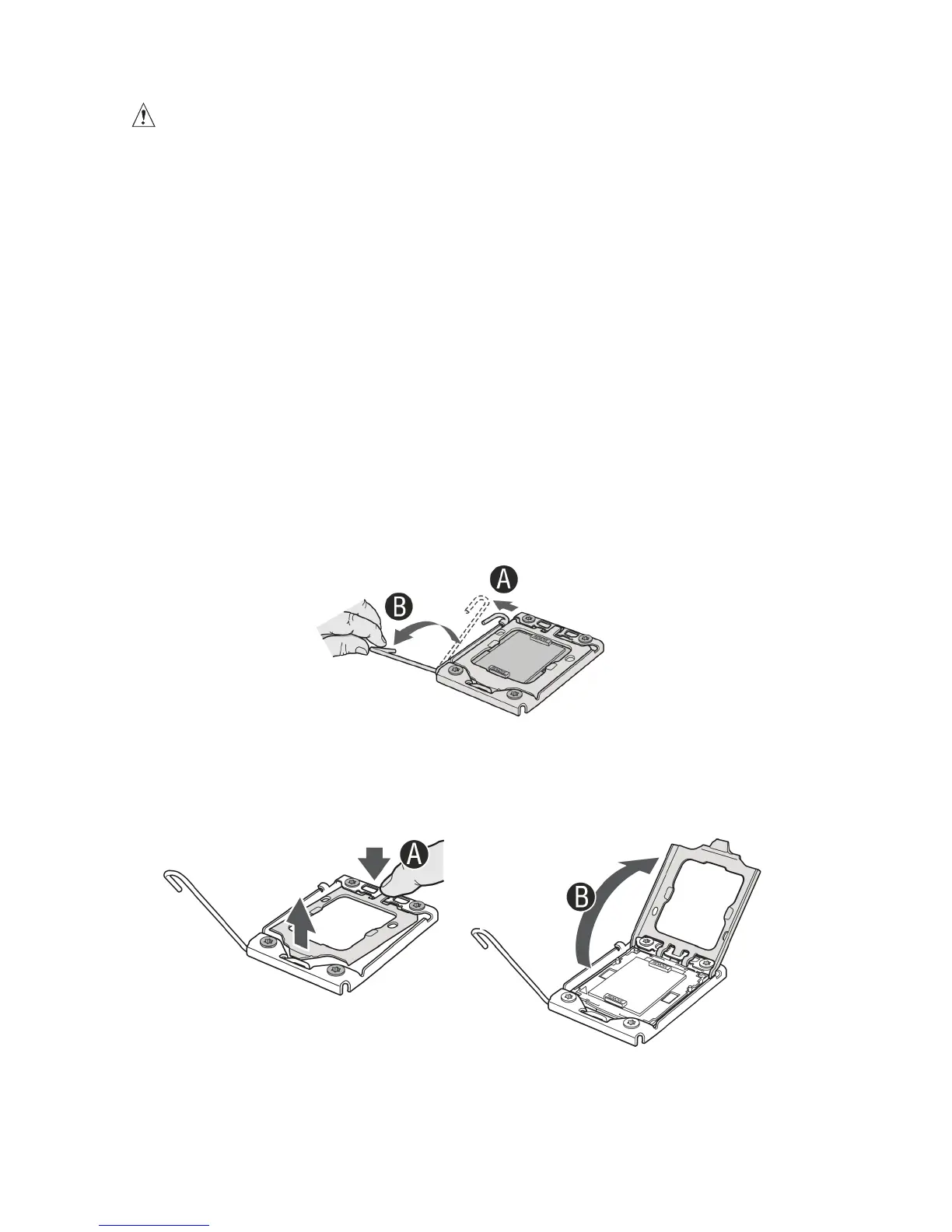
8. Push down the lever on the processor socket. While pushing downward, push it away from
the socket to release it from the hook. Open the socket lever completely. See figure 24.
Figure 24. Opening the Processor Socket Lever
9. Push the rear tab with your fingertip to bring the front end of the load plate up slightly. Open
the load plate completely. See figure 25.
Figure 25. Opening Load Plate



 To Next Page