27MAXDATA Server PLATINUM 3200 I M7
Light-Guided Diagnostics
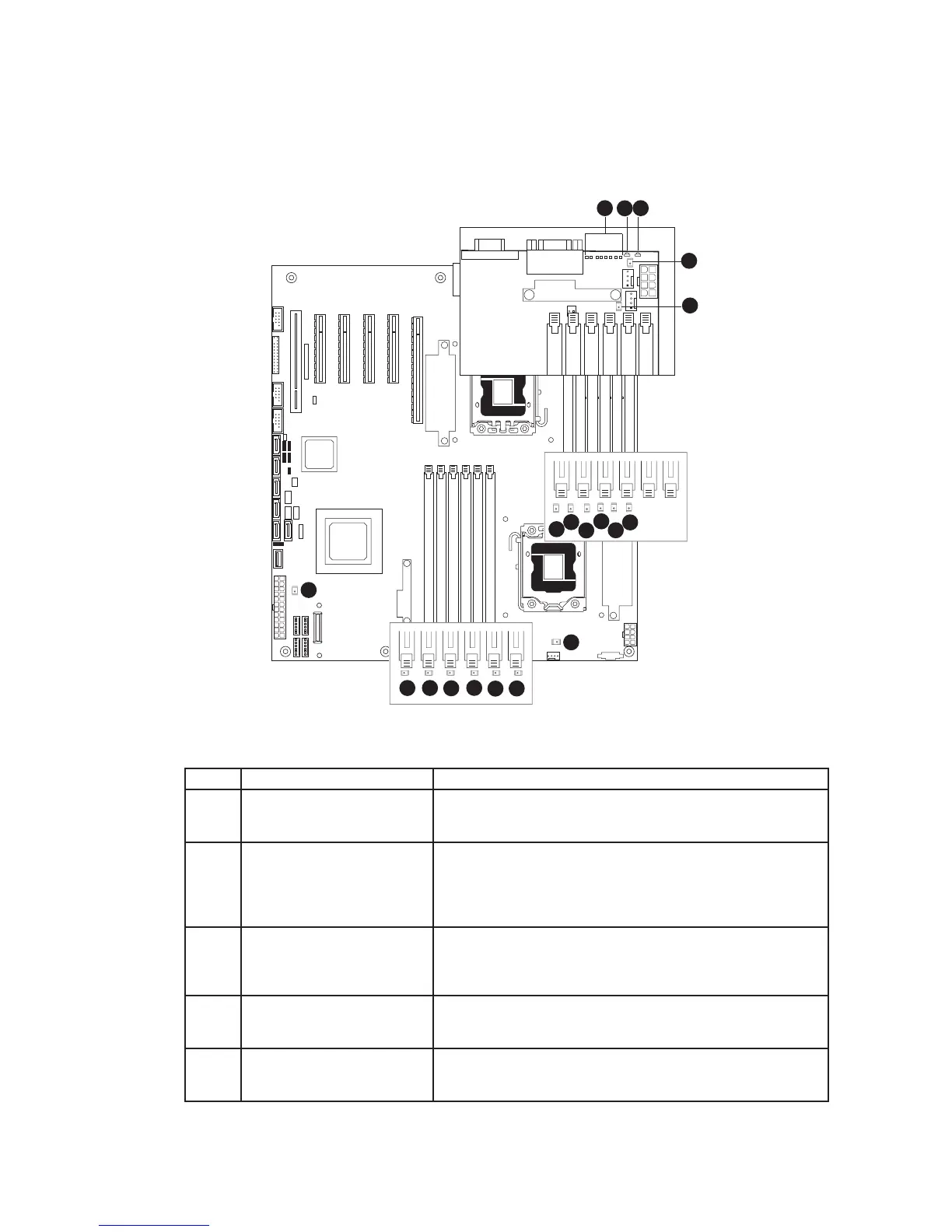
The server board contains diagnostic LEDs to help you identify failed and failing components and to
help you identify the server from among several servers. Except for the ID LED, the status LED, and
the +5-volt standby LED, the LEDs turn on (amber) only if a failure occurs.
Figure 22. Diagnostic LEDs
Callout LED Function
A. POST LEDs
The sequence of lit POST LEDs is used to identify specific
errors that might occur during the boot process. The LED code
will help technical support to identify possible problems.
B. ID LED This LED can be turned on and off either by pressing a
chassis button or by using system management software.
This LED is useful when the system is grouped with several
systems, such as in a rack, and you need to easily find the
system to perform maintenance on it.
C. Status LED The status LED indicates whether a system is operating
correctly, has experienced a minor fault, or a major system
error. This LED shows the same status as the front panel
Status LED.
D. System fan 5 fault LED This LED indicates a fault has occurred with system fan 5.
See your server chassis documentation for instructions to
replace the fan.
E.
L.
Fault LED for processor 1 fan
Fault LED for processor 2 fan
These LEDs are only for server systems that use an active
processor heatsink. They indicate when a fault has occurred
on the heatsink fan. Replace the faulty unit.



 To Next Page