4
Introduction
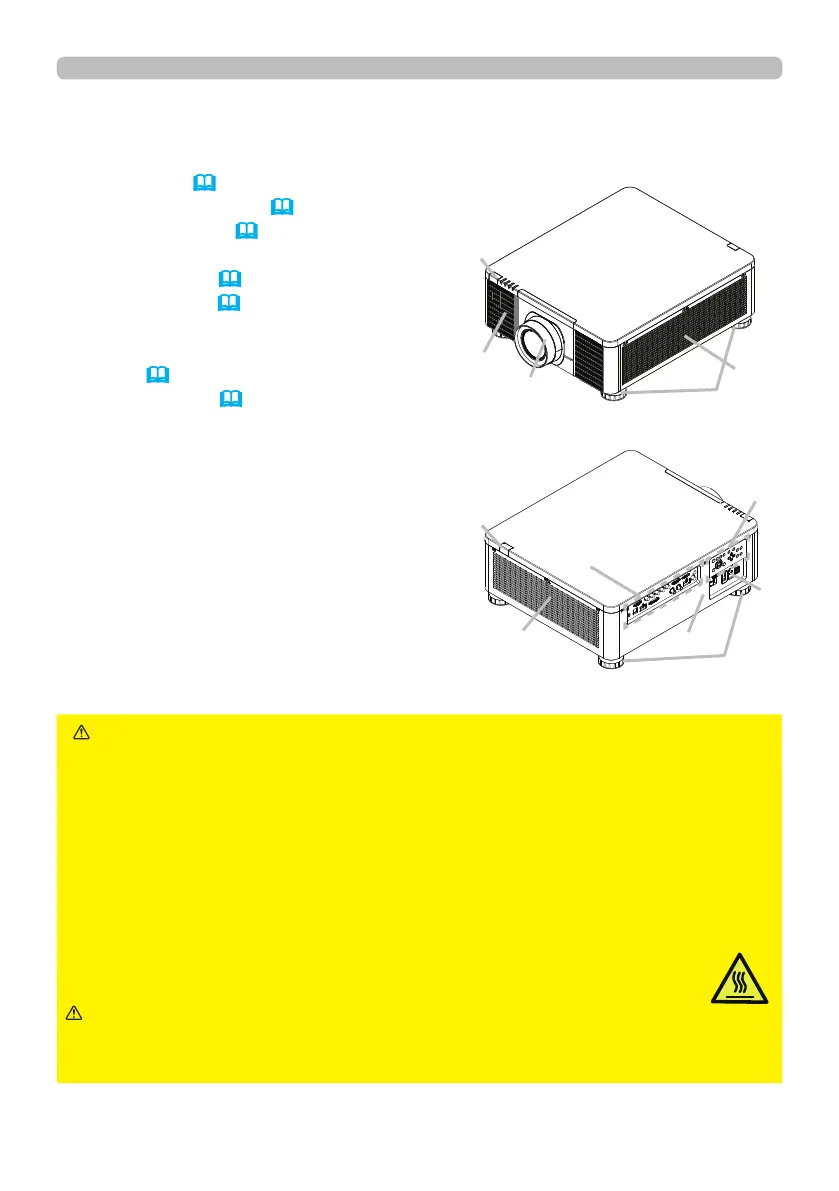
Part names
Projector
(1) Mount cap (
19)
(2) Adjustable foot (x4) (27)
(3) Remote sensor (23, 61)
(4) Ventilation inlet
(5) Control panel (5)
(6) AC (AC inlet) (19)
(7) Ventilation inlet
(8) Ventilation outlet
(9) Ports (6)
(10) Security slot (18)
►Do not open or remove any portion of the product, unless
the manuals direct it.
►Do not subject the projector to unstable conditions.
►Do not apply a shock or pressure to this product. Remove all the attachments
including the power cord and cables, from the projector when carrying the
projector.
►Do not look into the lens and the openings on the projector while the light
source is on since the projection ray may cause a trouble on your eyes.
►Keep any object away from concentrated projection light beam. Blocking the
beam by something causes high temperature and could result in re or smoke.
►Do not touch around the ventilation outlet during use or just after use,
since it is too hot.
WARNING
►Do not attach anything onto the lens except the lens
cover of this projector because it could damage the lens, such as melting the
lens.
CAUTION
(continued on next page)
(1)
(2)
(2)
(3)
(4)
(5)
(6)
(8)
(9)
(3)
(7)
(10)















 To Next Page