Detailed operation
:
Fixed time axis: If you select [ ] option, that means the processing control bar cover
two-hours video content. The time range refers to 1 hour before and after the middle point.
2)Record clip and backup function and playback zoom in/out function.
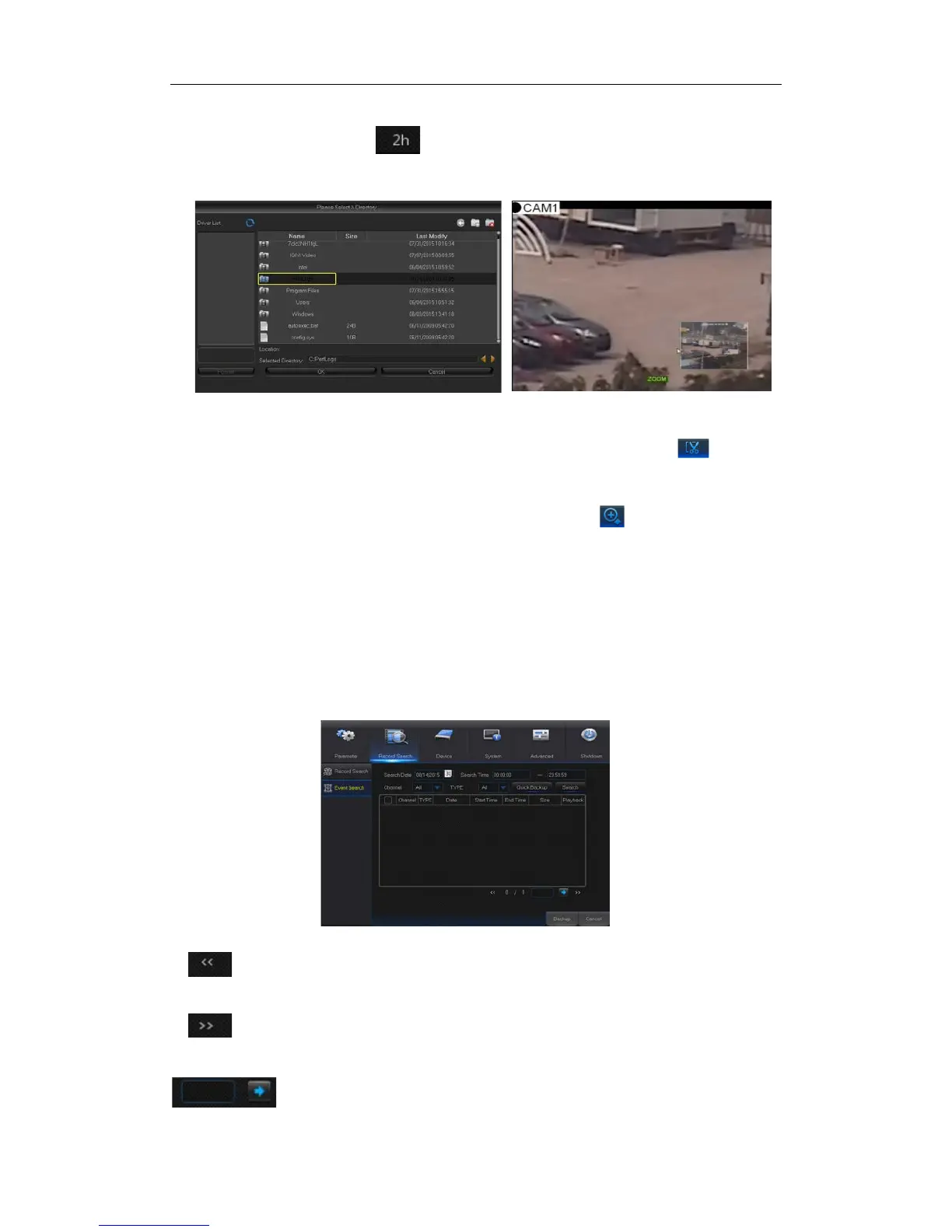
Picture 4-21-1 Picture 4-21-2
Clip and backup: When it is under single channel playback, the [ ] icon will
appear in the Play Control bar shown as Picture 4-21-1. Click the icon to start video
clip function, click the icon again to end the function and pop up the dialog shown as
Picture 4-21-1. Now, you may save the clipped video file.
Zoom out
:When it is under single channel playback, the icon will appear in the
Play Control bar. Click the icon to zoom in certain area of the playback screen and
right click mouse to return the Playback page.
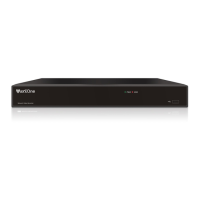
4.2.2.2 Event Search
Go to “Main Menu” → “Record Search” → “Event Search” to enter into the interface shown
as Picture 4-22.
In this page, user may search details by date, time, channel and record type. The relevant
operations are as follows:
Picture 4-22
: Next page; Click the button to go to next page when viewing events (except
the last page). When viewing the last page, click this button to display the event list in the
last page.
:Jump; Input the desired record event page in the input box and click arrow


 To Next Page