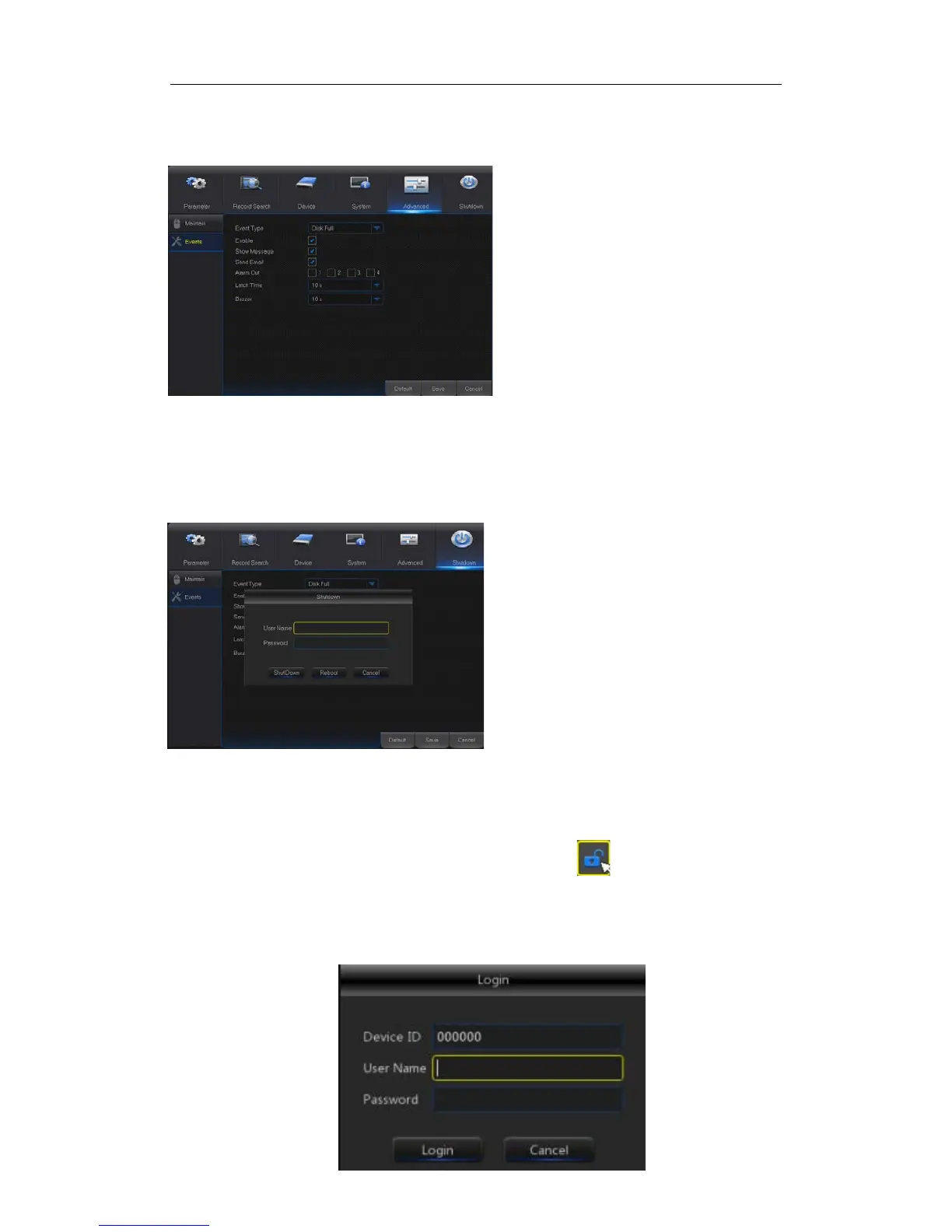
4.2.5.1 Events
Go to “Main Menu” → “Advance” → “Events” to enter into the interface shown as Picture
4-41.
Picture4-41
4.2.6 Shutdown
Go to “Main Menu” → “Shutdown” to enter into the menu interface shown as Picture 4-42.
Shutdown or reboot function requires user to login by inputting User Name and Password.
4.3 Menu Lock
In consideration of system safety, user may click the icon on the toolbar when he
leaves away from NVR and the system interface will be locked. User has to input Device
ID, User Name and Password on the login interface to unlock (Default: User Name: admin,
Password: blank). The login interface is as shown in Picture 4-43.
Event Type: Support three abnormal
types: Disk Full, Disk Error and Video
Loss.
Enable: Active alarms for abnormal
situations.
Alarm Out: Enable or disable alarms
Latch Time: How long the buzzer will
sound when external sensor alarm is
detected (10s, 20s, 40s, 60s).
Show Message: You can set show
message on the screen when sensor
alarm is detected.
Buzzer: How long t
sound (10s, 20s, 40s, 60s).
Send Email: Select to send Email to
specified Email address when
abnormal events appear.


 To Next Page