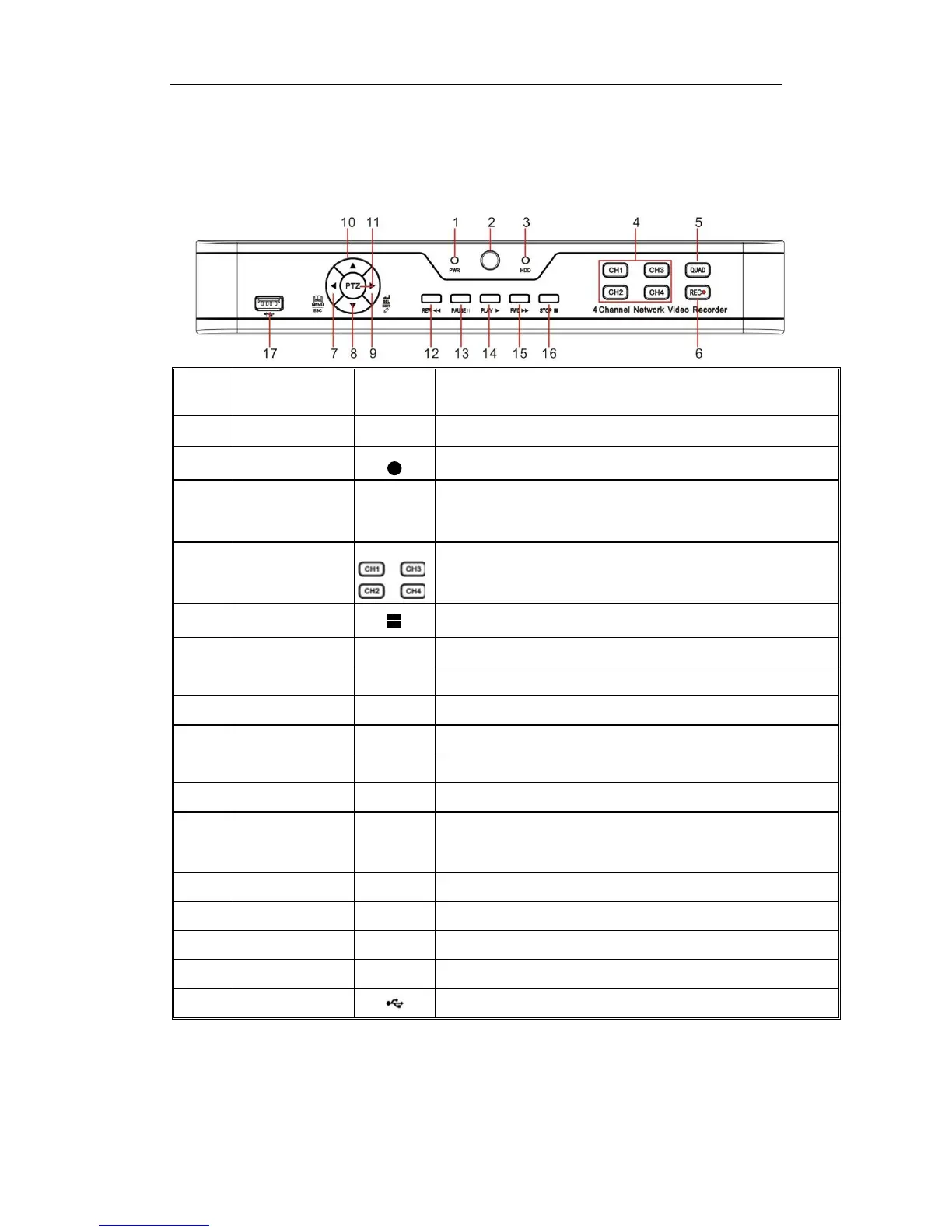
Remark Function & Description
1
Power Indicator
PWR
If the “Green” indicator is on, NVR is getting power normally.
2 IR Receiver
Receive IR signal from Remote Controller.
3 HDD Indicator HDD
If the “Red” indicator flashes, the hard drive is being read or written to. If the
indicator is always on, it means the hard disk is abnormal, unformatted or
has no recording files.
4
Channel select:
CH1 CH2
CH3 CH4
Select a channel
5 QUAD
On Live or Playback mode, switch to Quad display.
6 REC ●
Press the button to start manual record.
7 MENU/ESC
Enter into Main menu, exit or stop playing
8 Down Key
Move down
9 SEL/EDIT
Enter into shortcut menu and select ENTER and EDIT
10 Up Key
Move up
11 PTZ PTZ
Enter into PTZ control interface
12 REW
Move to left; Rewind function;
decrease PTZ rotation speed and parameter value of graphic setting
13 PAUSE
Pause / play frame by frame manually
14 PLAY
Enter into Record Search menu and play.
15 FWD
Right key; increase PTZ rotation speed and Parameter value.
16 STOP
Stop playing or stop manual record
17 USB
USB port
Table 1-1


 To Next Page