4.2.2 Record Search
4.2.2.1 Record Search
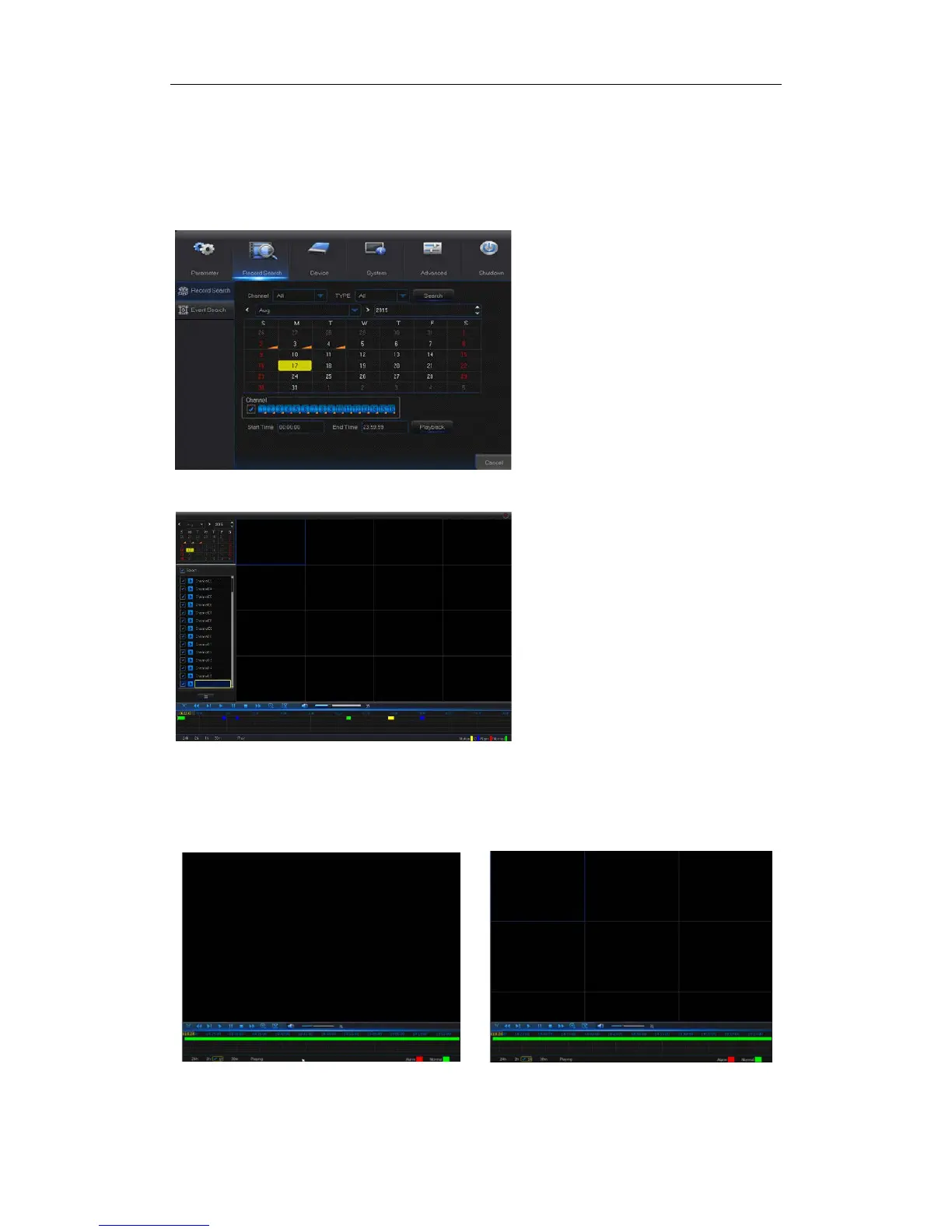
Go to “Main Search” → “Record Search” to enter into the interface shown as Picture 4-18
Picture 4-18
Picture 4-19
Time Axis setup, file clip and zoom in/out
1) The NVR supports the processing control bar function when playing back record files
Picture 4-20-1 Picture 4-20-2
Time Axis zoom: Default value is 24hours. Allow user to select 2 hours, 1 hour, 30 minutes
or user-defined.
Type: Select the type the playback record. There
are two options, i.e. Normal and Alarm.
Start Time/End Time: Select the specific period
of time. The default setting is from 0:00 to 24:00.
Playback Channel: Click a date and select
corresponding channel in Playback Channel.
The selected channels shall not be more than 16,
as shown in Picture 4-19.
Playback: Select the desired year and month
and click “Search”. If there are any records, a
yellow corner mark which shows the recording at
specific date will appear at the down-right corner
of the date sheet. Select the date checkbox and
select playback channel and click Playback to
enter into the interface.
Playback interface: You can use the Playback
Control bar to operate the Fast Forward (X2, X4,
X8 and X16), Rewind (X2, X4, X8 and X16), Slow
Pause/Frame. You can click or drag the volume
control bar to adjust volume. When playback
ends, NVR will remain in the playback interface,
as shown in Picture 4-19.


 To Next Page