4.2.1.4.2 Alarm
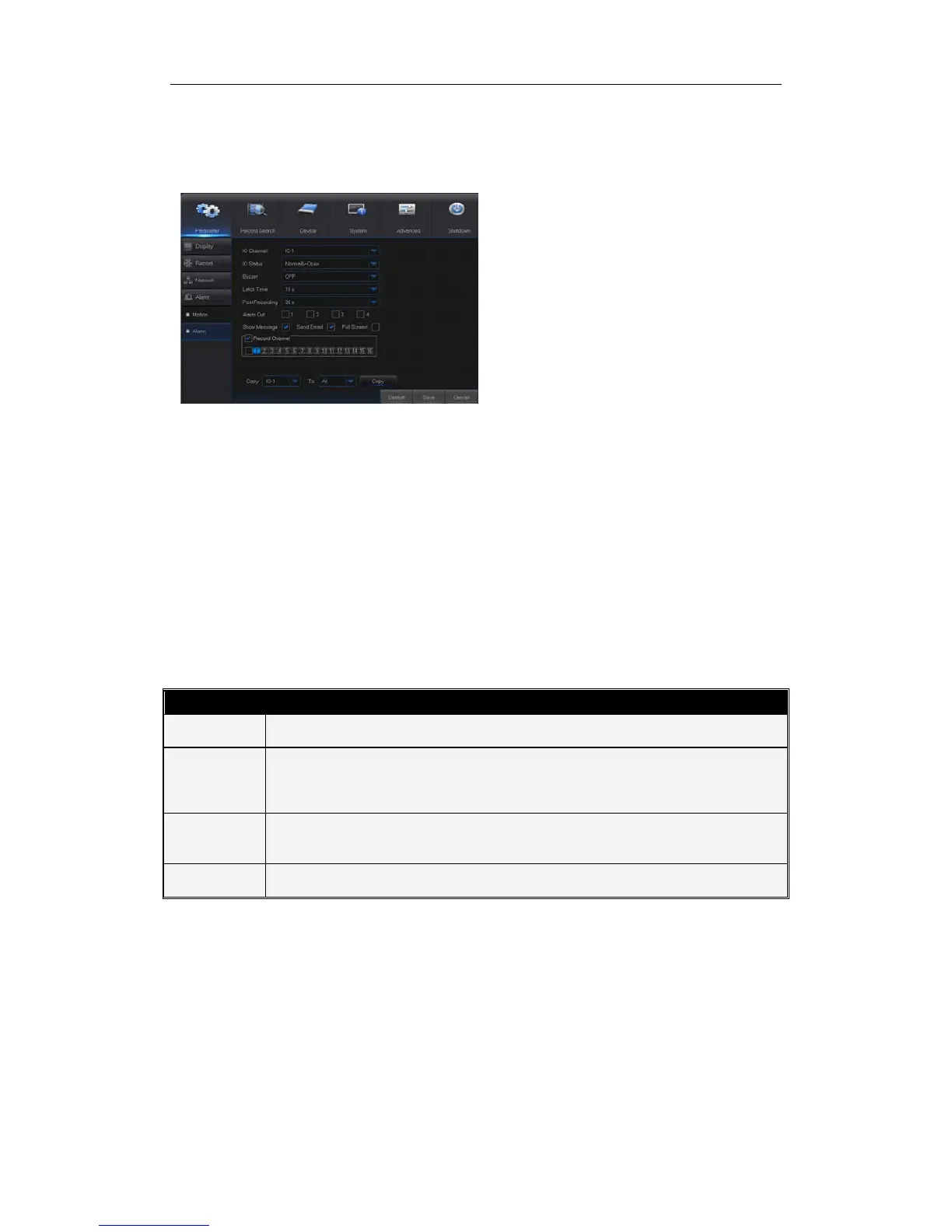
Go to “Main Menu” → “Alarm” → “Alarm” to enter into the interface shown as Picture 4-
17.
Picture 4-17
Show Message: Display the alarm messages on the screen when motion alarm is
detected.
Send Email: Set to send email to specified email when motion alarm is detected.
Full Screen Alarm: When the motion is detected, the corresponding channel will be
switched to the full screen mode.
Latch time: you can set how long the buzzer will sound when object move is detected
by external sensor(10s, 20s, 40s, 60s)
Post Recording: You can set how long alarm record will last when alarm ends (30s,
1minutes, 2minutes, 5minutes).
Record Channel: The record channel will be activated when the object move is
detected.
Copy: Allow you copy current channel parameters to any other channel (setting of
record channel cannot be copied).
Alarm Type Functions & Descriptions
Video Loss
When NVR fails to receive video signals due to some problems (camera damage, line
dropout or damage, power failure), the alarm will appear.
When IP camera detects object moving, alarm will be activated. Sensitivity is subject to
the actual application environment test. Sensitivity
is adjusted according to the
sensitivity of moving object detection and parameters are modified by combining the
Communicate with alarm device through I/O port. Alarm signals sent by IR sensor or
other devices will be transformed to the system recognized signal and activate relevant
channel to record or control the device output.
Alarm will appear when HDD does not work due to damage, power failure, HDD auto-
overwrite off and insufficient space.
Table 2-4
It is the alarm management and setting of the machine. User
may set alarms under different status in the interface. Please
refer to Table 2-4
Alarm in: User may set four groups of alarm input.
Alarm Type: There are three kinds of status, i.e.
Always ON, Always OFF, and OFF. Always ON: When
the trigger is on, I/O alarm appears; Always OFF: When
the trigger is off, I/O alarm appears; OFF: Do not
receive I/O alarm from trigger.
Buzzer Time: You can set how long the buzzer will
sound when motion is detected (off, 10s, 20s, 40s, 60s)
Alarm out: Connect the external alarm switch.


 To Next Page