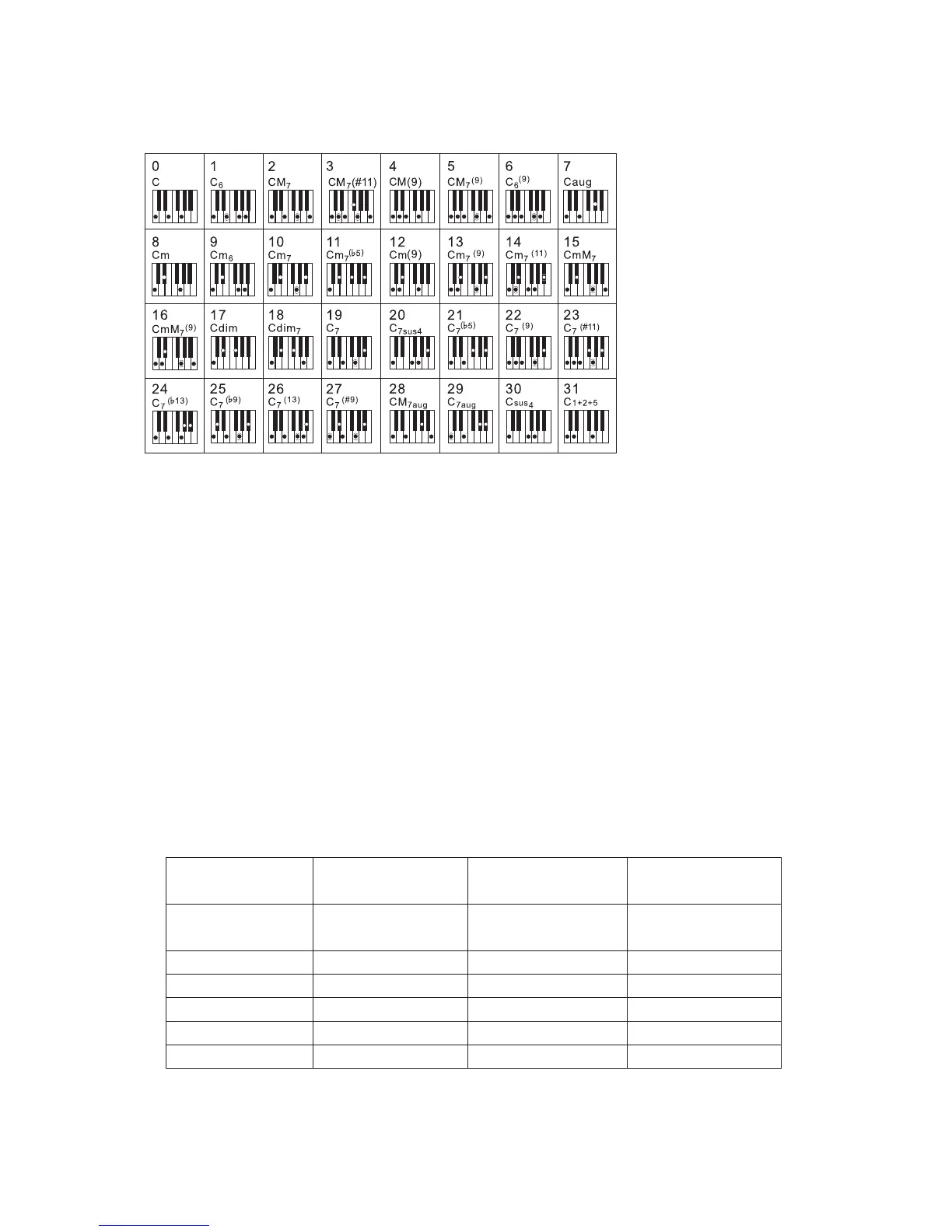
Fingered Chords (the following chart):
3
4
5
1
You can change the chords of the accompaniment by playing keys on the auto accompaniment section
of the keyboard using either the " Single Finger" or "Fingered" method.
Single Finger Chords:
C: to play a major chord: Press the root note of the chord.
Cm: to play a minor chord: Press the root note together with the nearest black key to the left of it.
C7: to play a seventh chord: Press the root note together with the nearest white key to the left of it.
Cm7: to play a minor seventh chord: Press the root note together with the nearest white and black
keys to the left of it(three keys altogether).
Note:
When A.B.C is set to ON, press the keys to the left of the split point.
Singer finger chords is recogniged next to fingered chords.
If a chord has been recognized, you press one or more keys.
The new chord will be recognized again.
Volume Control
Accomp Volume Control
MC620 has 5 accompaniment tracks: CHORD 1, CHORD2, CHORD 3, BASS, and DRUM. You can
adjust the volume of each accompaniment track.
TRACK CHANNEL PARAMETER DEFAULT
ACCOMP CH1, CH3, CH5,
CH7, CH10
0 127
112
CHORD 1 CH1
0 127 94
CHORD 2 CH3
0 127
98
CHORD 3 CH5
0 127
94
DRUM CH10
0 127
90
BASS CH7
0 127
94
19
-
-
-
-
-
-



 To Next Page