UK/ N. IRELAND HELPLINE 0871 37 61 020
REP. IRELAND HELPLINE 1-800-992508
(calls are charged at 7p per min from a standard landline, calls from mobiles could be higher)
-62-
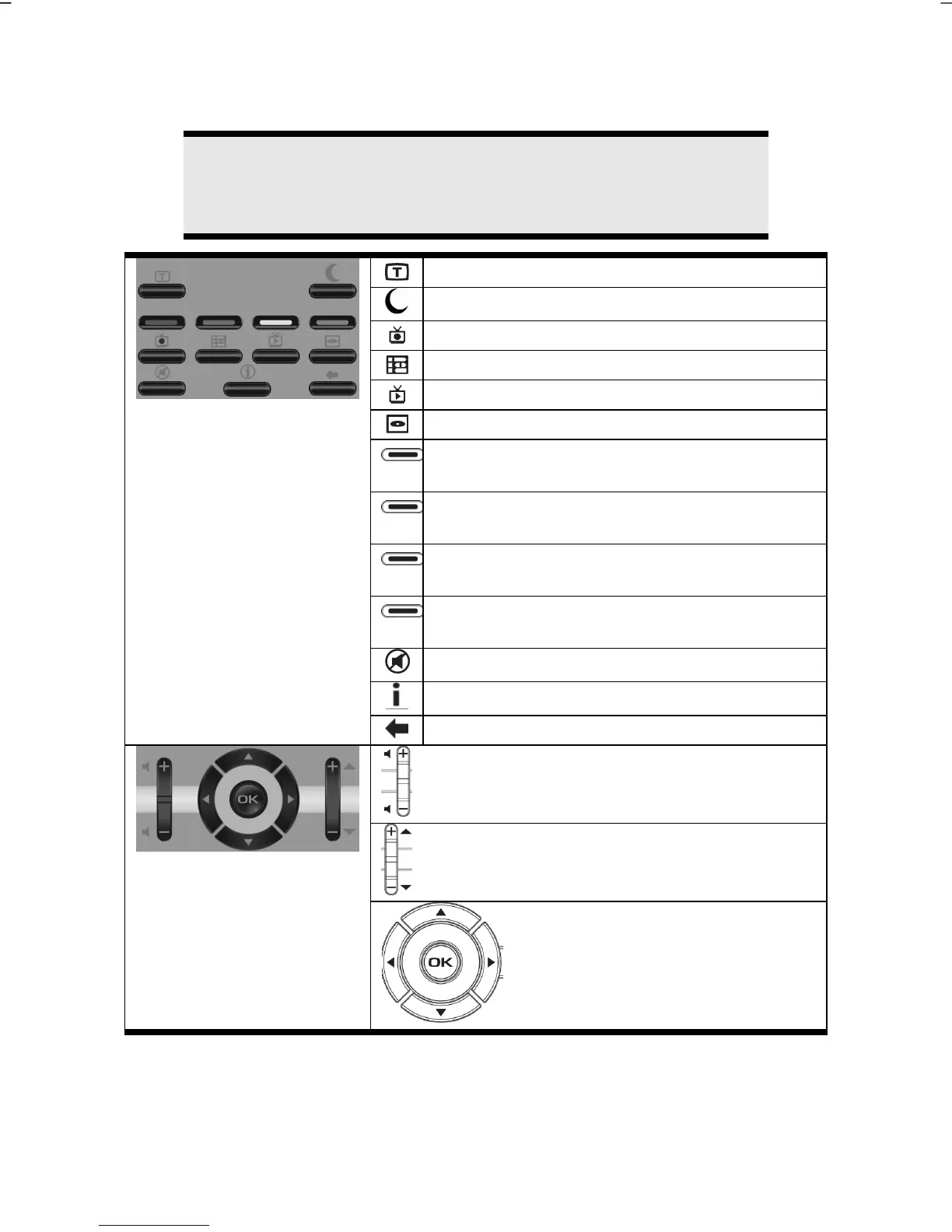
Button Layout
Note
The functions described here are standard functions. These Buttons
can differ according to the operating mode (TV, video, photo, etc.).
Start video text application.
Activate the energy saving mode
TV recordings
EPG function (Electronic Program Guide)
Live TV – Starts the frame Television mode
DVD menu
Special function buttton red
(e.g.: Selection of the audio track)
Special function buttton green
(e.g.: subtitle selection)
Special function buttton yellow
(e.g.: Camera selection)
Special function buttton blue
(e.g.: Chapter selection)
Mute Switch (switches the sound output off)
Application-related information function.
Reverts to the point selected previously
Press + to increase the volume.
Press - to lower the volume
Press + to select the next channel.
You select the previous channel with -.
With these navigation keys, you
can navigate between selection
and menu elements.
Press the OK button to confirm.



 To Next Page