www.megger.com
Megger Baker ADX User Guide
57
Assets
Creating a New Asset
NOTE: There are two ways to create a new asset: starting with a blank New Asset form or copying an
existing asset.
Copying an existing asset is an efficient way to create multiple assets of the same type and general
description. That process is covered later in this chapter in “Copying an Asset.”
This section addresses creating a new asset using the blank New Asset form.
1. Click on the ASSET icon in any main menu.
2. Press or click on the NEW ASSET button in the Asset Selection screen.
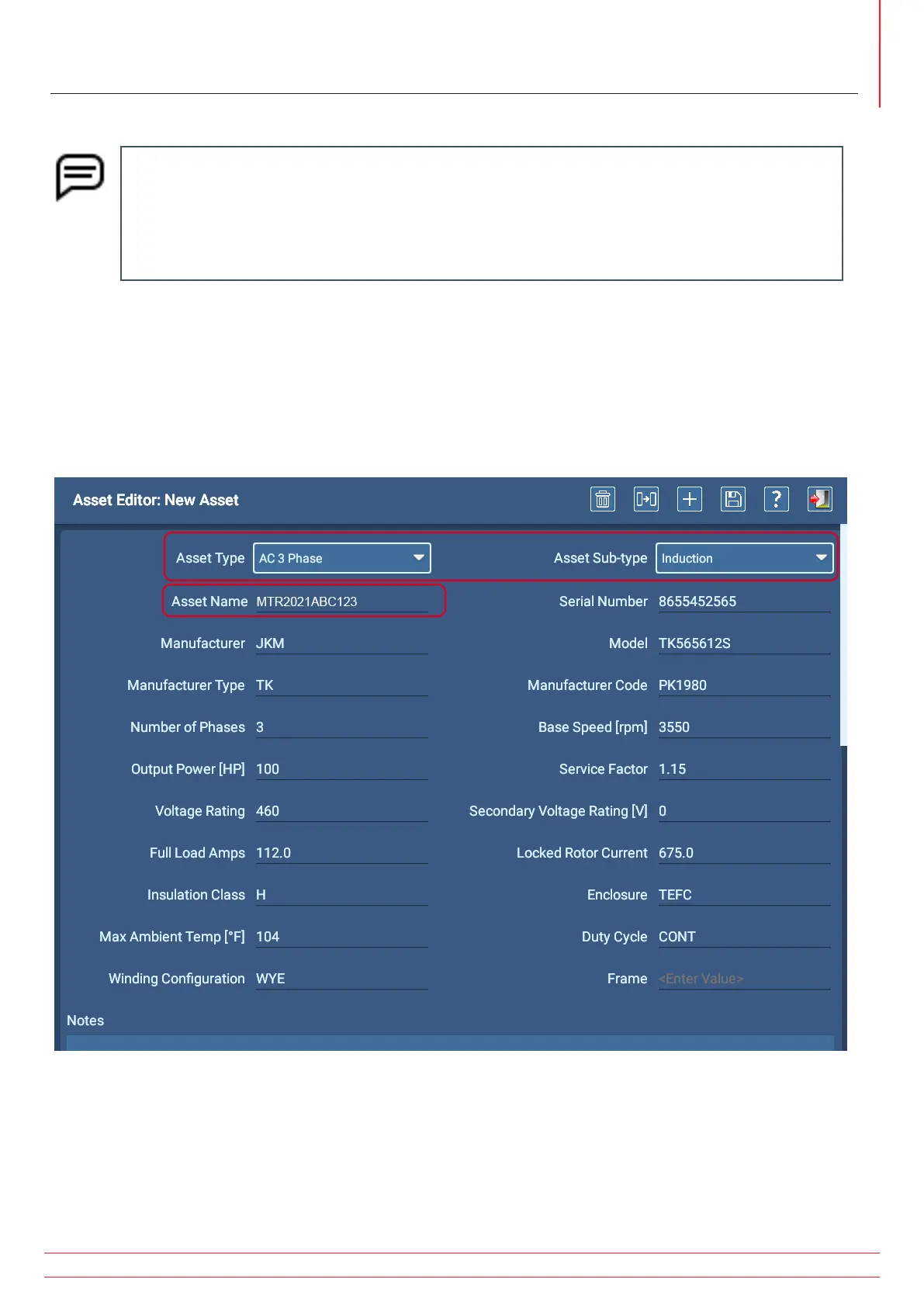
3. Select the Asset Type and Sub-type then enter a name for the asset in the Asset Name field.
4. Press the SAVE icon near the top right to add the new asset to your database, but do not exit the screen.
5. Continue entering nameplate information into the appropriate fields then enter notes about the asset to expand its
description as needed.
Fig 53: Asset Editor screen; selecting AC Asset Type and entering related nameplate data.


 To Next Page