www.megger.com
Megger Baker ADX User Guide
58
Assets
Assigning Sequence and Test Configurations
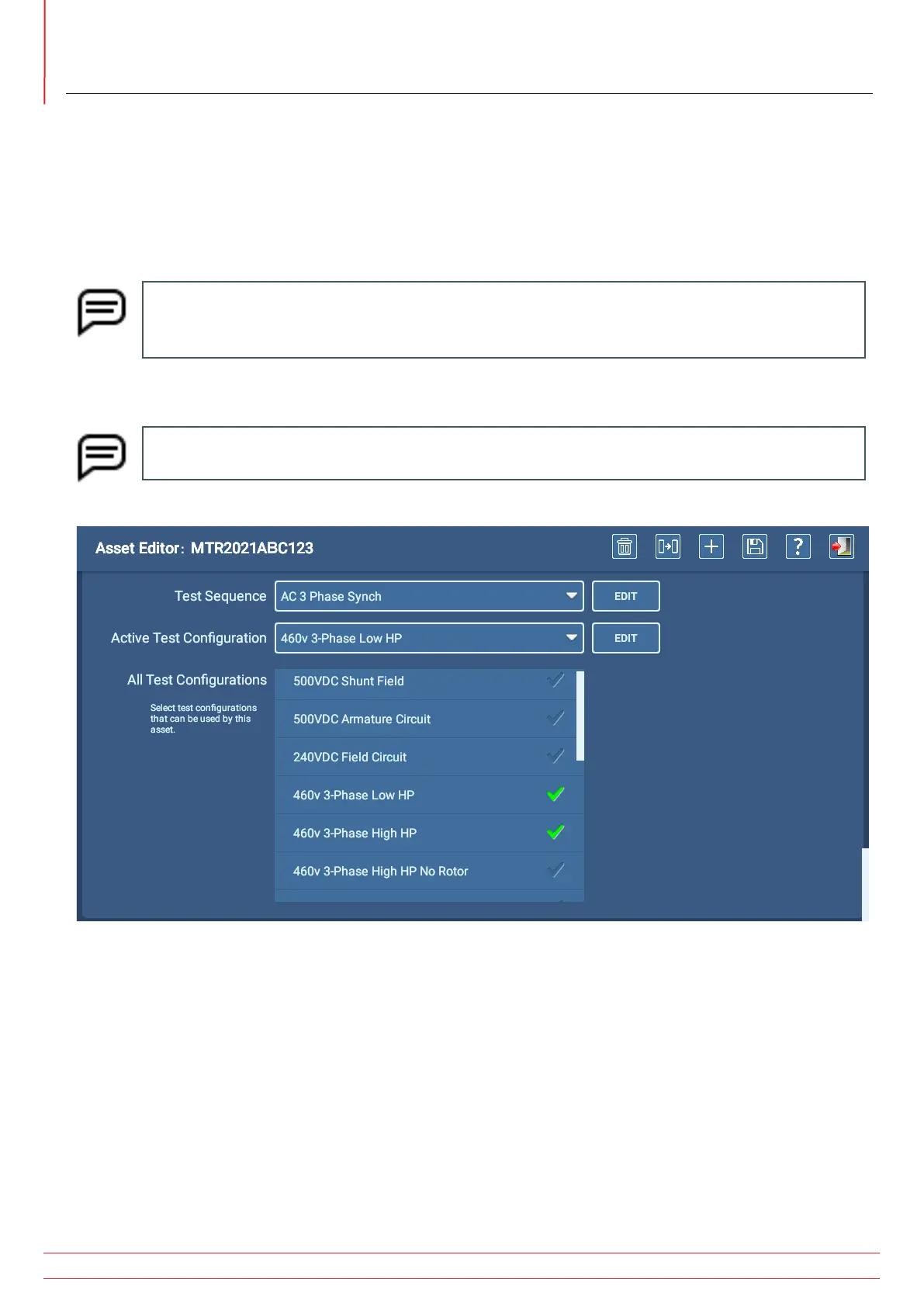
1. Scroll down to the next section then select the Test Sequence from the drop-down list if the asset will use a
sequenced test. Sequenced tests are fully-defined sets of tests that run automatically in Sequence mode.
2. In the All Test Configurations list, touch or click on each test configuration that you want to include in the list of
available test configurations for this asset. A check mark appears in the configuration’s row to let you know which
configurations will be added to the list of tests that can be run on the asset.
NOTE: The Test Configuration drop-down list that appears within the Test Initiation screen before
running automatic and sequenced tests contains the list defined at this time. Operators can change the
Test Configuration if needed for a particular testing session using this list.
3. Use the Active Test Configuration drop-down list to select which of the previously enabled test configurations will
be the default configuration used when the asset is selected.
NOTE: At least one test configuration is required for assets that will be tested in Automatic or Sequence
modes. Assets that will be tested in Sequence mode must also have a sequence assigned.
Fig 54: Asset Editor screen; selecting Test Sequence and Test Configurations.


 To Next Page