After selecting a secondary vector group, the
absolute vector selection screen can be used to enter
a non-standard (30°) phase shift.
5.9.5 Phase Shift Selection
5.9.6 Absolute Vector
Option
Option
Available Settings
0° - 360° (0.1° steps)
Phase Shift
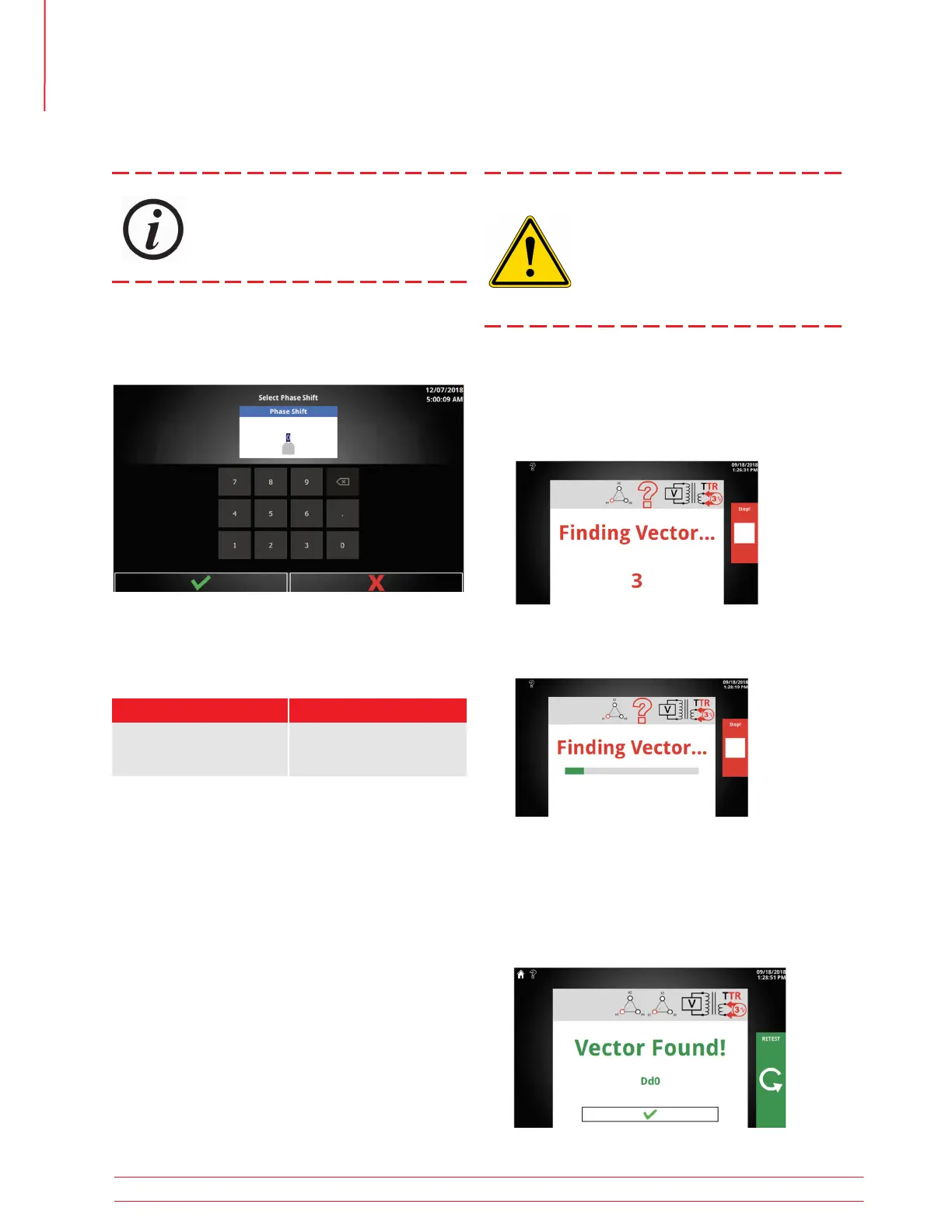
After selecting a secondary vector group, the find
vector function will execute a test to find the phase
shift.
1. First, a brief countdown is displayed
2. After the countdown, the test begins.
3. If no connection issues are detected, the vector
found screen will be displayed. Select the con-
firm button to accept the results of find vector.
This will update the secondary vector to the
found vector.
5.9.7 Find Vector
Find vector should be used as a last re-
sort. If the vector found does not match
the nameplate, operator MUST check
nameplate and validate this condition.
When connected to the system, improper
transformer phasing may result in cata-
strophic failure.
Optional SW Feature
Operation
26 TTRU3 User Manual us.megger.com



 To Next Page