11
CONNECTION(CONTINUED)
NOTES:
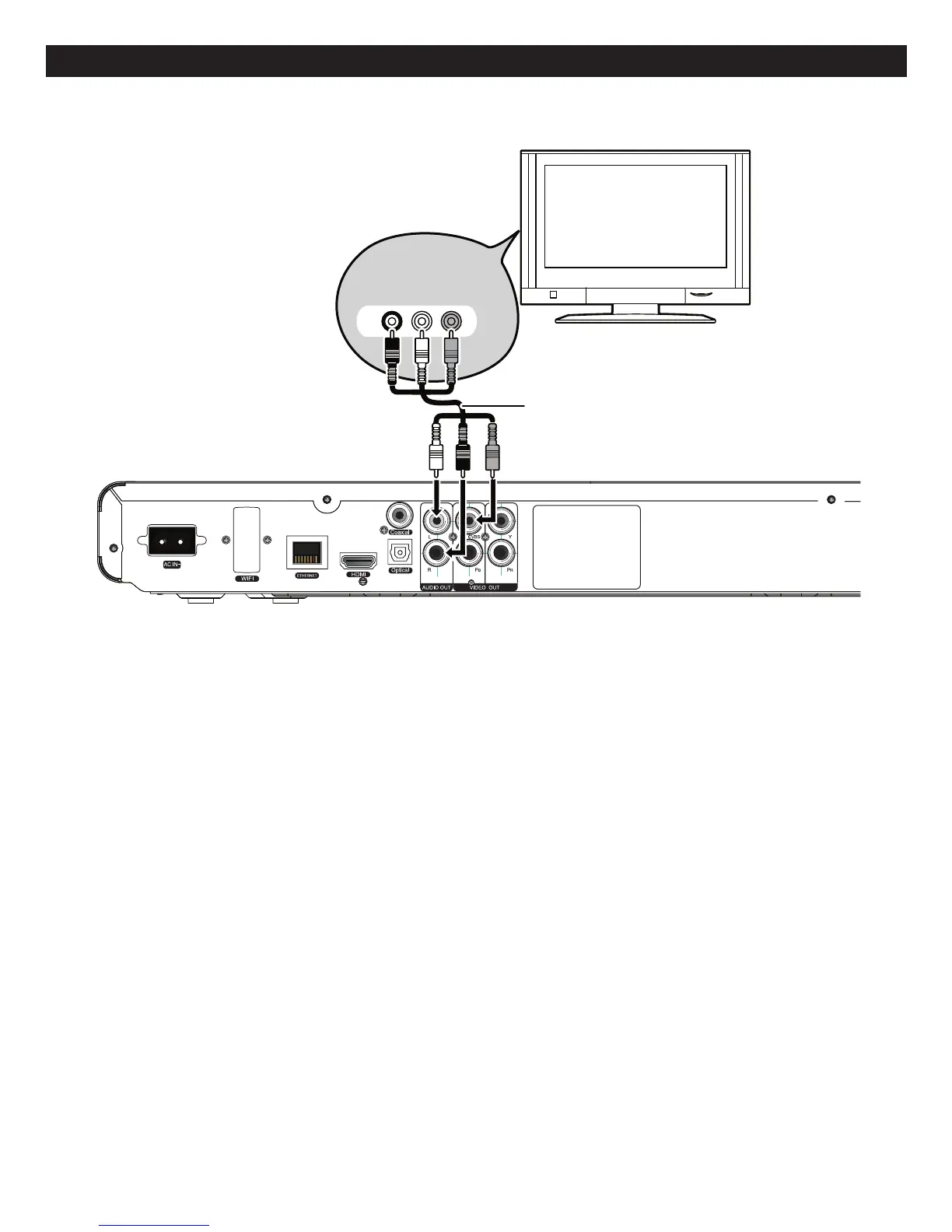
• IfyourTVhasanHDMIinput,connecttheplayerwiththeHDMIcableforbestresults,otherwiseusetheComponentor
VideoOUTjackontheplayer.
• SettheTV’sTV/VIDEObuttonorswitchtotheVIDEOsetting.
• WhenconnectingthePlayer,refertotheowner’smanualoftheTV,aswellasthismanual.
• Whenconnecting the Player to the TV, make sure the power is off and both units are unplugged before making any
connections.
• IfyourTVonlyhasoneaudioinput,theuseofa“Y”connectormaybenecessary.Visityourlocalelectronicssupplystore.
• ConnecttheplayertoyourTVdirectly.IfyouconnecttheplayerthroughaVCR,theplaybackpicturewillbedistorted
becausevideodiscsarecopyprotected.
CONNECTINGTHEPLAYERTOATVUSINGTHEAUDIO/VIDEOOUTPUTJACKS
Back of the unit
Television
COMPONENT
VIDEO IN
AUDIO IN
R L
Audio/Video
cable
Component
V
(not included)
ideo cable
Back of the unit
Television
AUDIO IN
VIDEO INR L
Audio/Video
+IJTM



 To Next Page