12
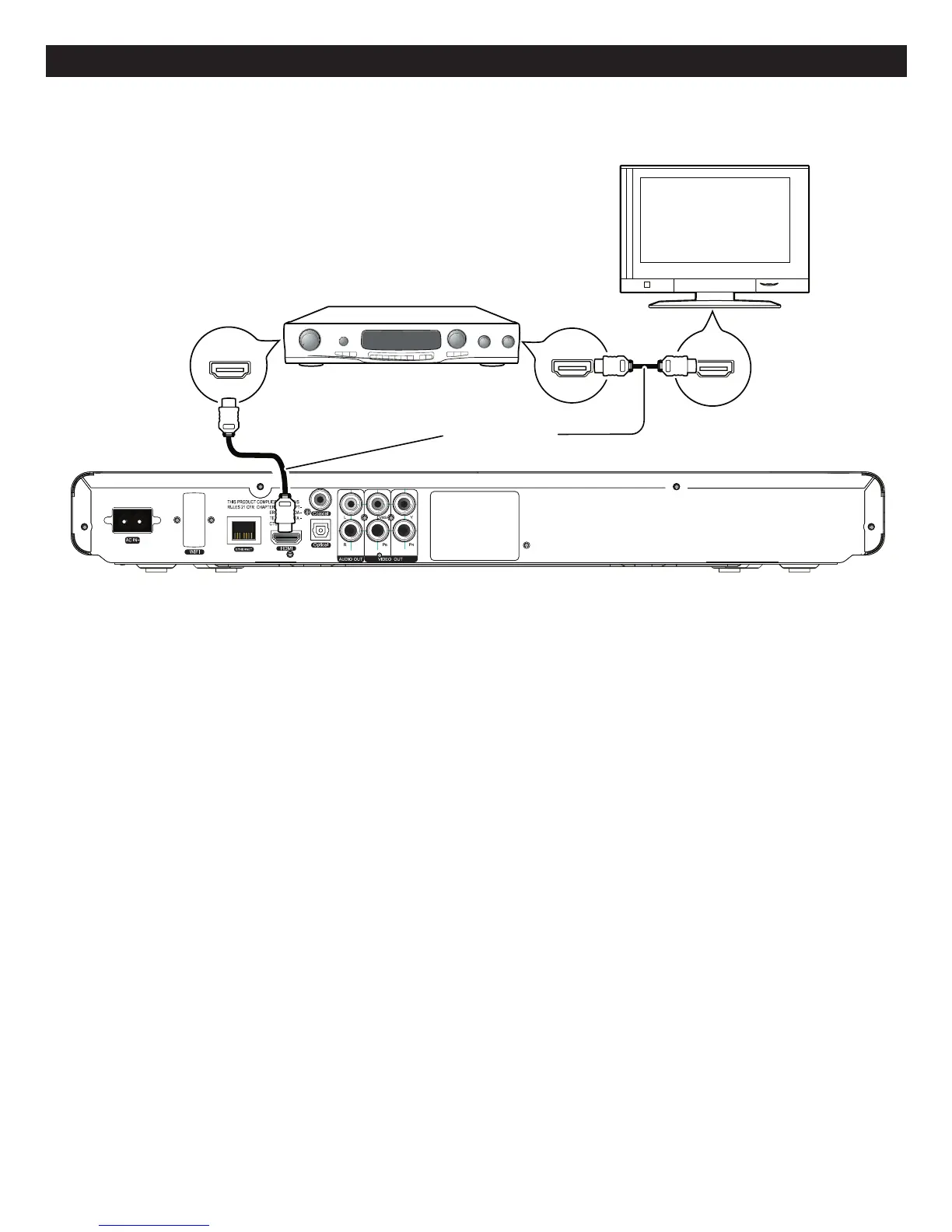
CONNECTION(CONTINUED)
Back of the unit
HDMI
compatible
television
HDMI IN
HDMI OUT
HDMI IN
HD
(not included)
MI cable
HDMI compatible
amplifier/receiver
CONNECTINGTHEPLAYERTOATVANDRECEIVERUSINGTHEHDMIOUTPUTJACK
NOTES:
• IfyourTVhasanHDMIinput,connecttheplayerwiththeHDMIcableforbestresults,otherwiseusetheComponentor
VideoOUTjackontheplayer.
• SettheTV’sTV/VIDEObuttonorswitchtotheVIDEOsetting.
• WhenconnectingthePlayer,refertotheowner’smanualoftheTVandreceiver,aswellasthismanual.
• WhenconnectingthePlayertotheTVandreceiver,makesurethepowerisoffandbothunitsareunpluggedbeforemaking
any connections.
• WhenusingHDMIasyoursource,setuptheHDresolutionintheVideomenuasdescribedonpage32andtheDigitalOutput
intheAudiomenuasdescribedonpage34.YoucanalsopresstheTVRESbuttonontheremotecontroltosetthedesired
resolution.
• DependingonyourTV,someHDMIresolutionsmaynotwork.



 To Next Page