21
BD/DVDOPERATION(CONTINUED)
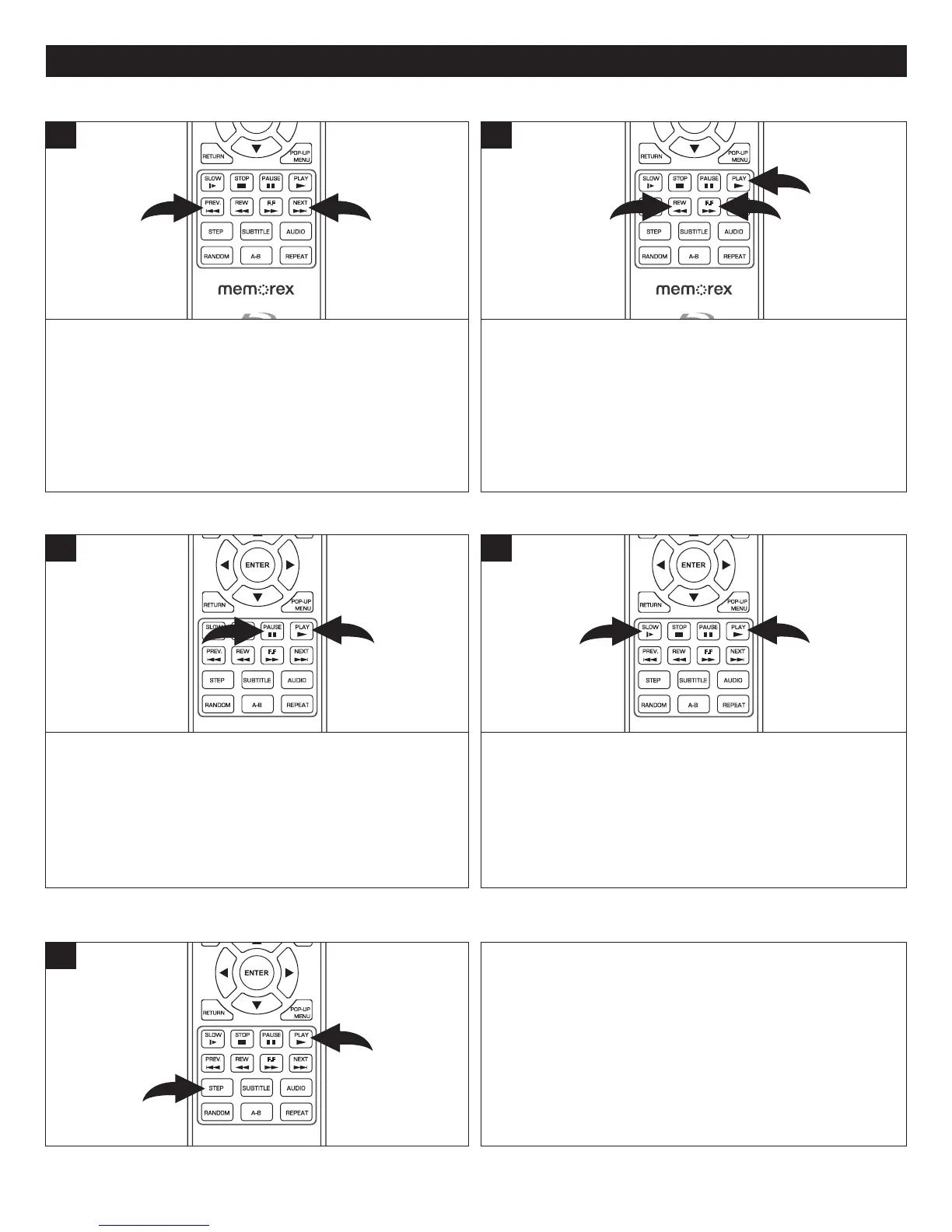
Press the Skip N button 1 to advance the disc to the
beginningofthenextchapter.
Press the Skip o button 2 once to move the disc to the
beginning of the currentchapter. Press twice to move the
disctothebeginningofthepreviouschapter.
SUBTITLE
AUDIO
STEP
RANDOM
SLOW STOP
REW
PREV.
F.F
NEXT
PAUSE
PLAY
A-B
REPEAT
RETU RN
POP- UP
MENU
SEARCH
OPEN
/
CLOSE
A
B
C
D
HOME/SETUP
ANGLE
DISPLAY
TV RES.
2
1
1
During playback, press either the Search/Forward ®® 1
orSearch/Reverse√√ 2 button tomovethediscforward
orbackwardatafasterspeedtolocateaspecificsection.
Repeatedlypressthesebuttonsandthespeedwillincrease
asfollows:2x,4x,8x,16x,32x,64xand128x.
ResumenormalplaybackbypressingthePlay® button 3.
SUBTITLE
AUDIO
STEP
RANDOM
SLOW
STOP
REW
PREV.
F.F
NEXT
PAUSE
PLAY
A-B
REPEAT
RETU RN
POP- UP
MENU
SEARCH
OPEN
/
CLOSE
A
B
C
D
HOME/SETUP
ANGLE
DISPLAY
TV RES.
2
1
3
1
SKIP N/SKIP o
SEARCH
PressthePausep button 1 topausethepicture.
PressthePausep button 1againorthePlay® button 2
toresumenormalplayback.
SUBTITLE
AUDIO
STEP
RANDOM
SLOW STO P
REW
PREV.
F.F
NEXT
PAUSE
PLAY
A-B
REPEAT
RETU RN
POP- UP
MENU
SEARCH
OPEN
/
CLOSE
A
B
C
D
HOME/SETUP
ANGLE
DISPLAY
TV RES.
1
2
1
Press the Slow button 1 to move the disc in slow motion
(1/2)speed.Repeatedlypressthisbuttonforspeedsof1/4x
and1/8x.
PressthePlay® button 2 toresumenormalplayback.
SUBTITLE
AUDIO
STEP
RANDOM
SLOW STO P
REW
PREV.
F.F
NEXT
PAUSE
PLAY
A-B
REPEAT
RETU RN
POP- UP
MENU
SEARCH
OPEN
/
CLOSE
A
B
C
D
HOME/SETUP
ANGLE
DISPLAY
TV RES.
1
2
1
PAUSE SLOWMOTION
During playback, press the STEP button 1 once to pause
playback.RepeatedlypresstheSTEPbutton1 toadvance
theunitoneframeatatime.
PressthePlay® button 2 toresumenormalplayback.
SUBTITLE
AUDIO
STEP
RANDOM
SLOW STO P
REW
PREV.
F.F
NEXT
PAUSE
PLAY
A-B
REPEAT
RETU RN
POP- UP
MENU
SEARCH
OPEN
/
CLOSE
A
B
C
D
HOME/SETUP
ANGLE
DISPLAY
TV RES.
1
2
1
STEP



 To Next Page