20
BD/DVDOPERATION
POWER
CLEAR
SUBTITLE
AUDIO
STEP
RANDOM
SLOW STO P
REW
PREV.
F.F
NEXT
PAUSE
PLAY
A-B
REPEAT
DISC
MENU
RETU RN
POP- UP
MENU
SEARCH
OPEN
/
CLOSE
A
B
C
D
HOME/SETUP
ANGLE
DISPLAY
TV RES.
3
1
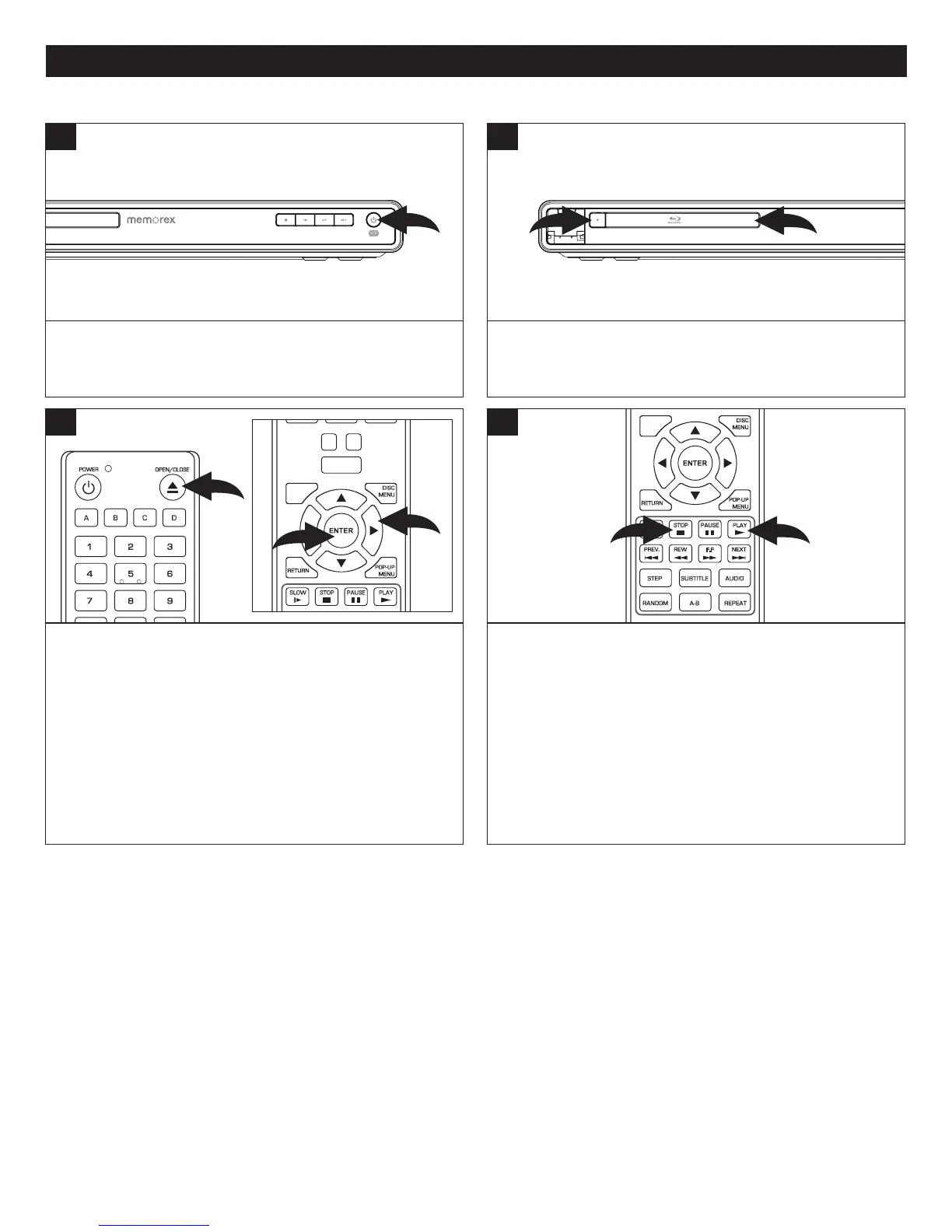
PresstheOpen/Closebutton1 toclosethedisctray.
Ifthe Auto Disc Playback setting is enabled, thedisc will
automaticallystartplayback.
If not, the Home screen will appear. Select BD-ROM or
DVDusingtheNavigation(π,†) buttons 2 andthenpress
theENTER button 3; playbackwillbegin.Onmanydiscs,
thediscwillbegin,butwillshowatitlescreen.Atthetitle
screen,usetheNavigation(√,®,π,†) buttons 2 to select
thedesiredoptionandtheENTERbutton3 to select it.
3
Press the POWER button to turn on the unit. The Power
indicatorlightwillgoon.
1
PresstheOpen/Closebutton1toopenthedisctrayand
insertadiscwiththelabelsidefacinguponthedisctray2.
1
2
Tostopplayback,presstheStopX button 1.Becausethe
unit will remember where you stopped, simply press the
Play ® button 2 to resume playback where you left off
(resumingplayback).
IftheStopX button 1ispressedagain,theunitwillenter
theStopmode.
SUBTITLE
AUDIO
STEP
RANDOM
SLOW STO P
REW
PREV.
F.F
NEXT
PAUSE
PLAY
A-B
REPEAT
DISC
MENU
RETU RN
POP- UP
MENU
SEARCH
OPEN
/
CLOSE
A
B
C
D
HOME/SETUP
ANGLE
DISPLAY
1
2
4
NOTES:
• IfaMenuappearsontheTVscreen,presstheNavigation(√,®,π,†)buttonstoselectthedesiredoption/item,thenpress
theENTERbutton.Pleasemakesuretorefertothedisc’sjacketorcaseforadditionalinformation.
• Thisunithasaresumefunctionthatwillallowyoutoresumeplaybackfromthepointyoulaststopped.Resumingplayback
maynotworkonalldiscs.
• WhileintheHomeScreen,selectBD-ROMorDVD.ThenpresstheENTERbuttontoselectitandstartplayback.
PLAYBACKOFABLU-RAYDISCORASTANDARDDVD
2
POWER
CLEAR
SUBTITLE
AUDIO
STEP
RANDOM
SLOW STO P
PAUSE
PLAY
DISC
MENU
RETU RN
POP- UP
MENU
HOME/SETUP
ANGLE
DISPLAY
TV RES.
3
2



 To Next Page