Page 82 www.menzimuck.com
Control and Display elements
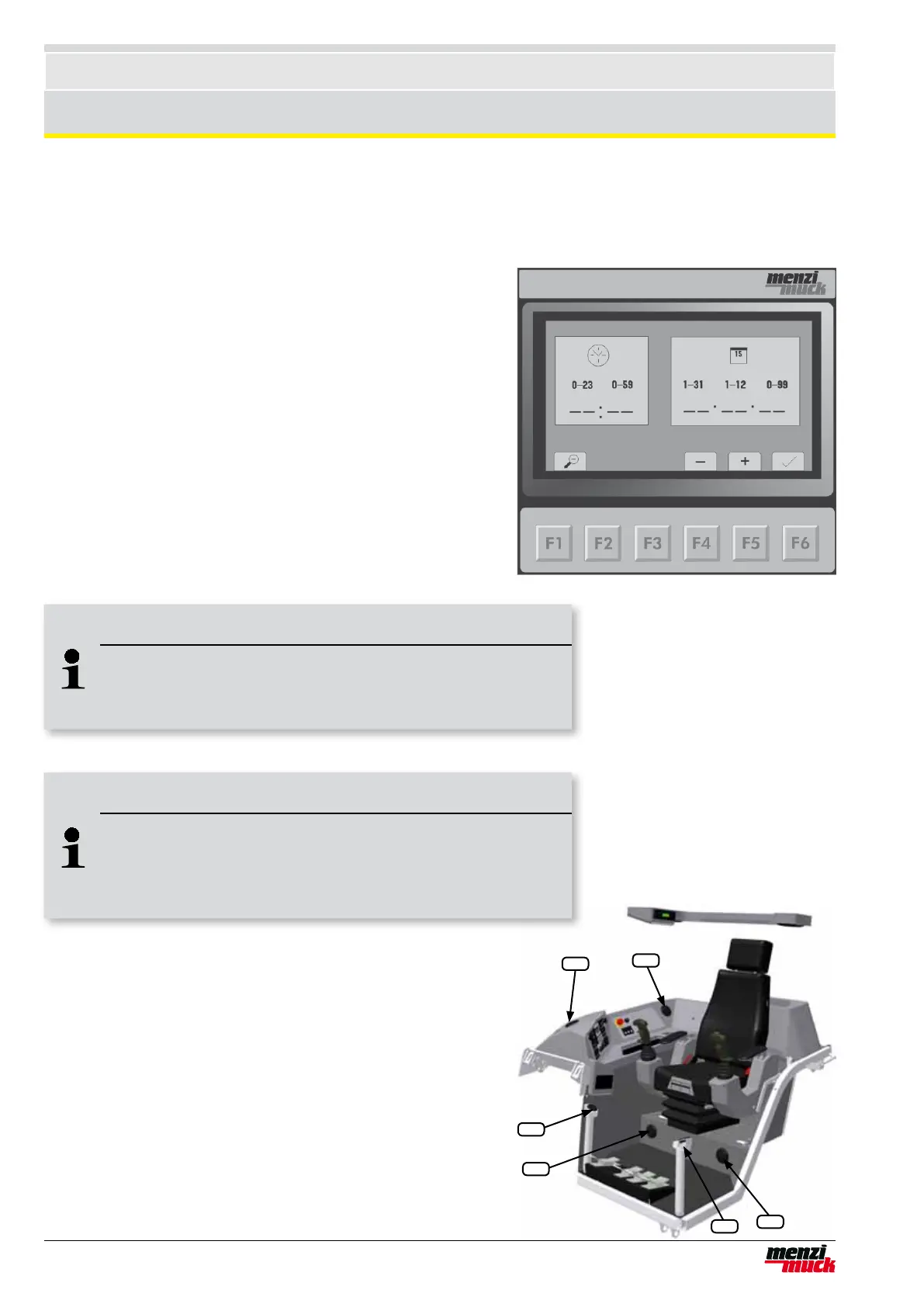
6.6.7 Date and time
This menu is reached by pressing the F5 key in the main menu or
detail menu.
1. Setting the clock
F4 sets the hour back, F5 sets advances the hour
F6 minute setting
F4 sets the minute display back, F5 advances the minutes
F6 date setting
2 Setting the date
F4 sets the day back, F5 advances the day.
F6 month setting
F4 sets the month back, F5 advances the month.
F6 year setting
F4 sets the year back, F5 advances the year.
F6 back to clock setting
The main menu or detail menu can be reached again by pressing
the F1 key.
6.6.8 Air vents
The air circulating in the driver’s cab can be controlled using the
built-in air vents. The air owing out of the heating/air conditioning
system can be directed as required by turning or opening/closing
the individual vents.
1 Front air vent for demisting/defrosting the windscreen
2 Footwell air vent
3 Right-hand air vent
4 Rear air vent
4
3
2
1
2
1
Note !
Faster settings
Holding down the F4 or F5 key adjusts the date or time
more quickly than pressing the key repeatedly.
Note !
Time and date
If the battery is removed or the main switch switched off, the
clock and date stand still. Afterwards, the date and time must be
corrected.



 To Next Page