26
Chapter 9
NAT Forwarding
connected to the router with the WAN IP address 218.18.232.154.
4G LTE Router
WAN: 218.18.232.154
LAN
Home
Personal Website
How can I do that?
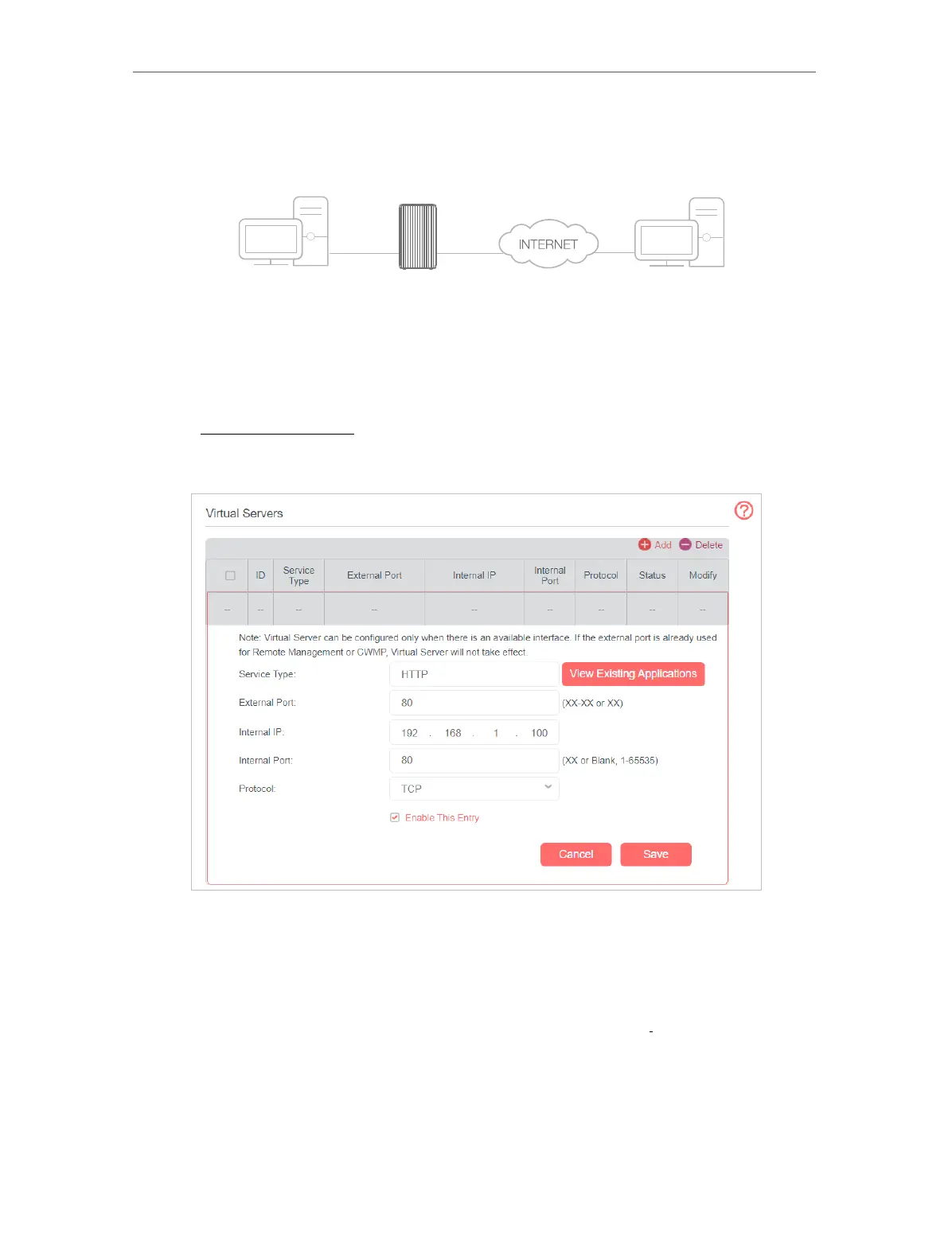
1. Assign a static IP address to your PC, for example 192.168.1.100.
2. Visit http://mwlogin.net, and log in with the password you set for the router.
3. Go to Advanced > NAT Forwarding > Virtual Servers, click Add.
4. Click View Existing Applications, and choose HTTP. The external port, internal
port and protocol will be auto-populated. Enter the PC’s IP address 192.168.1.100
in the Internal IP field.
5. Click Save to save the settings.
Notes:
1. It is recommended to keep the default settings of Internal Port and Protocol if you are not clear about
which port and protocol to use.
2. If the service you want to use is not in the Service Type, you can enter the corresponding parameters
manually. You should verify the port number that the service needs.
3. You can add multiple virtual server rules if you want to provide several services in a router. Please note
that the External Port cannot be overlapped.
Done!



 To Next Page