47
Chapter 4 Congure the Router in Wireless Router Mode
I want to:
Ensure a fast connection of my computer while I play online games for the next 2 hours.
How can I do that
1. Visit http://mwlogin.net, and log in with your Mercusys ID or the password you set for the
router.
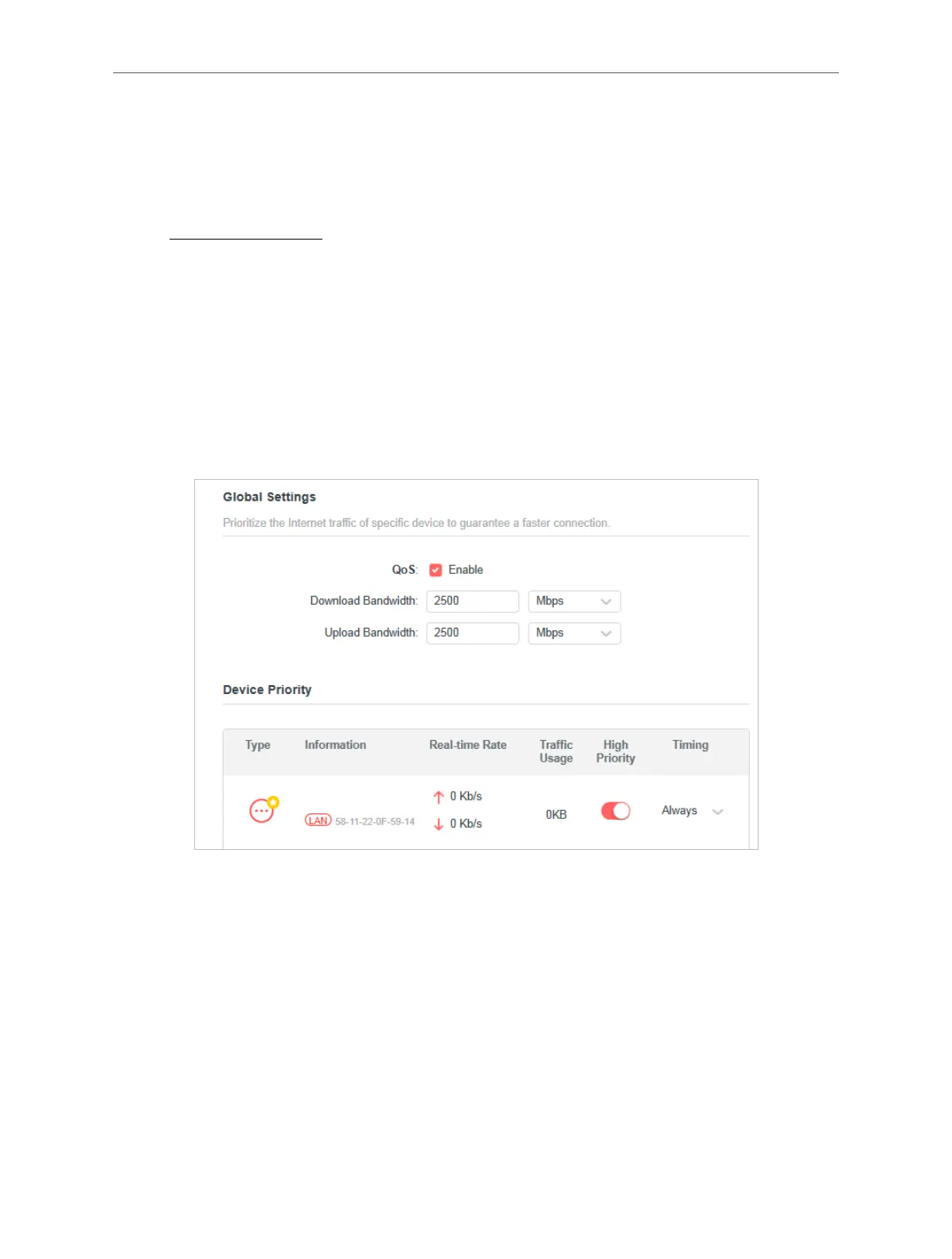
2. Go to Advanced > QoS.
3. Tick the Enable checkbox of QoS.
4. Enter the maximum upload and download bandwidths provided by your internet service
provider, and then click SAVE. 1Mbps equals to 1,000Kbps.
5. Find your computer in the Device Priority section and toggle on High Priority. Select 4
hours from the drop-down list of Timing. Your computer will be prioritized for the next 4
hours.
Done!
You can now enjoy playing games without lag on your computer for the next 4 hours.
4. 9. Security
This function allows you to protect your home network from cyber attacks and unauthorized
users by implementing these network security functions.



 To Next Page