81
Chapter 4 Congure the Router in Wireless Router Mode
4. 12. 3. Manage Devices in the EasyMesh Network
In an EasyMesh network, you can manage all mesh devices and connected clients on your
main router’s web page.
• To view mesh devices and connected clients in the network:
1. Visit http://mwlogin.net, and log in with your Mercusys ID or the password you set for the
router.
2. Go to Network Map.
3. Click
to view all mesh devices, and click to view all connected clients.
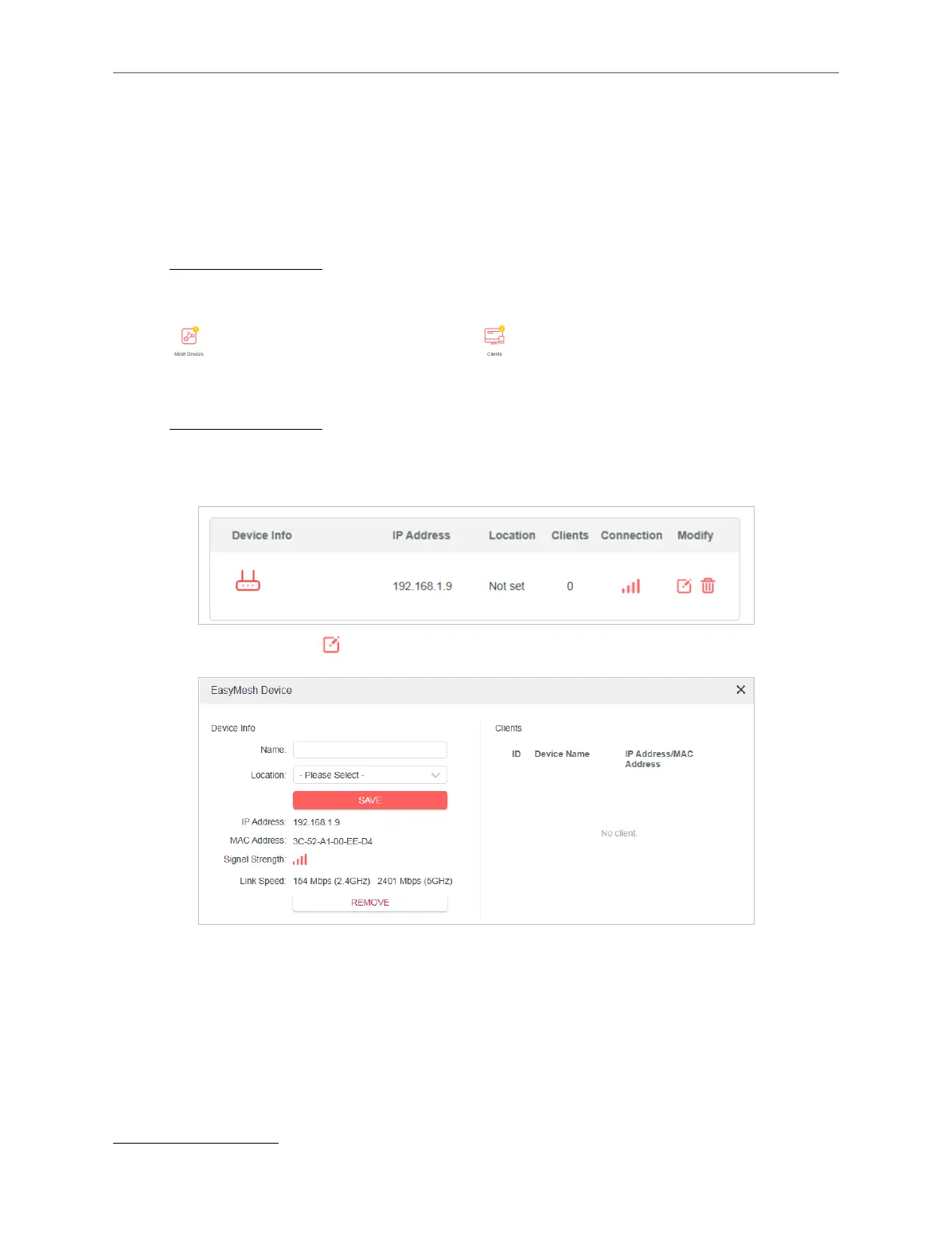
• To manage an EasyMesh device in the network:
1. Visit http://mwlogin.net, and log in with your Mercusys ID or the password you set for the
router.
2. Go to Advanced > EasyMesh.
3. Click the Modify button to view detailed information and change its settings.
4. 13. System
4. 13. 1. Firmware Upgrade
Mercusys is dedicated to improving and richening the product features, giving users a
better network experience. We will release the latest firmware at Mercusys official website
www.mercusys.com. You can download the latest firmware file from the Support page of
our website and upgrade the firmware to the latest version.



 To Next Page