18
|
PROVENO E
Rev. 1.2 (24.08.2016)
Functional description
3.4. Operation switches and indicator lights
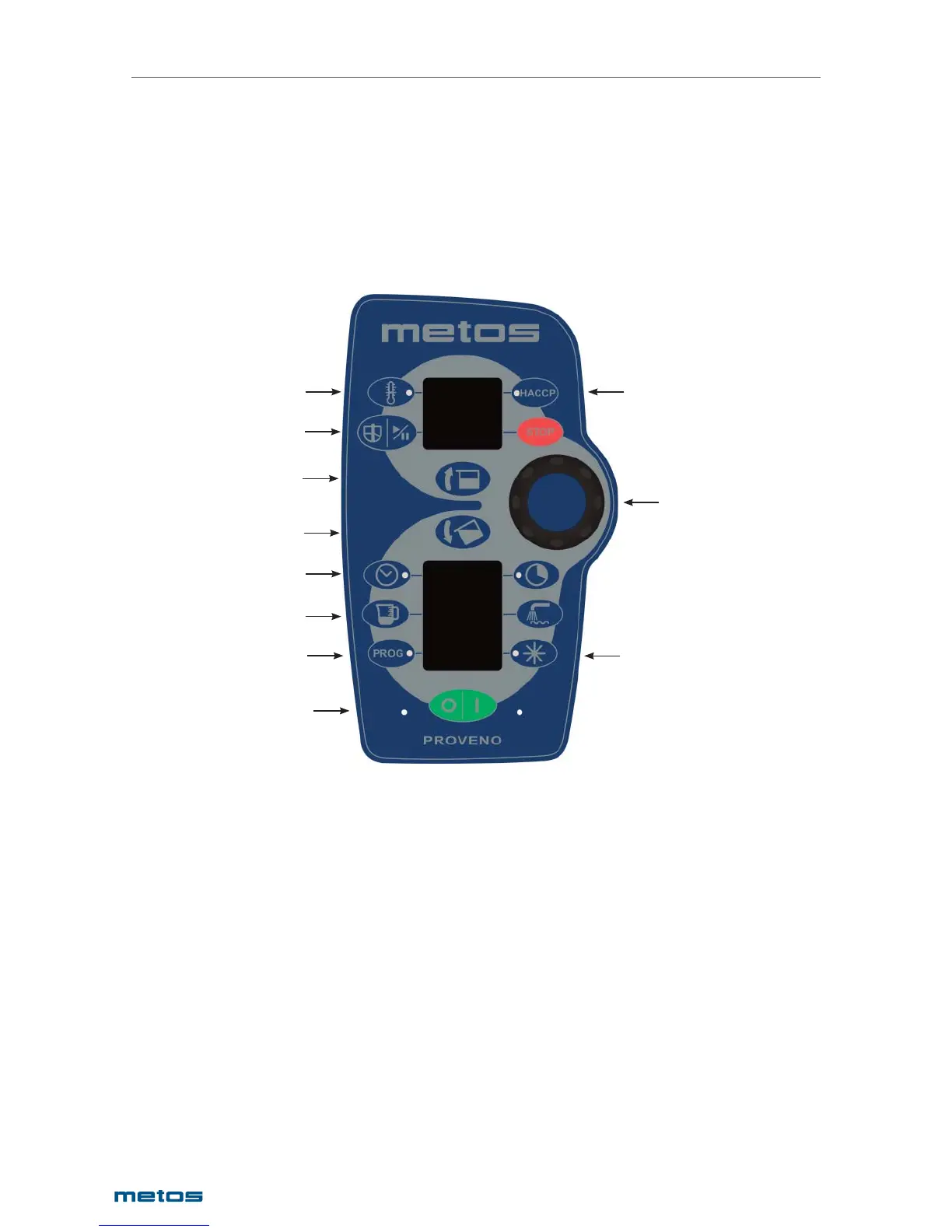
All Proveno’s operation switches are push buttons. Also the central dial has a pushbutton function. The
buttons are activated by a light and gentle push or by holding a button down for some time (2-10 se-
conds), depending on what function you plan to use. Values to be set are selected by means of an
auto-reverse central dial. Turning clockwise (to the right) increases and turning anticlockwise (to the left)
decreases the value being selected. If a button is fi tted with an indicator light, it shows if a function is on
or if it has been programmed to start later. The buttons and displays related to various functions as well
as the functions of the buttons are illustrated in the following pictures:
1. Heating function
2. Mixing function
3. Tilting function
4. Timer functions
5. Water fi ll functions
6. EasyRun programming function
7. ON/OFF and error message lights
8. HACCP
9. Central dial
10. Cooling function
1
8
2
4
5
6
3
10
9
7
3


 To Next Page