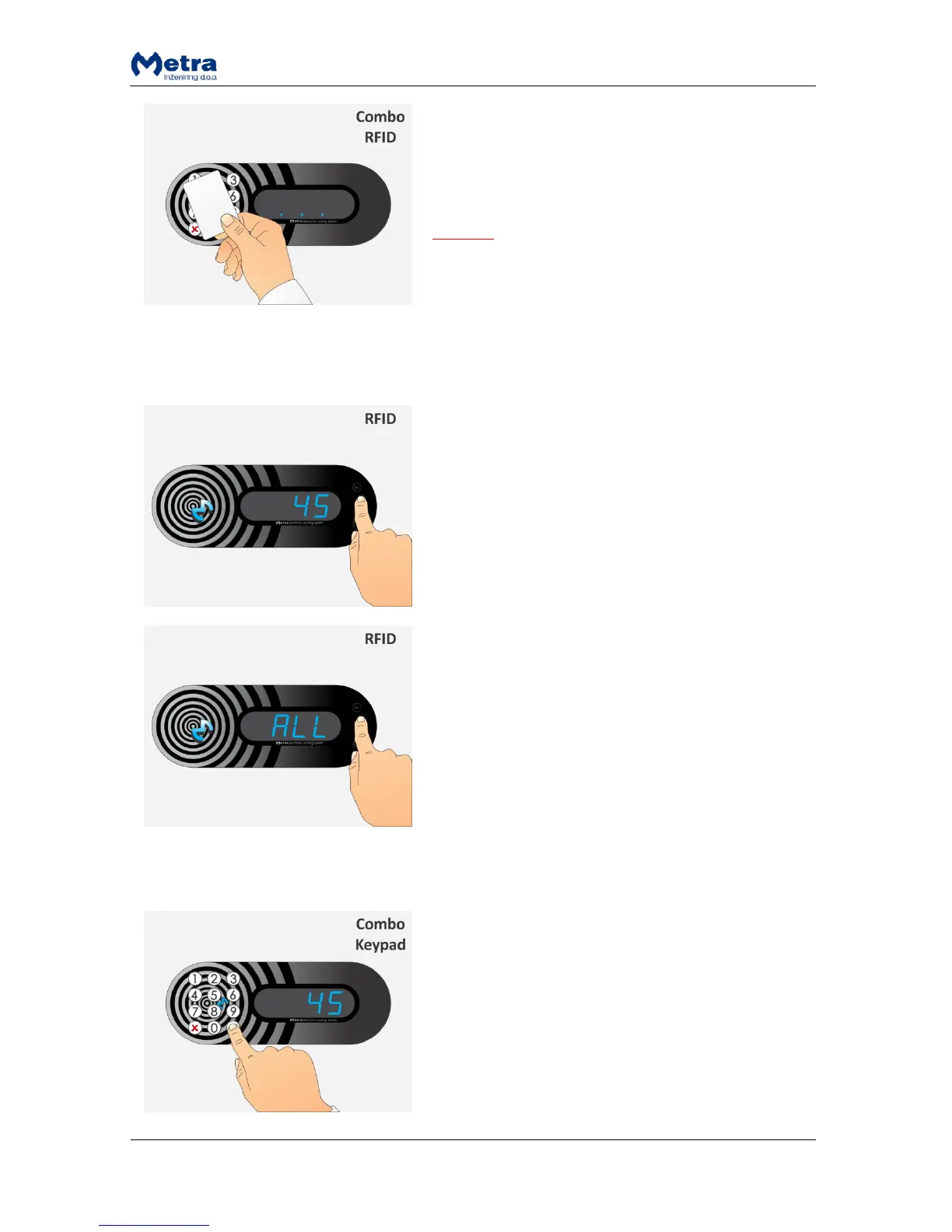
STEP 2: When the Master card is recognized Locker
Controller turns to Master mode of operation. It is
indicated by flashing 3 dots on the display.
Remove the Master card form the antenna filed.
NOTE
To exit the Master mode of operation press and hold the
key (Display Combo) or “Esc” key (Display RFID).
Master mode of operation exits automatically if no
action was triggered in last 60 seconds.
Opening locker with 4 key keypad
STEP 1: Select the desired locker number by pressing the
'up' key to increase or the 'down' key to decrease the
currently selected locker number. Use the “Enter” key to
confirm the unlocking of selected locker.
NOTE: “Esc” key will abort the master mode of
operation.
Corresponding locker is unlocked and opened.
NOTE: If you want to open all lockers select “ALL” and
confirm it with “Enter” key.
All the lockers connected to that Locker Controller start
to unlock and open one after another and corresponding
locker numbers are displayed.
Opening locker(s) with 12 key keypad
STEP 1: Enter the number of the locker you want to open
and confirm it with key.
NOTE: The key deletes last entry.
Corresponding locker is unlocked and opened.



 To Next Page