3.12 Attaching a sample rack
■■■■■■■■■■■■■■■■■■■■■■
26
■■■■■■■■
874 Oven Sample Processor
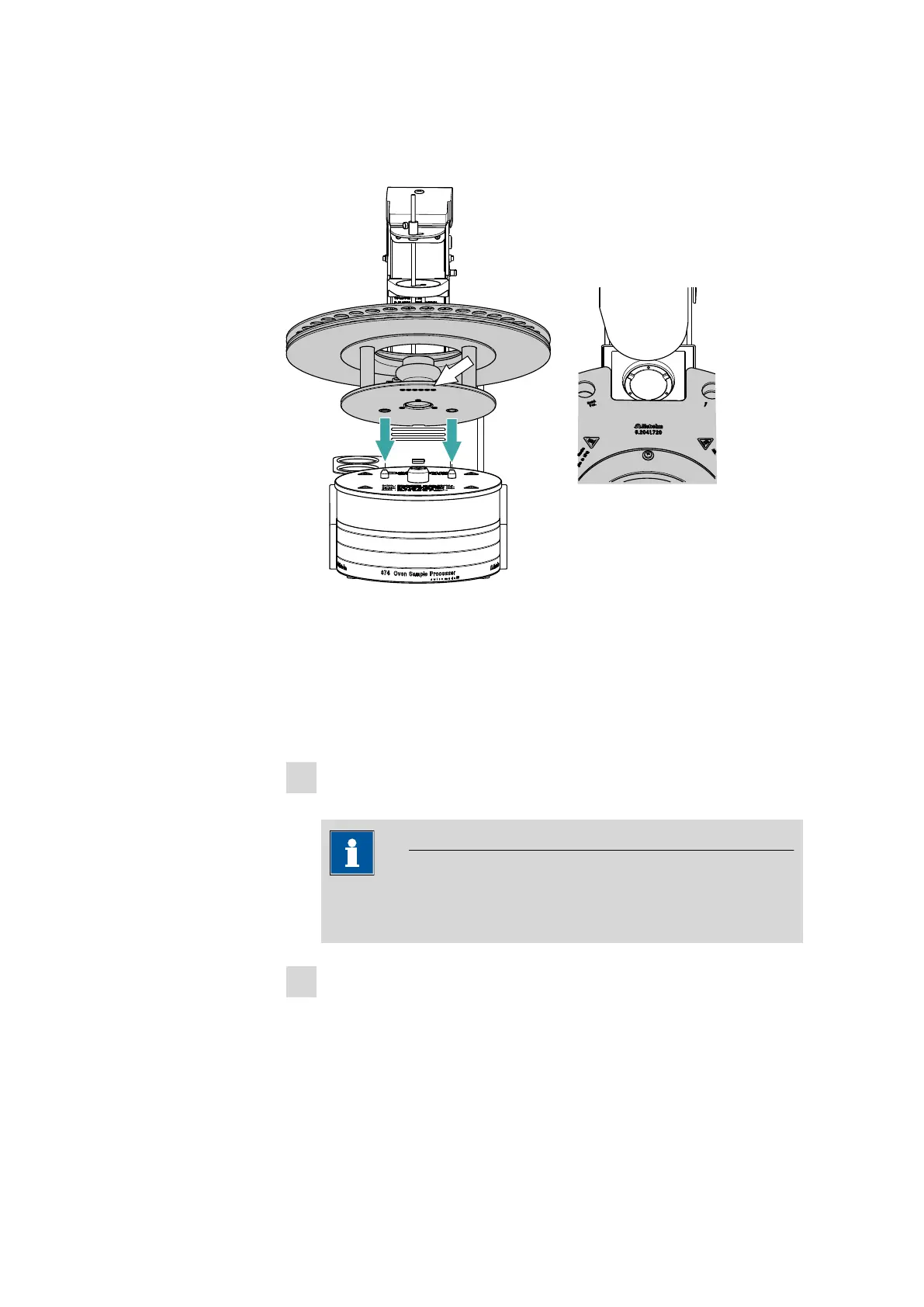
3.12 Attaching a sample rack
Figure 15 Attaching rack
The turntable of the 874 Oven Sample Processor must be in starting posi-
tion before the sample rack can be removed or put it into place. To
accomplish this, carry out the [Rack Reset] function in the manual con-
trol of the control software.
Put the rack into place as follows:
1
Carefully center the rack on the turntable. The guide bolts on the
turntable must engage with the openings in the bottom of the rack.
NOTICE
Hold the rack in such a way that the printed Metrohm logo is legi-
ble horizontally.
2
Carry out the [Rack reset] or [Initialize rack] function in the man-
ual control of the control software.
The rack is moved into starting position. The magnet code of the rack
is read out by the instrument during this process. The white arrow in
Figure 15 Figure indicates the position of the magnet holder. The six-
digit magnet code is used to identify the rack type. The sample posi-











 To Next Page