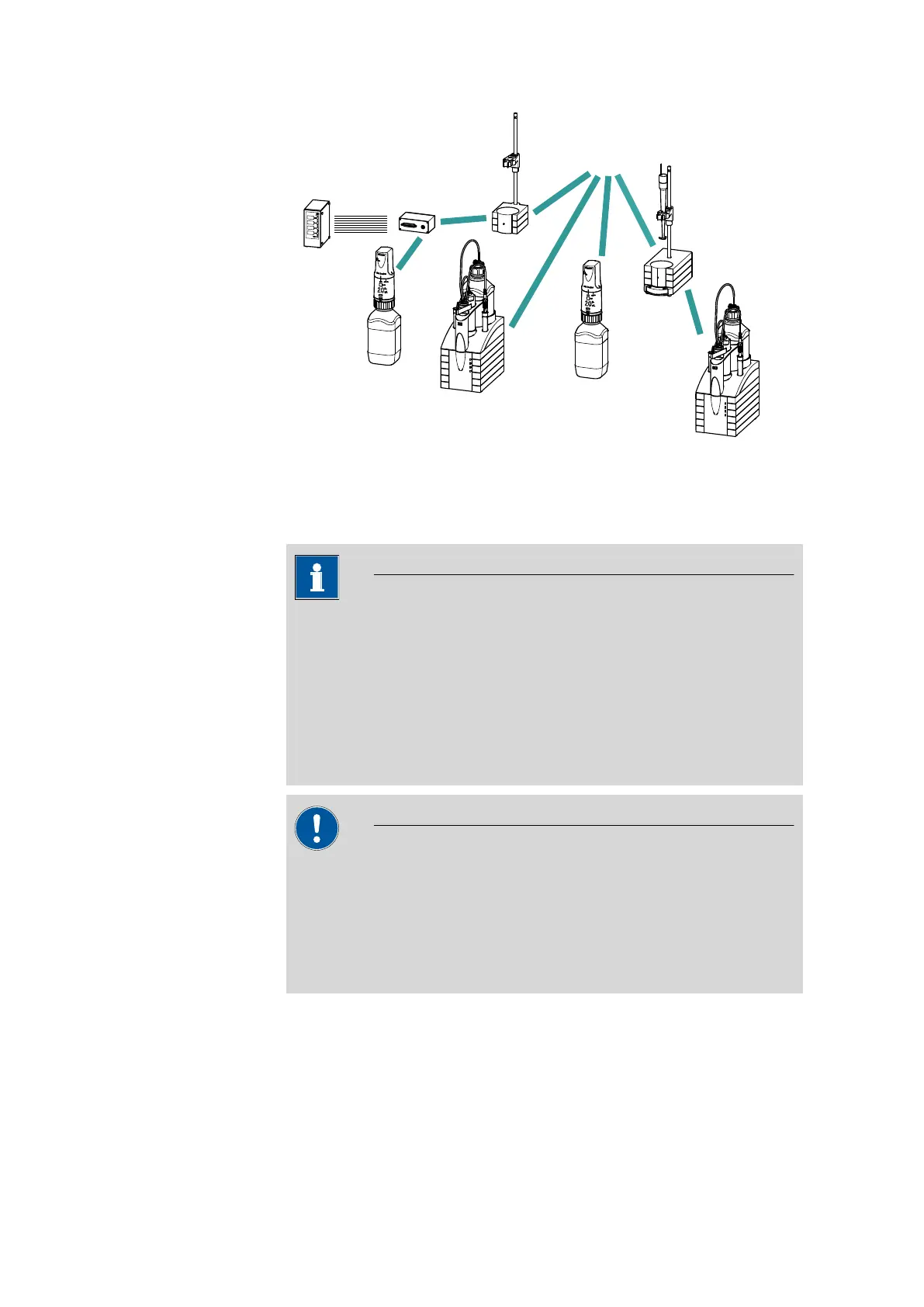
3.15 Connecting MSB devices
■■■■■■■■■■■■■■■■■■■■■■
30
■■■■■■■■
874 Oven Sample Processor
MSB
Stirrer / Ti Stand
Dosimat / Dosino
Dosimat
Remote Box
Dosino / Dosimat
Dosino
Relay Box
Ti Stand / Stirrer
Figure 18 MSB connections
The control instrument determines which peripheral devices are suppor-
ted.
NOTICE
When connecting MSB devices together, the following must be
observed:
■ Only one device of the same type can be used at a single MSB con-
nector at one time.
■ Dosing devices of the 700 Dosino and 685 Dosimat plus type cannot
be connected together with other MSB devices on a shared connec-
tor. These dosing devices must be connected separately.
CAUTION
Exit the control software before you plug in MSB devices. When it is
switched on, the control instrument automatically recognizes which
device is connected to which MSB connector. The operating unit or the
control software enters the connected MSB devices into the system
configuration (device manager).
MSB connections can be extended with the 6.2151.010 cable. The maxi-
mum connection length permitted is 15 m.











 To Next Page