3.14 Connecting a computer
■■■■■■■■■■■■■■■■■■■■■■
28
■■■■■■■■
874 Oven Sample Processor
■ Exit the program if you have started it after the installation.
2
Establishing the cable connections
■ Connect all peripheral devices to the instrument, see chapter
3.15, page 29.
■ Connect the instrument to the power grid if you have not already
done this (see chapter 3.2, page 11).
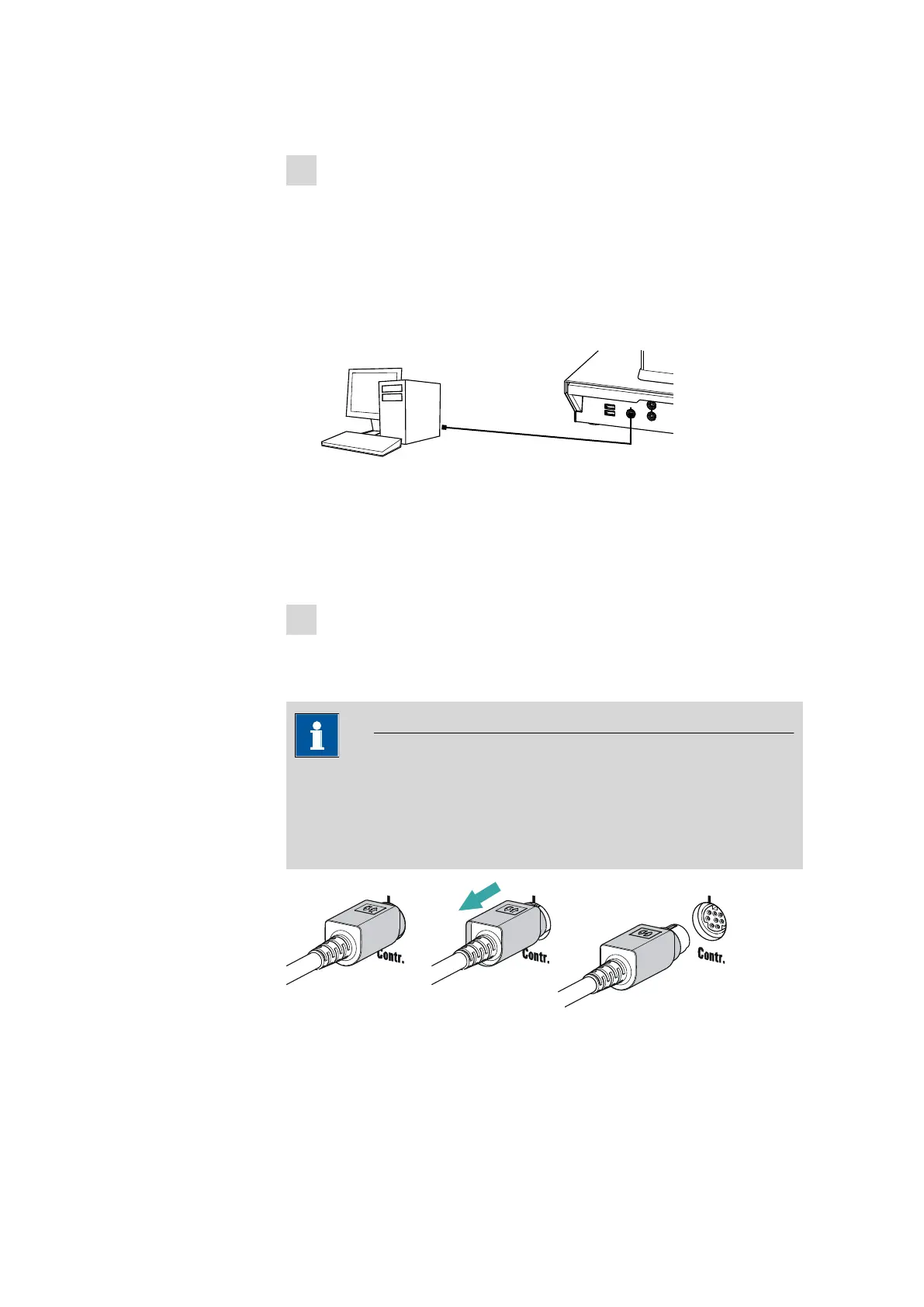
■ Connect the instrument to a USB connector (type A) of your com-
puter (see manual of your computer). The 6.2151.000 cable is
used for this purpose.
6.2151.000
USB 2
USB 1
Contr.
MSB 2
Figure 17 Connecting the computer
The instrument is recognized. Depending on the version of the Win-
dows operating system used, the driver installation proceeds differ-
ently afterwards. Either the necessary driver software is installed
automatically or an installation wizard is started.
3
Follow the instructions of the installation wizard.
If problems should occur during installation, contact your company's IT
support team.
NOTICE
The plug on the instrument end of the 6.2151.000 controller cable is
protected against accidental disconnection by means of a pull-out pro-
tection feature. If you wish to pull out the plug, you first need to pull
back the outer plug sleeve marked with arrows.











 To Next Page