■■■■■■■■■■■■■■■■■■■■■■
3 Installation
874 Oven Sample Processor
■■■■■■■■
31
3.15.1 Connecting a dosing device
Three dosing devices can be connected to the instrument.
The types of dosing devices that are supported are:
■ 800 Dosino
■ 700 Dosino
■ 805 Dosimat
■ 685 Dosimat plus
WARNING
If a Dosino is connected to the 874 Oven Sample Processor, then the
connection cable must be equipped with a T.2400.102 ferrite core. The
ferrite core diminishes any interference voltages and thus ensures com-
pliance with the strict EMC standards in accordance with the applicable
technical standards, see EU declaration of conformity of the instrument.
Proceed as follows:
1
Mounting the ferrite core
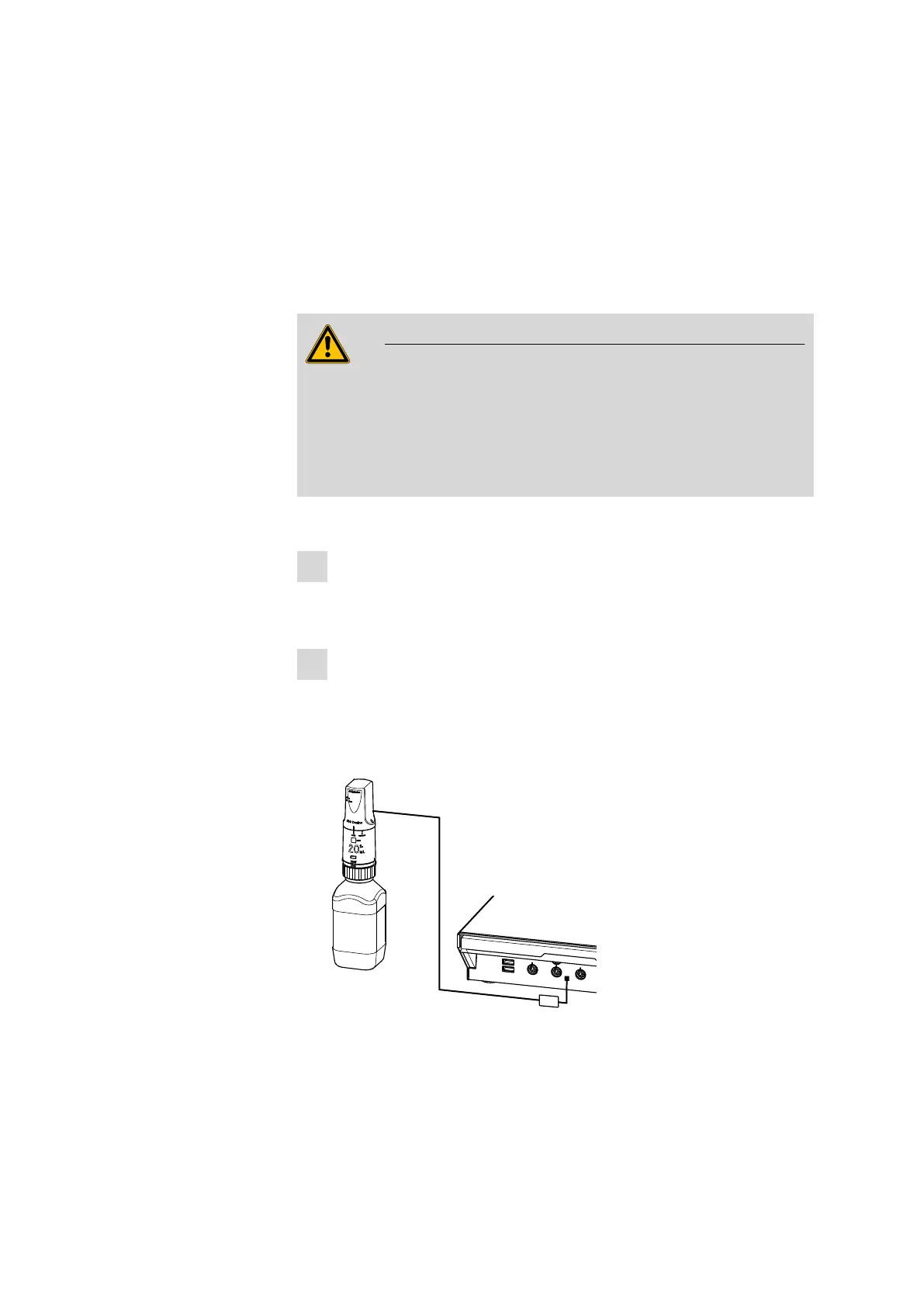
■ Fasten a T.2400.102 ferrite core to the Dosino connection cable
close to the plug.
2
Connecting a dosing device
■ Exit the control software.
■ Connect the connection cable of the dosing device to one of the
sockets marked with MSB on the rear of the control device.
■ Start the control software.
USB 1
Contr.
MSB 2
MSB 3
T.2400.102
Figure 19 Connecting a dosing device











 To Next Page